FocusBill is a productivity app developed by 琳琳 李.
User Ratings
The app has no ratings yet.
App Information
FocusBill is FREE to download. The download size is 3.05 MB. The latest version available is 1.0.0. The last update was on September 15, 2026.
Technical Requirements
The app has a content rating of Everyone. The app has been available on the App Store since September 2026.
Description
FocusBill — Where Focus Meets Reward
FocusBill is a productivity app that combines focus with self-reward. Earn coins through focused work, then spend them in your personalized "Life Store." Every session generates a Focus Bill, recording your focus time and reward spending — so every bit of effort comes with visible growth and payoff.
1. Projects → Tasks → Focus — Every Session Has a Purpose Break down long-term goals into projects and tasks, then dive into immersive focus sessions. No session starts at random — each one moves you toward what you actually want. Effort has a path, and growth has direction.
2. Life Store — Rewards, Defined by You In the Life Store, you decide what counts as a reward and what it costs. A cup of coffee, a nice meal, a shopping spree, or even a lazy morning in — rewards are tied to real life, and the choice of what makes you happy is always yours.
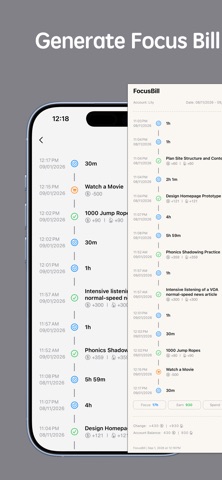
3. Focus Bill — Every Effort and Reward, Recorded The app automatically generates a personal Focus Bill, clearly tracking every focus session and every reward redeemed. Growth is no longer abstract — what you've built up and what you've spent are both visible, so you always know where your time and energy went.
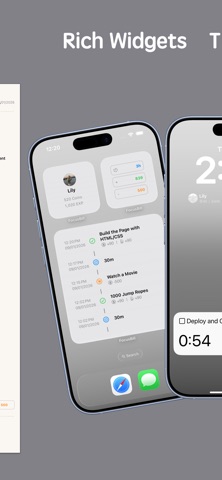
4. Gamified Feedback — Watch Your Coins Add Up in Real Time Save up coins to unlock the rewards you want, paired with rich home screen widgets that let you check your progress without even opening the app. Every small action is recognized, keeping motivation alive and growth tangible.
---
FocusBill offers the following membership plans. Subscribe or purchase to unlock all features and enjoy all future updates:
Subscriptions renew automatically by default. To cancel auto-renewal, manually turn it off in iTunes at least 24 hours before the end of the current subscription period.
Terms of Use (EULA): https://www.apple.com/legal/internet-services/itunes/dev/stdeula/
Each subscription will automatically renew 3 days before the expiration date for
the same time period. Subscriptions can be cancelled at any time before the renewal.