

FOKUS : Screen Time Control
FOKUS : Screen Time Control is made and published by Sharma & Singh GbR. AppBrain is an independent app data site and isn't affiliated with Sharma & Singh GbR. The app name, icon, screenshots and description belong to Sharma & Singh GbR and are shown as published on the App Store.
AppBrain's verdict
- Last updated
- October 23, 2026
- Size
- 14.2 MB
User feedback
Ratings and reviews on the App StoreComments on FOKUS : Screen Time Control for iOS
We don't have enough comments to show example comments. Please check back later.
Store listing
By Sharma & Singh GbR, from the App Store


Description by Sharma & Singh GbR Written by the developer, not by AppBrain. Click to read.
Fokus is a productivity and screen time blocker app designed to help you stay focused by adding something most apps can't: a physical key. This digital wellness tool uses Apple's Screen Time framework to block distracting apps and websites during focus sessions while keeping essential phone functions like calls and messages available. When it's time to end a session, distractions don't return with a tap—they return when you choose to get up and unlock them with your FOKUS device.
Why Fokus Works Differently
Most focus apps live entirely on your phone—which makes them easy to ignore. Fokus introduces a physical element that lives outside your screen. Place your FOKUS key in another room, like the kitchen, hallway, or office shelf. When you feel the urge to open social media or distracting apps, you're faced with a choice: stay focused, or get up and retrieve the key. That small pause makes a big difference in building better screen time habits and reducing digital distractions.
FEATURES
Screen Time Blocking & App Blocker
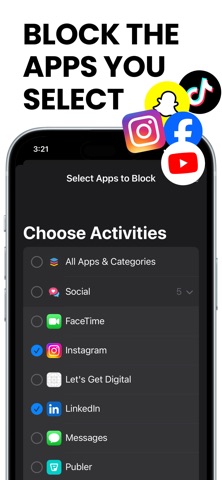
Block distracting apps and websites during focus sessions using Apple's official Screen Time framework. Fokus works at the system level to help reduce interruptions from social media, games, entertainment apps, and other high-distraction content. This app blocker gives you control over which apps and websites are restricted during your focus time.
Physical Key for Focus
Fokus uses a physical FOKUS device to intentionally unlock blocked apps. Ending a focus session requires a real-world action—tapping your phone on the FOKUS device—helping prevent mindless scrolling and supporting social media detox habits. This physical barrier creates a deliberate separation between you and digital distractions, making it harder to impulsively return to blocked content.
Focus Sessions & Scheduling
Create unlimited custom focus sessions for work, study, sleep, or personal routines. Start sessions manually with a long press or schedule them to begin and end automatically throughout the day. Set specific times and days for automatic focus mode activation, helping you build consistent focus habits.
Emergency Unblock
When flexibility is needed, Fokus includes an Emergency Unblock option with 3 limited monthly uses to preserve the effectiveness of focus sessions while providing necessary flexibility for urgent situations. This feature ensures you're never completely locked out when something important comes up.
Insights & Progress Tracking
Track focus time, completed sessions, daily streaks, and screen time analytics to better understand your digital habits and improve time management. Visualize your progress with charts, calendars, and detailed statistics showing your focus journey over time. See which days you focused, how long your sessions lasted, and celebrate your focus streaks.
DESIGNED FOR REAL LIFE
Fokus blocks distractions—not your phone. You can still receive calls, send messages, and use essential apps while a focus session is active. Fokus is designed to support productivity and digital wellness without disconnecting you from what matters. Perfect for students, professionals, and anyone seeking better focus and reduced screen time.
PRIVATE & ON-DEVICE
• Works entirely on your iPhone—no cloud sync required
• No account or login required—complete privacy
• No ads or third-party tracking—your data stays local
• Built using Apple's Screen Time APIs—system-level security
• All data stored locally on your device
REQUIREMENTS
• iPhone with required capabilities (iPhone 7 or later)
• FOKUS physical device (available at getfokus.de)
• Screen Time permission (required for app blocking functionality)
• iOS 17.0 or later
A CALMER WAY TO FOCUS
Safety and technology
Found in the app by AppBrain- Price
- Free
- App size
- 14.2 MB
- Content rating
- Everyone
Technologies used by FOKUS : Screen Time Control
Releases
Updates seen on the App Store- Version
- 1.0.3
- Launched
- January 2026
No changelog data
Alternatives
Similar apps and more from Sharma & Singh GbRAlternatives to FOKUS : Screen Time Control


Rankings
App Store top chartsApp Store Rankings for FOKUS : Screen Time Control
About the app and developer
About FOKUS : Screen Time Control
FOKUS : Screen Time Control is a productivity app developed by Sharma & Singh GbR.
User Ratings
The app has no ratings yet.
App Information
FOKUS : Screen Time Control is freely available from the App Store. The app size is 14.21 MB. The latest version available is 1.0.3. The last update was on October 23, 2026.
Technical Requirements
The app has a content rating of Everyone. The app has been available on the App Store since January 2026.
Developer information for Sharma & Singh GbR
Address:
Frequently asked questions about FOKUS : Screen Time Control
Is FOKUS : Screen Time Control free?
Yes. FOKUS : Screen Time Control is free on the App Store.
Is FOKUS : Screen Time Control still available?
Yes. FOKUS : Screen Time Control is on the App Store, and the last update we saw was on October 23, 2026.
How large is FOKUS : Screen Time Control?
FOKUS : Screen Time Control is 14.21 MB.
Is FOKUS : Screen Time Control suitable for children?
App Store rates the content of FOKUS : Screen Time Control as suitable for everyone.
Who made FOKUS : Screen Time Control?
FOKUS : Screen Time Control was developed by Sharma & Singh GbR. It is listed in the productivity category on the App Store.
What are the best alternatives to FOKUS : Screen Time Control?
People looking at FOKUS : Screen Time Control also look at these productivity apps: The Studios, Scrollwall: Unrot & Refocus, streaknest - Habit Tracker, SmartScroll: Quit Doomscroll, Regain: Screen Time Control.