Folder Looper is made and published by Joseph Ratterman. AppBrain is an independent app data site and isn't affiliated with Joseph Ratterman. The app name, icon, screenshots and description belong to Joseph Ratterman and are shown as published on the App Store.
AppBrain's verdict
- Rating on App Store
- 5.00
- 2 ratings
- Last updated
- August 30, 2026
It doesn't have enough ratings yet to judge what users think.
Rankings
App Store top chartsApp Store Rankings for Folder Looper
Competitors
Similar apps and more from Joseph RattermanAlternatives to Folder Looper
More from Joseph Ratterman
Releases
Updates seen on the App Store- Version
- 2.1
- Launched
- June 2026
No changelog data
User feedback
Ratings and reviews on the App StoreComments on Folder Looper for iOS
We don't have enough comments to show example comments. Please check back later.
Technology
Found in the app by AppBrain- Price
- Free
- App size
- 2.41 MB
- Content rating
- Everyone
Technologies used by Folder Looper
About the app and developer
About Folder Looper
Folder Looper is a music app developed by Joseph Ratterman.
User Ratings
Folder Looper is rated 5.00 out of 5 stars. The rating is based on 2 ratings.
App Information
Folder Looper is freely available from the App Store. The app size is 2.41 MB. The latest version available is 2.1. The last update was on August 30, 2026.
Technical Requirements
The app has a content rating of Everyone. The app has been available on the App Store since June 2026.
Developer information for Joseph Ratterman
Address:
Store listing
By Joseph Ratterman, from the App StoreDescription by Joseph Ratterman Written by the developer, not by AppBrain. Click to read.
It is built for musicians, worship teams, performers, teachers, language learners, audiobook listeners, and anyone who wants quick access to organized audio files in iCloud Drive or other Files locations.
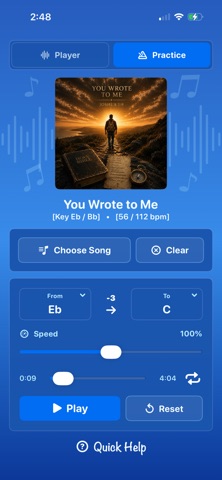
Version 2.0 adds a new Practice mode alongside the folder player. Move the current song into Practice, or choose a single audio file, then slow it down, speed it up, transpose it, repeat it, and view detected key and tempo details as a starting point for rehearsal.
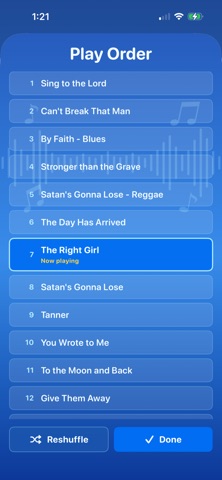
Folder Looper can also display embedded song artwork when available, show Now Playing information, support background playback, and let you browse or reshuffle the current play order at any time.
Features:
• Play audio files directly from folders in the Files app
• Supports MP3, WAV, AAC, AIF, AIFF, CAF, and M4A formats
• Continuous playback through all supported files in a folder
• Optional shuffle mode
• Browse the play order, jump to any song, and reshuffle anytime
• Background audio and remote playback controls
• Displays embedded song artwork when available
• Shows current song, folder, playback time, song count, key, and tempo details
• Remembers your selected folder between app launches
• Smart filename sorting for numbered tracks
• Works with iCloud Drive and other Files-accessible locations
Practice Features:
• Choose a single song for focused practice
• Bring the current Player song into Practice
• Detect key and tempo for supported audio files
• Transpose from one key to another
• Adjust playback speed from 50% to 150%
• Repeat the practice song continuously
• Reset detected values, key changes, and speed changes without removing the song
Key and tempo detection are helpful estimates based on the audio signal. Results may vary depending on recording quality, arrangement, intros, outros, modulations, live recordings, and layered instruments.
Folder Looper keeps the workflow simple: pick a folder, press play, or switch into Practice when it is time to work on one song more closely.