

Folderizer
Folderizer is made and published by Eugenio Keller Puente. AppBrain is an independent app data site and isn't affiliated with Eugenio Keller Puente. The app name, icon, screenshots and description belong to Eugenio Keller Puente and are shown as published on the App Store.
AppBrain's verdict
- Last updated
- September 20, 2026
Rankings
App Store top chartsApp Store Rankings for Folderizer
Competitors
Similar apps and more from Eugenio Keller PuenteMore from Eugenio Keller Puente




Releases
Updates seen on the App Store- Version
- 2.8
- Launched
- April 2024
No changelog data
User feedback
Ratings and reviews on the App StoreComments on Folderizer for iOS
We don't have enough comments to show example comments. Please check back later.
Technology
Found in the app by AppBrain- Price
- $2.99
- App size
- 11.4 MB
- Content rating
- High
Technologies used by Folderizer
About the app and developer
About Folderizer
Folderizer is an utilities app developed by Eugenio Keller Puente.
What is the rating of Folderizer?
Folderizer has no ratings yet.
Is Folderizer free?
Folderizer costs $2.99. The app size is 11.42 MB. The latest version available is 2.8. The last update was on September 20, 2026.
What are the requirements for Folderizer?
The app has a content rating of High Maturity. The app has been available on the App Store since April 2024.
Developer information for Eugenio Keller Puente
Address:
Frequently asked questions about Folderizer
Is Folderizer free?
No. Folderizer costs $2.99 on the App Store.
Is Folderizer still available?
Yes. Folderizer is on the App Store, and the last update we saw was on September 20, 2026.
How large is Folderizer?
Folderizer is 11.42 MB.
Is Folderizer suitable for children?
App Store gives Folderizer a high maturity rating. It is meant for adults.
Who made Folderizer?
Folderizer was developed by Eugenio Keller Puente. It is listed in the utilities category on the App Store.
Store listing
By Eugenio Keller Puente, from the App Store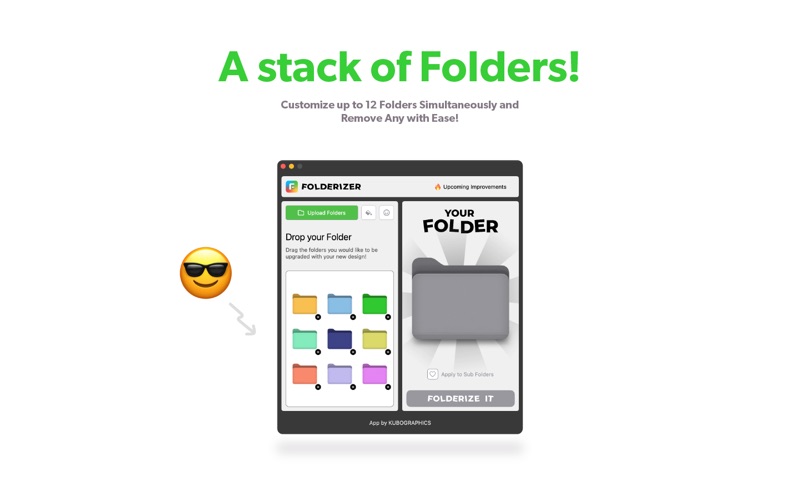

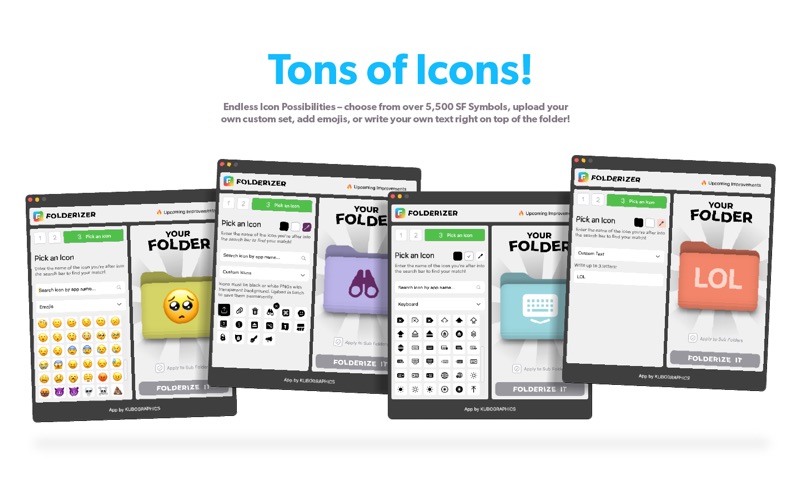
Description by Eugenio Keller Puente Written by the developer, not by AppBrain. Click to read.
Choose from a wide range of vibrant colors, stylish icons, or upload your own icons to create eye-catching folder designs. You can now also add custom text—up to 3 words—right on top of your folders for even more personalization. Want to add a bit of fun? Use emojis (a curated selection to start) or upload and store your own icons locally for future use.
Folderizer offers a seamless and user-friendly experience, allowing you to preview your folder designs before applying them. Once you're satisfied with your creation, simply click the copy button to apply the icon to your selected folders.
Whether you're a creative professional looking to streamline your workflow or a design enthusiast wanting to add a personal touch to your desktop, Folderizer is the perfect tool for you. Organize your files in style and make your desktop truly yours with Folderizer.