AppBrain
AppBrain
  • Apps
  • Apps being viewed right now Trending apps today Most popular apps All-time most installed apps Top rated apps iPhone and iPad apps
  • Intelligence ▾
    Intelligence overview → Track any Android app or your whole market
    Track & analyze
    Keyword Tracker & OptimizerTrack & improve Play rankings App Performance ReportOne-off PDF for any app StatisticsFree Android & Play market stats
    Promote your app
    Featured Apps App Links
  • Intelligence
  • Pricing
  • Dashboard
  • Sign up
  • Log in
App Store Apps > Productivity > FoldFlow: Multi Task Timer
FoldFlow: Multi Task Timer icon

FoldFlow: Multi Task Timer

1.1.1
Ena Yoon
0.00
0 reviews
Free

FoldFlow: Multi Task Timer Screenshot 1 of 7
FoldFlow: Multi Task Timer Screenshot 2 of 7
FoldFlow: Multi Task Timer Screenshot 3 of 7
FoldFlow: Multi Task Timer Screenshot 4 of 7
FoldFlow: Multi Task Timer Screenshot 5 of 7
FoldFlow: Multi Task Timer Screenshot 6 of 7
FoldFlow: Multi Task Timer Screenshot 7 of 7
Screenshots by Ena Yoon, from the the App Store listing
View on the App Store Also on Google Play

About FoldFlow: Multi Task Timer

FoldFlow: Multi Task Timer is a productivity app developed by Ena Yoon.

What is the rating of FoldFlow: Multi Task Timer?

FoldFlow: Multi Task Timer has no ratings yet.

Is FoldFlow: Multi Task Timer free?

FoldFlow: Multi Task Timer is free. The app size is 47.00 MB. The latest version available is 1.1.1. The last update was on October 14, 2026.

What are the requirements for FoldFlow: Multi Task Timer?

The app has a content rating of Everyone. The app has been available on the App Store since October 2026.

FoldFlow: Multi Task Timer is made and published by Ena Yoon. AppBrain is an independent app data site and isn't affiliated with Ena Yoon. The app name, icon, screenshots and description belong to Ena Yoon and are shown as published on the App Store.

Description by Ena Yoon (from the App Store)
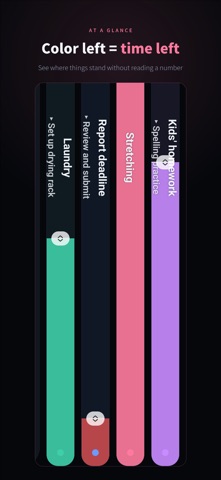
Give every task its own countdown timer and run them all at once. Folded tasks become color bars that show the time left — no numbers to read.

Put up to five tasks on one screen. While you focus on one, the others fold into slim bars. Each folded bar is itself a timer gauge — the height of its color is the time left. One glance tells you where everything stands, and one tap takes you there.

FEATURES

• Fold-and-unfold task panels — move between tasks with a tap or a swipe. Smooth transitions keep your context.
• Visual timers — the color height of a folded bar is the time left. No numbers to read, and the color warns you as the end gets close.
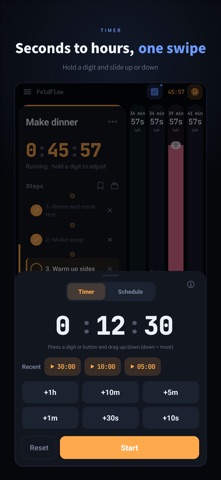
• One-handed time setting — hold a digit and drag to set it; drag the color edge of a bar to adjust while it runs. Recent values are one tap away.
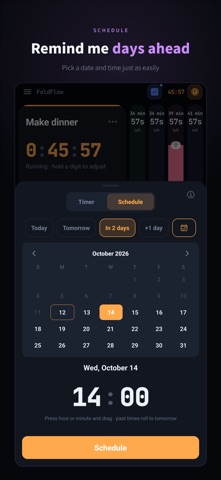
• Scheduling — tonight, tomorrow morning, the day after at 2 PM… set things days ahead the same way, or pick a date on the calendar.
• Step checklists — list the steps for each task and work through them in order. Save step lists you repeat as favorites and load them anywhere.
• Follow-up reminders — if a timer ends and you don't come back, FoldFlow reminds you again at the times you choose (1, 3, 5 or 10 min).
• Archive — park tasks you're not doing right now instead of deleting them. Give them a schedule and the app calls you back when it's time.
• Quick to-dos — small things that don't deserve a panel go on one line with an alarm. You can even drag a step out of a panel into it.
• Minimal dark design. No account, no cloud — your data stays on your device.
• In English, Korean, Japanese, Traditional Chinese, German, French and Spanish.

FOLDFLOW PRO (one-time purchase, no subscription)

• 5 task panels instead of 4
• Unlimited favorites, organized in groups
• Unlimited archive
• Every Pro feature added in the future

Few days let you do one thing at a time. You start one task, switch to another while you wait, begin something else — and then wonder, "what happened with that one?" Multitasking is hard not because there's too much to do, but because there's no way to see everything that's running at a glance.

FoldFlow grew out of a teacher's real day — lesson prep, admin, meetings and side projects all running at once. Put a time on each and fold and unfold them one by one: that way of working is what FoldFlow is.

Great whenever several timers run at once: a separate kitchen timer for each pot, laundry and cleaning in turns, switching subjects while studying, work projects in parallel. It also suits anyone who reads time better as color than as numbers, or who easily loses track of time.
Show more Show less

Also available on Google Play

FoldFlow: Visual Multi Timer icon FoldFlow: Visual Multi Timer
SyninaSoft
0.0
Free
5+

Alternatives to FoldFlow: Multi Task Timer

ととの日 - わたしの1日スケジュール icon ととの日 - わたしの1日スケジュール
AKITO YAMAZAKI
0.0
Free
SwingCat - Focus Timer icon SwingCat - Focus Timer
SYNCRAFT
0.0
Free
MultipleTimers+ icon MultipleTimers+
EIICHI KOMINE
4.7
Free
143 ratings
DaySche | Daily Task Manager icon DaySche | Daily Task Manager
Taito Iikura
5.0
Free
6 ratings
Schedule Planner MyDailyTime icon Schedule Planner MyDailyTime
App Palette LLC
4.8
Free
6 ratings
DayRoutine - Pie Timetable icon DayRoutine - Pie Timetable
PREST
5.0
Free
3 ratings
Timers – HIIT & Interval Timer icon Timers – HIIT & Interval Timer
Koji Ito
4.7
Free
50 ratings
Simple Notepad -BestNote- icon Simple Notepad -BestNote-
EasterEggs
4.7
Free
2.9K ratings

More from Ena Yoon

RallyStat: Volleyball Stats icon RallyStat: Volleyball Stats
Ena Yoon
5.0
Free
4 ratings
말씀담음 icon 말씀담음
Ena Yoon
0.0
Free
Volleyball Rotation & Tactics icon Volleyball Rotation & Tactics
Ena Yoon
0.0
Free

Changelog of FoldFlow: Multi Task Timer

No changelog data

Developer information for Ena Yoon

Ena Yoon

Address:

Share FoldFlow: Multi Task Timer

Comments on FoldFlow: Multi Task Timer for iOS

We don't have enough comments to show example comments. Please check back later.

App Store Rankings for FoldFlow: Multi Task Timer

This app is not ranked

Technologies used by FoldFlow: Multi Task Timer

Popular Productivity Apps Top new apps Today's trending apps Apps other people are watching Price drops on Google Play
ととの日 - わたしの1日スケジュール icon ととの日 - わたしの1日スケジュール
SwingCat - Focus Timer icon SwingCat - Focus Timer
MultipleTimers+ icon MultipleTimers+
DaySche | Daily Task Manager icon DaySche | Daily Task Manager
Schedule Planner MyDailyTime icon Schedule Planner MyDailyTime
DayRoutine - Pie Timetable icon DayRoutine - Pie Timetable
Timers – HIIT & Interval Timer icon Timers – HIIT & Interval Timer
Simple Notepad -BestNote- icon Simple Notepad -BestNote-
AppBrain Intelligence premium content

Subscribe now to get full and unlimited access to AppBrain Intelligence. You'll have access to:

  • App Intelligence dashboard (performance timeline, competitor comparison, country rankings, insight cards)
  • Detailed ranking data per app
  • Full timeline per developer
  • Device market shares data per country
  • Unlimited keyword tracking
  • AI assistant access via MCP (Claude, Cursor or any MCP client)
1 Month

$75/mo
(billed every month)

SAVE 0%
Subscribe
3 Months

$65/mo
($195 billed every 3 months)

SAVE 13%
Subscribe
1 Year

$57.50/mo
($690 billed every year)

SAVE 23%
Subscribe
Each subscription will automatically renew 3 days before the expiration date for the same time period. Subscriptions can be cancelled at any time before the renewal.

AppBrain is an app data site, we track rankings, ratings, installs for all apps and games on Google Play and the App Store. AppBrain doesn't host app files or APKs, all install links go directly to the official store. All trademarks are owned by their respective owners.

More apps

  • Top Android apps being viewed
  • BibleWatch - Watch the Bible
  • Happy Color®: Color by Number
  • Suzy Says! stats

App statistics

  • Android statistics
  • Google Play Developer stats
  • Trending Android Apps
  • Trending iOS apps
  • Top popular Apps
  • Buy the best Android phone
  • Buy & sell app businesses

About AppBrain

  • Contact
  • Privacy
  • Documentation
  • DMCA takedowns
  • Blog
  • Discover trending web games
© 2010-2026 - AppBrain