

Font Wizard Pro: Font Manager
Font Wizard Pro: Font Manager is made and published by Samuel Stallin Kapembe. AppBrain is an independent app data site and isn't affiliated with Samuel Stallin Kapembe. The app name, icon, screenshots and description belong to Samuel Stallin Kapembe and are shown as published on the App Store.
AppBrain's verdict
Established- Rating on App Store
- 1.00
- 1 ratings
- Last updated
- July 27, 2026
- Size
- 22.5 MB
It doesn't have enough ratings yet to judge what users think.
User feedback
Ratings and reviews on the App StoreComments on Font Wizard Pro: Font Manager for iOS
We don't have enough comments to show example comments. Please check back later.
Store listing
By Samuel Stallin Kapembe, from the App Store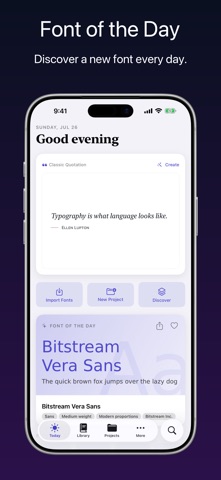



Description by Samuel Stallin Kapembe Written by the developer, not by AppBrain. Click to read.
Font Wizard Pro turns your iPhone, iPad, or iPod touch into a clean, portable font workflow for real projects. Browse the web for fonts. Download OTF, TTF, OpenType, and TrueType files. Import your own font files. Preview each typeface, compare styles, build project sets, tag what matters, export ZIP files, and transfer fonts to your Mac or PC over Wi-Fi.
Stop hunting through messy folders. Stop guessing from file names. Keep the right font ready.
BUILT FOR
- Designers building font sets for logos, posters, brand kits, apps, and websites.
- Marketers managing typefaces for campaigns, ads, landing pages, and client work.
- Developers keeping font files ready for apps, sites, prototypes, and interface tests.
- Content creators comparing styles for thumbnails, videos, titles, and posts.
- Students collecting fonts for projects, print work, and presentations.
- Small business owners keeping brand fonts close without a folder hunt.
- Writers and makers testing how words feel before choosing a style.
FROM FONT CHAOS TO FONT CONTROL
Font work slows down when files live everywhere: websites, downloads, email, Files, old folders, and past projects. You remember the look, but not the name. You saved it, but not where. You download the same font again. Then again.
Font Wizard Pro gives every typeface a home. It helps you save, search, sort, preview, compare, export, and transfer your library from one clear place.
PRO TOOLS FOR REAL FONT WORK
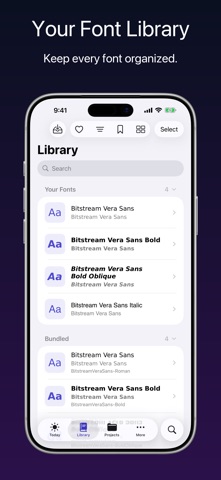
BUILD A CLEAN FONT LIBRARY
Import font files, preview styles, add tags, assign fonts to projects, repair missing items, and use install or activation options on compatible fonts and devices. On iOS, install fonts using a configuration profile.
BROWSE, SAVE, AND DOWNLOAD
Use the built-in browser to visit font sites and send useful files into downloads. Add font URLs by hand. Search your queue. Retry or resume failed items. Remove duplicates before they clutter.
PREVIEW THE FONT, NOT JUST THE NAME
A file name cannot show mood, shape, weight, spacing, or feel. A live preview can. See how each font looks before it reaches a design, deck, site, app, or client file.
COMPARE WITH REAL WORDS
Place typefaces side by side with your own sample text. Change size. Adjust alignment. Test a headline, label, sentence, or short note. Choose the font that reads best.
ORGANIZE WITH TAGS AND PROJECTS
Tag fonts by style, mood, client, brand, platform, or use case. Create project sets. Keep a logo set apart from a website set. Keep a campaign set apart from a client set.
FIND THE RIGHT FONT FAST
Search fonts and projects from one field. Open the match you need without scrolling through an endless list.
EXPORT AND TRANSFER WITH WI-FI
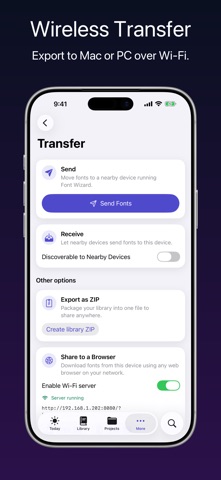
Export your library as a ZIP file. Use local Wi-Fi transfer with QR and link helpers to move font files to a nearby Mac or PC. Your mobile device becomes part of your workflow, not a storage trap.
CONTROL YOUR SETUP
Adjust appearance, haptics, reminders, download limits, telemetry, iCloud sync, storage cleanup, and Files sync in Settings. On compact screens, the More area keeps Browse, Transfer, Tags, Settings, and About easy to reach.
WHY IT MATTERS
The right font changes how words feel. It can make a message look calm, bold, warm, sharp, playful, serious, modern, or classic. But the right font cannot help if it is buried in a messy folder.
Font Wizard Pro keeps your font library ready for action.
Save it. Preview it. Tag it. Compare it. Put it in a project. Export it. Transfer it. Use it.
USE AND TRADEMARK NOTES
Font Wizard Pro ships with a redistributable font family for easy first use.
The app works with font files you import or download from sources you choose.
Only use fonts you have the right to copy, install, share, or use.
Compatibility varies by font file, device, system version, and transfer setup.
iPhone, iPad, iPod touch, Mac, and App Store are trademarks of Apple Inc., registered in the U.S. and other regions.
Safety and technology
Found in the app by AppBrain- Price
- $1.69
- App size
- 22.5 MB
- Content rating
- High
Technologies used by Font Wizard Pro: Font Manager
Releases
Updates seen on the App Store- Version
- 4.14.0
- Launched
- February 2010
No changelog data
Alternatives
Similar apps and more from Samuel Stallin KapembeAlternatives to Font Wizard Pro: Font Manager





More from Samuel Stallin Kapembe


![BeatS [Hip-Hop/Rap Edition] icon](https://is1-ssl.mzstatic.com/image/thumb/Purple221/v4/84/58/35/8458353b-213d-0a64-e2ce-572eb6a0cc74/AppIcon-Hip-Hop-0-1x_U007emarketing-0-8-0-85-220-0.png/100x100bb.jpg)
![BeatS [R&B/Soul Edition] icon](https://is1-ssl.mzstatic.com/image/thumb/Purple221/v4/81/63/f4/8163f4c7-6d7b-60d7-b7a3-735d45070882/R_U0026B-0-1x_U007epad-0-1-sRGB-85-220-0.png/100x100bb.jpg)
 Business Cards HD for Adobe Illustrator® - Editable Royalty-Free Templates

![BeatS [Reggaeton Edition] icon](https://is1-ssl.mzstatic.com/image/thumb/Purple221/v4/a8/58/bc/a858bca3-6438-2dc8-36c8-15a73cd2f9dd/Reggaeton-0-1x_U007epad-0-1-sRGB-85-220-0.png/100x100bb.jpg)

Rankings
App Store top chartsApp Store Rankings for Font Wizard Pro: Font Manager
About the app and developer
About Font Wizard Pro: Font Manager
Font Wizard Pro: Font Manager is a productivity app developed by Samuel Stallin Kapembe.
What is the rating of Font Wizard Pro: Font Manager?
Font Wizard Pro: Font Manager is rated 1.00 out of 5 stars, based on one rating ratings.
Is Font Wizard Pro: Font Manager free?
Font Wizard Pro: Font Manager costs $1.69. The app size is 22.48 MB. The latest version available is 4.14.0. The last update was on July 27, 2026.
What are the requirements for Font Wizard Pro: Font Manager?
The app has a content rating of High Maturity. The app has been available on the App Store since February 2010.
Developer information for Samuel Stallin Kapembe
Address: