

ForkLock: Meal Timer & Blocker
ForkLock: Meal Timer & Blocker is made and published by ANGELO MONTIL. AppBrain is an independent app data site and isn't affiliated with ANGELO MONTIL. The app name, icon, screenshots and description belong to ANGELO MONTIL and are shown as published on the App Store.
AppBrain's verdict
- Last updated
- April 27, 2026
Rankings
App Store top chartsApp Store Rankings for ForkLock: Meal Timer & Blocker
Competitors
Similar apps and more from ANGELO MONTILAlternatives to ForkLock: Meal Timer & Blocker


More from ANGELO MONTIL




Releases
Updates seen on the App Store- Version
- 1.0.1
- Launched
- April 2026
No changelog data
User feedback
Ratings and reviews on the App StoreComments on ForkLock: Meal Timer & Blocker for iOS
We don't have enough comments to show example comments. Please check back later.
Technology
Found in the app by AppBrain- Price
- Free
- App size
- 4.08 MB
- Content rating
- Everyone
Technologies used by ForkLock: Meal Timer & Blocker
About the app and developer
About ForkLock: Meal Timer & Blocker
ForkLock: Meal Timer & Blocker is a health & fitness app developed by ANGELO MONTIL.
What is the rating of ForkLock: Meal Timer & Blocker?
ForkLock: Meal Timer & Blocker has no ratings yet.
Is ForkLock: Meal Timer & Blocker free?
ForkLock: Meal Timer & Blocker is free. The app size is 4.08 MB. The latest version available is 1.0.1. The last update was on April 27, 2026.
What are the requirements for ForkLock: Meal Timer & Blocker?
The app has a content rating of Everyone. The app has been available on the App Store since April 2026.
Developer information for ANGELO MONTIL
Address:
Frequently asked questions about ForkLock: Meal Timer & Blocker
Is ForkLock: Meal Timer & Blocker free?
Yes. ForkLock: Meal Timer & Blocker is free on the App Store.
Is ForkLock: Meal Timer & Blocker still available?
Yes. ForkLock: Meal Timer & Blocker is on the App Store, and the last update we saw was on April 27, 2026.
How large is ForkLock: Meal Timer & Blocker?
ForkLock: Meal Timer & Blocker is 4.08 MB.
Is ForkLock: Meal Timer & Blocker suitable for children?
App Store rates the content of ForkLock: Meal Timer & Blocker as suitable for everyone.
Who made ForkLock: Meal Timer & Blocker?
ForkLock: Meal Timer & Blocker was developed by ANGELO MONTIL. It is listed in the health & fitness category on the App Store.
What are the best alternatives to ForkLock: Meal Timer & Blocker?
People looking at ForkLock: Meal Timer & Blocker also look at these health & fitness apps: Testosterone Tracker: TRT AI, JRingFit, FitWit AI – Fitness & Meals, Push Ups Counter: OneMore, Wakie: Alarm Clock to Wake Up.
Store listing
By ANGELO MONTIL, from the App Store


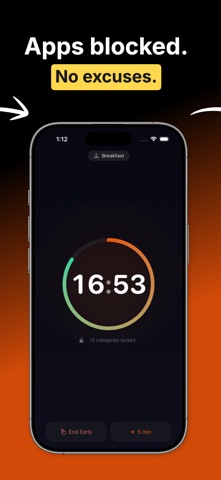

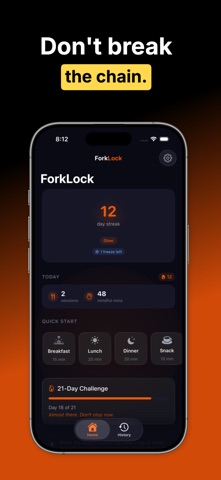

Description by ANGELO MONTIL Written by the developer, not by AppBrain. Click to read.
Put your phone down and enjoy your food. ForkLock locks distracting apps during meals using Screen Time so you can eat
without scrolling. Set a timer, block apps, and build the habit of phone-free meals.
We check our phones 58 times a day. Many of those happen during meals. ForkLock helps you take back mealtime with a
simple countdown timer that blocks the apps pulling your attention away.
HOW IT WORKS
Pick a meal. Set a timer. Your apps get blocked until the timer ends. That's it. ForkLock uses Apple Screen Time to
block distracting apps while keeping essentials like Phone and Messages available. When the meal is done, everything
unlocks automatically.
FEATURES
- Meal countdown timer (5 to 60 minutes) with a beautiful animated ring
- App blocking powered by Apple Screen Time and FamilyControls
- Quick Block, Full Focus, or Custom blocking modes
- Built-in presets for Breakfast, Lunch, Dinner, and Snack
- Live Activity and Dynamic Island countdown so you always see the time
- Gentle haptic nudges to stay present during meals
- 21-Day Challenge to build a lasting phone-free meal habit
- Meal Momentum streaks with tier progression (Ember, Pulse, Glow, Radiance)
- Habit stacking prompts to anchor meals to routines
- Weekly reflections to track your mindful eating progress
- Milestone moments at 7, 14, 21, 30, 60, 100, and 365 days
- Post-meal presence rating to reflect on how mindful you were
- Siri Shortcuts to start sessions and check your streak with your voice
- Full VoiceOver, Dynamic Type, and Reduce Motion accessibility support
- Dark mode first design with warm orange branding
FORKLOCK PRO (One-Time Purchase)
Unlock the full experience with a single purchase. No subscriptions.
- Apple Watch companion app with one-tap meal sessions
- Meal scheduling with reminders and weekly planner
- Full session history with a 26-week contribution graph
- Insights and reports with completion rate, best day, and trends
- Custom meal presets with personalized durations and settings
- Smart suggestions that learn your meal patterns
- Customizable nudge intervals (2, 5, or 10 minutes)
- Momentum freeze to protect your streak once per week
- Home Screen and Lock Screen widgets
- Apple Health integration for mindful minutes
- Focus Mode integration
- CSV data export
FREE FOREVER
The core experience is completely free. Timer, app blocking, 21-Day Challenge, habit stacking, nudges, weekly
reflections, milestones, and 7 days of session history are all included at no cost.
PRIVACY FIRST
ForkLock never sees which apps you use. Apple Screen Time handles all blocking privately on your device. No accounts.
No tracking. No data leaves your phone.
BUILD THE HABIT OF PHONE-FREE MEALS
Most people quit a new habit within the first week. ForkLock is designed to get you past that wall with daily
challenges, momentum streaks, gentle nudges, and milestone celebrations that keep you coming back to the table.
Download ForkLock and start your first phone-free meal today.