

Formattery: File Converter
Formattery: File Converter is made and published by Alvaro Escarcha Esteban. AppBrain is an independent app data site and isn't affiliated with Alvaro Escarcha Esteban. The app name, icon, screenshots and description belong to Alvaro Escarcha Esteban and are shown as published on the App Store.
AppBrain's verdict
- Rating on App Store
- 4.75
- 8 ratings
- Last updated
- October 7, 2026
- Size
- 43.8 MB
It doesn't have enough ratings yet to judge what users think.
User feedback
Ratings and reviews on the App StoreComments on Formattery: File Converter for iOS
We don't have enough comments to show example comments. Please check back later.
Store listing
By Alvaro Escarcha Esteban, from the App Store




Description by Alvaro Escarcha Esteban Written by the developer, not by AppBrain. Click to read.
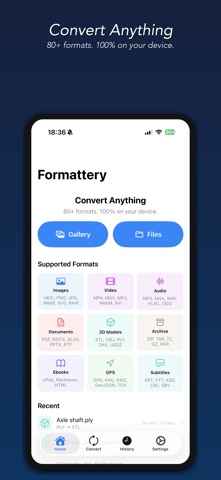
Formattery converts images, documents, videos, and audio files instantly without uploading anything to the cloud. Your files never leave your iPhone or iPad.
SUPPORTED FORMATS
Images: HEIC/HEIF, WebP, AVIF, JPEG XL, SVG, PNG, JPG/JPEG, TIFF/TIF, BMP, GIF, ICO, PSD
Camera RAW: DNG, CR2, NEF, ARW, ORF, RW2, RAF
Documents: PDF, RTF
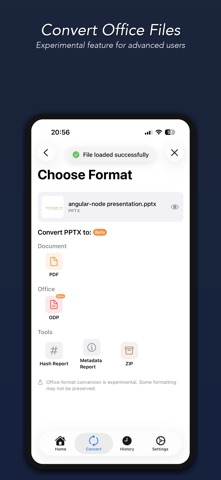
Office: DOCX, XLSX, PPTX, CSV, ODT, ODP, XLS, Pages, Keynote (experimental)
Video: MP4, MOV, MKV, WebM, AVI, FLV, WMV, 3GP, OGV
Audio: MP3, M4A, WAV, AAC, AIFF, FLAC, OGG, Opus, WMA, AC3
Ebooks: ePub
Subtitle: SRT, VTT, ASS, LRC, SBV, SUB
GPS: GPX, KML, KMZ, GeoJSON, TCX
3D Models: STL, OBJ, PLY, DAE, USDZ
Markup: Markdown (.md/.markdown), HTML/HTM, Plain Text
Archive: ZIP, TAR, GZ/GZIP, 7Z, RAR, CBR, CBZ
Tools: File Hash (MD5, SHA-1/256/384/512, CRC32), Metadata Viewer
KEY FEATURES
- 100% offline — no internet required, no cloud uploads
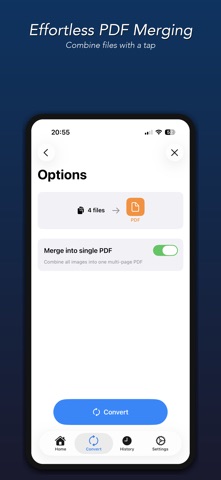
- Batch conversion — convert multiple files at once
- Adjustable quality — fine-tune compression and video resolution
- Office documents — convert DOCX, XLSX, PPTX and more (experimental)
- File preview — preview converted files before sharing
- Source file thumbnails — see what you're converting at a glance
- Quick Look preview — tap history to preview any converted file
- Photo library integration — saves to a dedicated Formattery album
- Conversion history — easily find and share past conversions
- 3D model conversion — STL, OBJ, PLY, DAE, USDZ
- ePub ebooks — read and create ePub files
- Archive formats — ZIP, TAR, GZ, 7Z, RAR extraction
- Dark mode — beautiful in any lighting
FREE & PRO
Image conversions are completely free. Upgrade once to unlock PDF, video, and audio conversions — no subscriptions, no ads, ever.
PRIVACY FIRST
Every conversion happens entirely on your device. We never collect data, track usage, or upload your files anywhere. What stays on your device is yours alone.
Safety and technology
Found in the app by AppBrain- Price
- Free
- App size
- 43.8 MB
- Content rating
- Everyone
Technologies used by Formattery: File Converter
Releases
Updates seen on the App Store- Version
- 26.10.1
- Launched
- March 2026
No changelog data
Alternatives
Similar apps and more from Alvaro Escarcha EstebanAlternatives to Formattery: File Converter


More from Alvaro Escarcha Esteban


Rankings
App Store top chartsApp Store Rankings for Formattery: File Converter
About the app and developer
About Formattery: File Converter
Formattery: File Converter is an utilities app developed by Alvaro Escarcha Esteban.
User Ratings
Formattery: File Converter is rated 4.75 out of 5 stars. The rating is based on 8 ratings.
App Information
Formattery: File Converter is freely available from the App Store. The app size is 43.77 MB. The latest version available is 26.10.1. The last update was on October 7, 2026.
Technical Requirements
The app has a content rating of Everyone. The app has been available on the App Store since March 2026.
Developer information for Alvaro Escarcha Esteban
Address:
Frequently asked questions about Formattery: File Converter
Is Formattery: File Converter free?
Yes. Formattery: File Converter is free on the App Store.
Is Formattery: File Converter still available?
Yes. Formattery: File Converter is on the App Store, and the last update we saw was on October 7, 2026.
How large is Formattery: File Converter?
Formattery: File Converter is 43.77 MB.
Is Formattery: File Converter suitable for children?
App Store rates the content of Formattery: File Converter as suitable for everyone.
How do people rate Formattery: File Converter?
Formattery: File Converter scores 4.75 out of 5 stars, from 8 ratings on the App Store.
Who made Formattery: File Converter?
Formattery: File Converter was developed by Alvaro Escarcha Esteban. It is listed in the utilities category on the App Store.
What are the best alternatives to Formattery: File Converter?
People looking at Formattery: File Converter also look at these utilities apps: LinkNest: Save & Manage Links, Audiscript: Voice to Text, Full Page Shot, TeFont, Video & Image Converter.