




AppBrain's verdict
- Last updated
- November 10, 2026
- Size
- 23.4 MB
User feedback
Ratings and reviews on the App StoreComments on FormlyConvert for iOS
We don't have enough comments to show example comments. Please check back later.
Store listing
By Suleyman CAYIR, from the App StoreDescription by Suleyman CAYIR Written by the developer, not by AppBrain. Click to read.
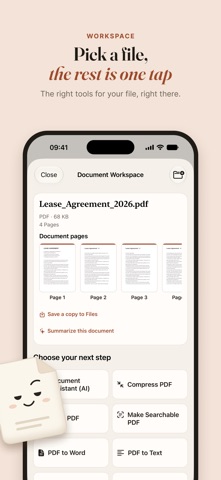
39 DOCUMENT TOOLS IN ONE APP • Convert PDF to Word, Excel, PowerPoint, JPG, PNG and text • Turn Word, Excel, PowerPoint, HTML and images into PDF • Convert UYAP UDF files to PDF in seconds • Merge, split, compress and rotate PDFs, and reorder pages • Add watermarks, page numbers, Bates numbers and stamps • Protect, unlock, redact and repair PDFs • Make scanned documents searchable with OCR
FILL ANY FORM IN ONE TAP The form guide finds the fields in your PDF and walks you through them. "Fill with my details" fills name, phone, email and address fields in a single tap. Your details are kept on this device only. Draw your signature and add dates, check marks and QR codes.
SCAN, SIGN, MARK UP Scan paper documents into PDF with your camera. Take pressure-sensitive notes with Apple Pencil, highlight text and place your signature on the page.
DOCUMENT ASSISTANT Summarize long contracts and reports, see key points with their page numbers, and ask questions about the document.
READ ALOUD AND TRANSCRIBE Listen to your documents sentence by sentence, with the current sentence highlighted. Turn meeting recordings and videos into text and save the result as Word, PDF or TXT.
LIBRARY Keep every file organized in folders, with pinned files on top. Search by file name, sync across your devices with iCloud and lock the app with Face ID.
FORMI IS HERE TO HELP Our paper friend Formi shows you around on your first steps and acts out what each tool does.
WORK FASTER • Process several files at once • Follow long tasks from the Lock Screen and the Dynamic Island • Home Screen and Lock Screen widgets • Shortcuts and Share Sheet support • Designed for iPhone and iPad, with Dark Mode
FORMLY PRO Go Pro for unlimited conversions and no ads. Monthly, yearly and lifetime options are available. Subscriptions renew automatically unless cancelled at least 24 hours before the end of the current period, and payment is charged to your Apple Account. You can manage and cancel your subscription in your App Store account settings.
Use: https://www.apple.com/legal/internet-services/itunes/dev/stdeula/
Safety and technology
Found in the app by AppBrain- Price
- Free
- App size
- 23.4 MB
- Content rating
- Everyone
Technologies used by FormlyConvert
Releases
Updates seen on the App Store- Version
- 1.3.1
- Launched
- March 2026
No changelog data
Alternatives
Similar apps and more from Suleyman CAYIRAlternatives to FormlyConvert


More from Suleyman CAYIR

Rankings
App Store top chartsApp Store Rankings for FormlyConvert
About the app and developer
About FormlyConvert
FormlyConvert is a productivity app developed by Suleyman CAYIR.
User Ratings
The app has no ratings yet.
App Information
FormlyConvert is freely available from the App Store. The app size is 23.41 MB. The latest version available is 1.3.1. The last update was on November 10, 2026.
Technical Requirements
The app has a content rating of Everyone. The app has been available on the App Store since March 2026.
FormlyConvert is made and published by Suleyman CAYIR. AppBrain is an independent app data site and isn't affiliated with Suleyman CAYIR. The app name, icon, screenshots and description belong to Suleyman CAYIR and are shown as published on the App Store.
Developer information for Suleyman CAYIR
Address:
Frequently asked questions about FormlyConvert
Is FormlyConvert free?
Yes. FormlyConvert is free on the App Store.
Is FormlyConvert still available?
Yes. FormlyConvert is on the App Store, and the last update we saw was on November 10, 2026.
How large is FormlyConvert?
FormlyConvert is 23.41 MB.
Is FormlyConvert suitable for children?
App Store rates the content of FormlyConvert as suitable for everyone.
Who made FormlyConvert?
FormlyConvert was developed by Suleyman CAYIR. It is listed in the productivity category on the App Store.
What are the best alternatives to FormlyConvert?
People looking at FormlyConvert also look at these productivity apps: Scroll Goblin: App Blocker, Chatgrove: AI Chat Organizer, Collate: PDF & Image Merger, AI Grammar Keyboard: TypeBuddy, LeaveBy: Leave On Time.