AppBrain
AppBrain
  • Apps
  • Apps being viewed right now Trending apps today Most popular apps All-time most installed apps Top rated apps iPhone and iPad apps
  • Intelligence ▾
    Intelligence overview → Track any Android app or your whole market
    Track & analyze
    Keyword Tracker & OptimizerTrack & improve Play rankings App Performance ReportOne-off PDF for any app StatisticsFree Android & Play market stats
    Promote your app
    Featured Apps App Links
  • Intelligence
  • Pricing
  • Dashboard
  • Sign up
  • Log in
App Store Apps > Productivity > ForNote
App profile & analytics · Productivity · Data updated 2026-10-09
ForNote icon

ForNote

by CAGAN DURGUN · Free · Version 2.0
Availability On the App Store since June 2025 ↗
Rating on App Store
–
Rating
–
0 reviews
Best rank
–
not in the top lists
Last updated
May 19, 2026
2.0

ForNote is made and published by CAGAN DURGUN. AppBrain is an independent app data site and isn't affiliated with CAGAN DURGUN. The app name, icon, screenshots and description belong to CAGAN DURGUN and are shown as published on the App Store.

About ForNote

ForNote is a productivity app developed by CAGAN DURGUN.

User Ratings

The app has no ratings yet.

App Information

ForNote is freely available from the App Store. The app size is 1.87 MB. The latest version available is 2.0. The last update was on May 19, 2026.

Technical Requirements

The app has a content rating of Everyone. The app has been available on the App Store since June 2025.

Description by CAGAN DURGUN (from the App Store)
The notebook that turns Apple Pencil strokes into searchable, organized handwritten notes.

ForNote is a native iPad and iPhone notes app for handwriting, sketching, and annotating PDFs. Draw with Apple Pencil, organize notebooks in nested folders, drop a photo or PDF as a page background, and find any handwritten word from Spotlight.


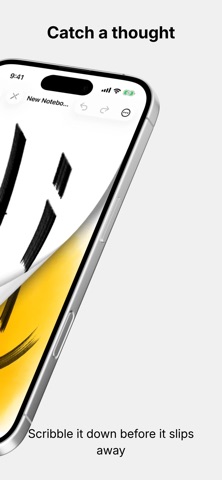
HAND-DRAWN PAGES

• Draw with Apple Pencil on iPad, or with your finger on iPhone
• Pen, marker, eraser, and lasso with a full color picker
• Native page-curl animation between pages
• Pinch to zoom up to 5×
• Floating tool palette you can drag anywhere on screen


FOLDERS & ORGANIZATION

• Nest folders inside folders — Files-style hierarchy
• Drag and drop notebooks and folders between locations
• Spring-load on the back arrow to navigate while dragging
• Select multiple items at once
• Bulk export, move, or delete in a single action


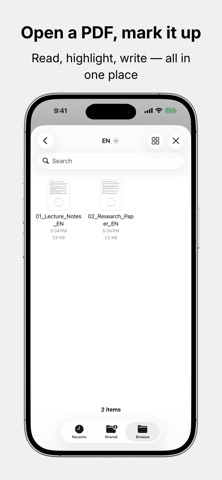
PAGE BACKGROUNDS

• Drop a photo as a background and annotate over it
• Import a PDF — every page becomes a notebook page you can write on
• Scan a document with the camera and turn it into pages instantly
• Annotate every imported page with Apple Pencil


SPOTLIGHT SEARCH

• Vision OCR runs in the background on every page you draw on
• Search for any handwritten word from Spotlight on your device
• Tap a result to jump straight to the exact page
• Turkish and English recognition out of the box


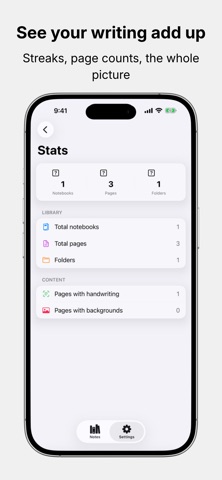
STATISTICS

• Track your writing streak across notebooks, pages, and folders
• Library overview with item counts
• Content breakdown of OCR-indexed and image-backed pages
• Everything stays on-device


LIQUID GLASS DESIGN

Every card, sheet, and toolbar uses iOS 26's stunning Liquid Glass material. The whole app is built with native SwiftUI — no custom chrome, just the system you already know from Notes, Files, and Reminders.


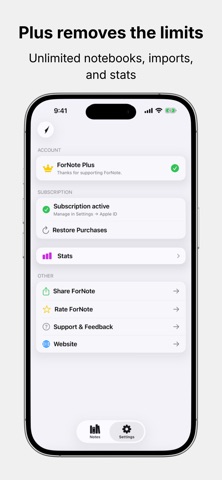
FORNOTE PLUS — TRY FREE

• Unlimited notebooks
• Unlimited PDF imports
• Photos, PDF, and document scanner page backgrounds inside the editor
• Detailed writing statistics

Start a free trial today. Cancel anytime.


Built for students, researchers, planners, and anyone who thinks better with a pen.

Available in 3 languages: English, Turkish, and Simplified Chinese.

———————————————

Terms of Use (EULA): https://www.apple.com/legal/internet-services/itunes/dev/stdeula/
Privacy Policy: https://cagandurgun.com/fornoteprivacy
Show more Show less

Screenshots

ForNote Screenshot 1 of 6
ForNote Screenshot 2 of 6
ForNote Screenshot 3 of 6
ForNote Screenshot 4 of 6
ForNote Screenshot 5 of 6
ForNote Screenshot 6 of 6
Screenshots by CAGAN DURGUN, from the the App Store listing
Official page on the App Store

Alternatives to ForNote

Timeboard - AlwaysOn Hub icon Timeboard - AlwaysOn Hub
Vedran Balagovic
0.0
Free
Habit Time Tracker - Flowtic icon Habit Time Tracker - Flowtic
ERIK WILLIAM YOUNG
4.8
Free
12 ratings
Dumbphone : Limit Distractions icon Dumbphone : Limit Distractions
Umer Ahmed
4.5
Free
49 ratings
QuirkPlus: AI Day Planner icon QuirkPlus: AI Day Planner
ELITIST SOFTWARE SOLUTIONS LLP
5.0
$19.99
1 ratings
WakeMinder - Popup Reminders icon WakeMinder - Popup Reminders
Omar Sherif
4.5
Free
22 ratings
TO DO List : Todo Reminders icon TO DO List : Todo Reminders
Beetabyte LLC
4.5
Free
33 ratings
PDF Converter Scanner Printer icon PDF Converter Scanner Printer
杨胜 朱
4.3
Free
25 ratings
Summary AI - QuickSummary icon Summary AI - QuickSummary
Thien Nguyen
4.4
Free
16 ratings

More from CAGAN DURGUN

DOC2PDF icon DOC2PDF
CAGAN DURGUN
3.5
Free
2 ratings

Changelog of ForNote

No changelog data

Developer information for CAGAN DURGUN

CAGAN DURGUN

Address:

Share ForNote

Comments on ForNote for iOS

We don't have enough comments to show example comments. Please check back later.

App Store Rankings for ForNote

This app is not ranked

Technologies used by ForNote

Frequently asked questions about ForNote

Is ForNote free?

Yes. ForNote is free on the App Store.

Is ForNote still available?

Yes. ForNote is on the App Store, and the last update we saw was on May 19, 2026.

How large is ForNote?

ForNote is 1.87 MB.

Is ForNote suitable for children?

App Store rates the content of ForNote as suitable for everyone.

Who made ForNote?

ForNote was developed by CAGAN DURGUN. It is listed in the productivity category on the App Store.

What are the best alternatives to ForNote?

People looking at ForNote also look at these productivity apps: Timeboard - AlwaysOn Hub, Habit Time Tracker - Flowtic, Dumbphone : Limit Distractions, QuirkPlus: AI Day Planner, WakeMinder - Popup Reminders.

Apps other people are watching Price drops on Google Play Top new apps Today's trending apps Popular Productivity Apps
Timeboard - AlwaysOn Hub icon Timeboard - AlwaysOn Hub
Habit Time Tracker - Flowtic icon Habit Time Tracker - Flowtic
Dumbphone : Limit Distractions icon Dumbphone : Limit Distractions
QuirkPlus: AI Day Planner icon QuirkPlus: AI Day Planner
WakeMinder - Popup Reminders icon WakeMinder - Popup Reminders
TO DO List : Todo Reminders icon TO DO List : Todo Reminders
PDF Converter Scanner Printer icon PDF Converter Scanner Printer
Summary AI - QuickSummary icon Summary AI - QuickSummary
Overview Alternatives Reviews Rankings Technology
AppBrain Intelligence premium content

Subscribe now to get full and unlimited access to AppBrain Intelligence. You'll have access to:

  • App Intelligence dashboard (performance timeline, competitor comparison, country rankings, insight cards)
  • Detailed ranking data per app
  • Full timeline per developer
  • Device market shares data per country
  • Unlimited keyword tracking
1 Month

$75/mo
(billed every month)

SAVE 0%
Subscribe
3 Months

$65/mo
($195 billed every 3 months)

SAVE 13%
Subscribe
1 Year

$57.50/mo
($690 billed every year)

SAVE 23%
Subscribe
Each subscription will automatically renew 3 days before the expiration date for the same time period. Subscriptions can be cancelled at any time before the renewal.

AppBrain is an app data site, we track rankings, ratings, installs for all apps and games on Google Play and the App Store. AppBrain doesn't host app files or APKs, all install links go directly to the official store. All trademarks are owned by their respective owners.

More apps

  • Top Android apps being viewed
  • Pocket Saga - Short Dramas stats
  • Random Chat - Stranger Chat
  • Cox Thrive

App statistics

  • Android statistics
  • Google Play Developer stats
  • Trending Android Apps
  • Trending iOS apps
  • Top popular Apps
  • Buy the best Android phone
  • Buy & sell app businesses

About AppBrain

  • Contact
  • Privacy
  • Documentation
  • DMCA takedowns
  • Articles
  • Blog
  • Tips to improve your Android promotional campaign
© 2010-2026 - AppBrain