AppBrain's verdict on Fotor: AI Photo Editor, Design
- Last updated
- November 23, 2026
- Size
- 733.7 MB
About Fotor: AI Photo Editor, Design
Fotor: AI Photo Editor, Design is a photo & video app developed by Chengdu Everimaging Science and Technology Co., Ltd.
What is the rating of Fotor: AI Photo Editor, Design?
Fotor: AI Photo Editor, Design has no ratings yet.
Is Fotor: AI Photo Editor, Design free?
Fotor: AI Photo Editor, Design is free. The app size is 733.74 MB. The latest version available is 5.1.13. The last update was on November 23, 2026.
What are the requirements for Fotor: AI Photo Editor, Design?
The app has a content rating of Everyone. The app has been available on the App Store since March 2013.
Fotor: AI Photo Editor, Design is made and published by Chengdu Everimaging Science and Technology Co., Ltd. AppBrain is an independent app data site and isn't affiliated with Chengdu Everimaging Science and Technology Co., Ltd. The app name, icon, screenshots and description belong to Chengdu Everimaging Science and Technology Co., Ltd and are shown as published on the App Store.
Designed for Mac, Fotor opens directly from your desktop and gives you powerful AI tools to create stunning photos and videos—no editing skills required.
Fotor was mentioned as the 'lite Photoshop' by BBC and it will cater all your photography needs.
"I found Fotor to be simple and intuitive to use… I think many photographers will like Fotor Photo Editor." – TUAW
"If you're looking for an easy to use photo editor with lots of editing options and effects, look no further than Fotor" -- Softpedia.com
"Fotor might be the perfect solution for many amateur photographs, which is completely free to download and use." – Macreview.com
People everywhere are getting their edit on with Fotor’s solid photo editor for Mac!
*** #1 free photography app in more than 70 countries ***
*** In the top 5 free apps overall in more than 50 countries ***
【Design】
Brand-new function - Fotor designs. Everyone can be a creator.
Make design complexities simple: You don't need to have any design experience or draw one stroke at a time. You only need to choose a template created by a professional designer, and then simply edit it with a few clicks, saving both time and energy. You can realize your vision!
Fotor design tools offer dozens of design sizes, including Facebook Covers/Twitter Covers/YouTube Channel Art/Mobile Wallpapers/Logos/Posters/Cards/Resumes/Planners/Invitations across over 100,000 designs with rich scenes, styles, themes, meeting your various needs in your personal lives, professional lives, and entertainment.
Fotor design offers over 200,000 carefully selected design resource elements, including fonts, graphic shapes, icons, illustrations, backgrounds, textures, symbols, and signs, which can help you create stunning designs.
【Portraits Touch Up】
No matter whether you want smooth skin, to reshape your face, or make the way you look in portraits more lifelike, the touch up function helps you with all of that—deftly, and in double quick time.
【Batch】
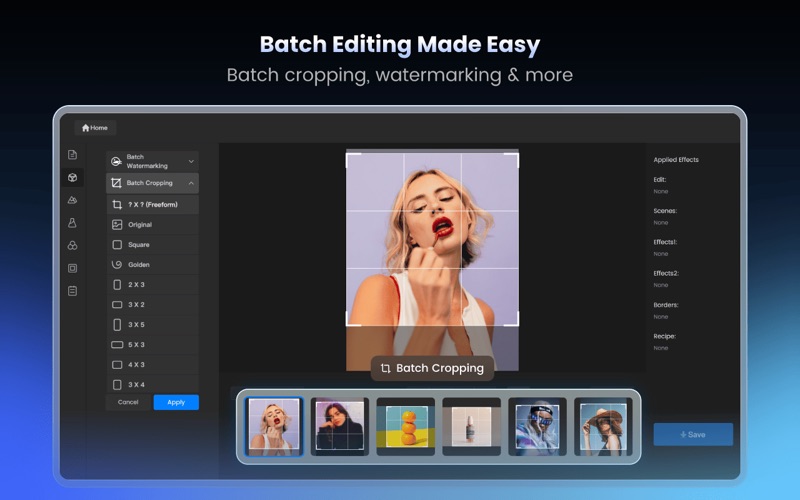
Quickly process dozens of photos to save time and efforts. Batch processing can help apply Scenes, Effects, and Borders with one click, and can also quickly complete Batch resizing, renaming, and file format conversion.
【Collage】
Versatile collage feature gives you a ton of flexibility to create and customize! Select from over 80 templates up to 9 photos at a time, or use Free Style to move photos around whatever you want with 26 unique backgrounds to choose from. Finish off your masterpiece with the border color that catches your eye, or select from 10 border designs. Even adjust border width, add a shadow effect or round off the corners.
【Photo Editing】
Fotor's state-of-the-art photo processing engine makes it easy to process high quality photos quickly. Adjust exposure, brightness, contrast, white balance, and saturation, sharpen/blur, highlights/shadows, HSL, add a vignette or film grain, remove red eye, reduce image noise, or crop, straighten, rotate, fix image distortion or correct lens distortion.
Effects & Borders
Fotor comes loaded with over 150 effects, including Classic, Retro, Lomo, B&W, and new popular packs of Cinematic, Disposable, Mono, Filmatic, Lighting Leaking, Groovy, Mellow, Spring, Warm Winter, Solar and Serenity. Over 60 styles of frames, including Simple lines, Borders, Artico, Styled, Floral, Old School, Holiday, Lovers, Gallery and Stamp.
***Fotor Pro***
- Unlimited premium assets like effects, borders, textures etc.
- keep adding new features
- Price may vary by location. Subscriptions will be charged to your credit card through your iTunes account. Your subscription will automatically renew unless canceled at least 24 hours before the end of the current period. You will not be able to cancel the subscription once activated. Manage your subscriptions in Account Settings after purchase.
https://www.apple.com/legal/internet-services/itunes/dev/stdeula/
More data about Fotor: AI Photo Editor, Design
| Price | Free |
| Rating | No ratings |
| Ranking | Not ranked |
| Version | 5.1.13 |
| App size | 733.7 MB |
| Suitable for | Everyone |
Share Fotor: AI Photo Editor, Design
Comments on Fotor: AI Photo Editor, Design for iOS
We don't have enough comments to show example comments. Please check back later.
- Price
- Free
- App size
- 733.7 MB
- Content rating
- Everyone
Technologies used by Fotor: AI Photo Editor, Design
Changelog of Fotor: AI Photo Editor, Design
Updates seen on the App Store- Version
- 5.1.13
- Launched
- March 2013
No changelog data
More from Chengdu Everimaging Science and Technology Co., Ltd
App Store Rankings for Fotor: AI Photo Editor, Design
Developer information for Chengdu Everimaging Science and Technology Co., Ltd
Frequently asked questions about Fotor: AI Photo Editor, Design
Is Fotor: AI Photo Editor, Design free?
Yes. Fotor: AI Photo Editor, Design is free on the App Store.
Is Fotor: AI Photo Editor, Design still available?
Yes. Fotor: AI Photo Editor, Design is on the App Store, and the last update we saw was on November 23, 2026.
How large is Fotor: AI Photo Editor, Design?
Fotor: AI Photo Editor, Design is 733.74 MB.
Is Fotor: AI Photo Editor, Design suitable for children?
App Store rates the content of Fotor: AI Photo Editor, Design as suitable for everyone.
Who made Fotor: AI Photo Editor, Design?
Fotor: AI Photo Editor, Design was developed by Chengdu Everimaging Science and Technology Co., Ltd. It is listed in the photo & video category on the App Store.
Subscribe now to get full and unlimited access to AppBrain Intelligence. You'll have access to:
- App Intelligence dashboard (performance timeline, competitor comparison, country rankings, insight cards)
- Detailed ranking data per app
- Full timeline per developer
- Device market shares data per country
- Unlimited keyword tracking
- AI assistant access via MCP (Claude, Cursor or any MCP client)
AppBrain is an app data site, we track rankings, ratings, installs for all apps and games on Google Play and the App Store. AppBrain doesn't host app files or APKs, all install links go directly to the official store. All trademarks are owned by their respective owners.
More apps
App statistics