

Framable | Framed Screenshots
Framable | Framed Screenshots is made and published by 镇 王. AppBrain is an independent app data site and isn't affiliated with 镇 王. The app name, icon, screenshots and description belong to 镇 王 and are shown as published on the App Store.
AppBrain's verdict
- Rating on App Store
- 4.75
- 4 ratings
- Last updated
- April 16, 2026
- Size
- 30.7 MB
It doesn't have enough ratings yet to judge what users think.
User feedback
Ratings and reviews on the App StoreComments on Framable | Framed Screenshots for iOS
We don't have enough comments to show example comments. Please check back later.
Store listing
By 镇 王, from the App Store



Description by 镇 王 Written by the developer, not by AppBrain. Click to read.
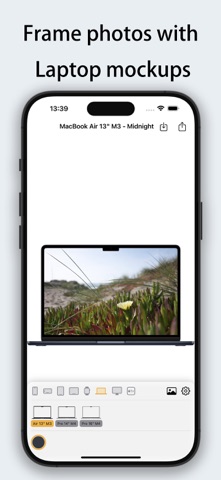
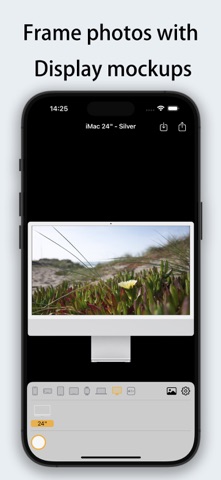
Make your screenshots look professional instantly! Framable supports adding realistic device frames to screenshots/photos for iPhone, iPad, Mac, Apple Watch, and Apple TV. Process in 1 second and share with ease.
Perfect Fit for the Latest Apple Devices
• iPhone 14/15/16/17 series (including Pro/Pro Max/Air)
• iPad Air/Pro/mini (Full M2/M4 support)
• MacBook Air/Pro (13"~16", M3/M4 chips)
• iMac 24", Apple TV 4K
• Apple Watch S10/S11/Ultra 2/Ultra 3 (42mm/46mm)
[New Update] Flexible Composition & Interactive Optimization
• Diverse Fit Modes: Supports "Stretch", "Fit Width (Vertical Scroll)", and "Fit Height (Horizontal Scroll)" for any image ratio.
• Intuitive Gesture Control: In fit modes, simply drag the image inside the frame to adjust the visible area and capture the perfect look.
[Exclusive] Powerful Shortcuts Support
• System Integration: No need to open the app! Use the Share Sheet in the Photos app to add frames instantly.
• Batch Processing: Process dozens of screenshots at once via Shortcuts workflows for maximum efficiency.
• Dedicated Intents: Individual shortcuts for iPhone, iPad, and Watch to meet your precise automation needs.
Core Features
• Blazing Fast - Generate framed images in under 1 second.
• HD Output - Retains original image quality with 4K support.
• Diverse Frames - Multiple color options (Space Black, Starlight, Midnight, Titanium, etc.).
• Smart Adaptation - Automatically detects portrait/landscape orientations to match the best device frame.
Use Cases
• Developers: Create App Store marketing materials.
• Tech Enthusiasts: Design personalized social media or review posts.
• Professionals: Give product demos and document screenshots a premium look.
• Efficiency Seekers: Use Shortcuts for a fully automated framing workflow.
"From ordinary screenshot to professional display in 1 second. Automated composition has never been this easy!"
Safety and technology
Found in the app by AppBrain- Price
- $0.99
- App size
- 30.7 MB
- Content rating
- Everyone
Technologies used by Framable | Framed Screenshots
Releases
Updates seen on the App Store- Version
- 1.0.3
- Launched
- June 2025
No changelog data
Alternatives
Similar apps and more from 镇 王Alternatives to Framable | Framed Screenshots


More from 镇 王





Rankings
App Store top chartsApp Store Rankings for Framable | Framed Screenshots
About the app and developer
About Framable | Framed Screenshots
Framable | Framed Screenshots is a graphics & design app developed by 镇 王.
User Ratings
Framable | Framed Screenshots is rated 4.75 out of 5 stars. The rating is based on 4 ratings.
App Information
Framable | Framed Screenshots costs $0.99. The app size is 30.73 MB. The latest version available is 1.0.3. The last update was on April 16, 2026.
Technical Requirements
The app has a content rating of Everyone. The app has been available on the App Store since June 2025.
Developer information for 镇 王
Address:
Frequently asked questions about Framable | Framed Screenshots
Is Framable | Framed Screenshots free?
No. Framable | Framed Screenshots costs $0.99 on the App Store.
Is Framable | Framed Screenshots still available?
Yes. Framable | Framed Screenshots is on the App Store, and the last update we saw was on April 16, 2026.
How large is Framable | Framed Screenshots?
Framable | Framed Screenshots is 30.73 MB.
Is Framable | Framed Screenshots suitable for children?
App Store rates the content of Framable | Framed Screenshots as suitable for everyone.
How do people rate Framable | Framed Screenshots?
Framable | Framed Screenshots scores 4.75 out of 5 stars, from 4 ratings on the App Store.
Who made Framable | Framed Screenshots?
Framable | Framed Screenshots was developed by 镇 王. It is listed in the graphics & design category on the App Store.
What are the best alternatives to Framable | Framed Screenshots?
People looking at Framable | Framed Screenshots also look at these graphics & design apps: Screen Mockups, Mockup Assistant, Icon Editor - SF Symbols, EmoArt - Pixel Art with Emojis, Shotbot - Framed Screenshots.