

Frame Grabber: FrameLift
Frame Grabber: FrameLift is made and published by Renaissance Apps LLC. AppBrain is an independent app data site and isn't affiliated with Renaissance Apps LLC. The app name, icon, screenshots and description belong to Renaissance Apps LLC and are shown as published on the App Store.
AppBrain's verdict
New- Rating on App Store
- 5.00
- 1 ratings
- Last updated
- October 24, 2026
- Size
- 15.4 MB
Frame Grabber: FrameLift came out 74 days ago. It doesn't have enough ratings yet to judge what users think.
User feedback
Ratings and reviews on the App StoreComments on Frame Grabber: FrameLift for iOS
We don't have enough comments to show example comments. Please check back later.
Store listing
By Renaissance Apps LLC, from the App Store
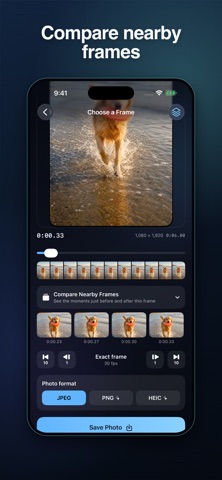

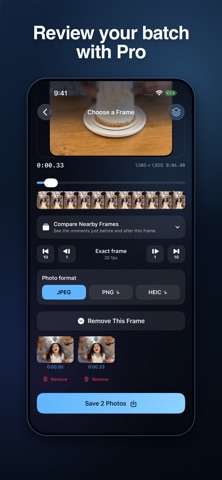
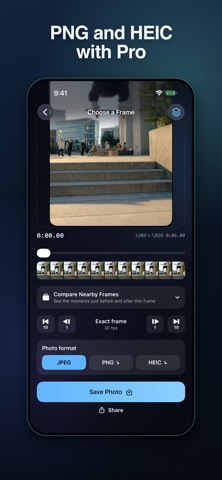
Description by Renaissance Apps LLC Written by the developer, not by AppBrain. Click to read.
FIND YOUR EXACT MOMENT
• Import a video from Photos or Files
• Scrub through visual timeline previews
• Step forward or back by one or ten frames
• Compare up to seven nearby frames before choosing
KEEP THE DETAIL
• Export at the source video's resolution, including 4K when present
• Save JPEG photos without a watermark
• Keep the original recording date when available, or save with today's date
• Share a photo or save it directly to Photos
REVIEW SEVERAL MOMENTS WITH PRO
• Add frames to a thumbnail queue
• Review or remove individual selections before saving
• Save several frames together
• Retry unsaved selections if a batch is interrupted
• Choose JPEG, PNG or HEIC export
FOR VIDEOS WORTH KEEPING
Catch a pet's expression, find a smile in a family video, choose a thumbnail for your next post or inspect a moment from sports footage.
Your videos and extracted images are processed on your device. FrameLift does not upload them. Export quality depends on the source video; frame extraction cannot remove existing motion blur.
FREE AND PRO
FrameLift includes three full-resolution JPEG saves per day. FrameLift Pro adds unlimited saves, batch saving, and PNG and HEIC export. Weekly and annual auto-renewable subscriptions are available. Manage or cancel your subscription in your App Store account.
Terms: https://renaissanceapps.com/terms-conditions
Privacy: https://renaissanceapps.com/privacy-policy
Safety and technology
Found in the app by AppBrain- Price
- Free
- App size
- 15.4 MB
- Content rating
- Everyone
Technologies used by Frame Grabber: FrameLift
Releases
Updates seen on the App Store- Version
- 1.2
- Launched
- August 2026
No changelog data
Alternatives
Similar apps and more from Renaissance Apps LLCAlternatives to Frame Grabber: FrameLift


More from Renaissance Apps LLC




Rankings
App Store top chartsApp Store Rankings for Frame Grabber: FrameLift
About the app and developer
About Frame Grabber: FrameLift
Frame Grabber: FrameLift is a photo & video app developed by Renaissance Apps LLC.
User Ratings
Frame Grabber: FrameLift is rated 5.00 out of 5 stars. The rating is based on one rating ratings.
App Information
Frame Grabber: FrameLift is freely available from the App Store. The app size is 15.37 MB. The latest version available is 1.2. The last update was on October 24, 2026.
Technical Requirements
The app has a content rating of Everyone. The app has been available on the App Store since August 2026.
Developer information for Renaissance Apps LLC
Address: