

Frames - Device Mockups
Frames - Device Mockups is made and published by Immanuel Sabwami. AppBrain is an independent app data site and isn't affiliated with Immanuel Sabwami. The app name, icon, screenshots and description belong to Immanuel Sabwami and are shown as published on the App Store.
AppBrain's verdict
New- Rating on App Store
- 5.00
- 1 ratings
- Last updated
- September 13, 2026
- Size
- 194.3 MB
Frames - Device Mockups came out 81 days ago. It doesn't have enough ratings yet to judge what users think.
User feedback
Ratings and reviews on the App StoreComments on Frames - Device Mockups for iOS
We don't have enough comments to show example comments. Please check back later.
Store listing
By Immanuel Sabwami, from the App Store


Description by Immanuel Sabwami Written by the developer, not by AppBrain. Click to read.
Frames turns screenshots and screen recordings into device mockups, ready for the App Store, social media, presentations, websites and more.
Drop in a screenshot and Frames matches it to the right device. Then make it yours with real device finishes, backgrounds, shadows, custom layouts and more.
FRAME EVERY SCREEN
Choose from 265 device frames across 51 models, including iPhone, iPad, MacBook, iMac, Apple Watch and Studio Display. Pick from real hardware finishes, Watch sizes, materials, bands and colors.
MAKE IT YOURS
Go beyond putting a bezel around a screenshot. Choose solid colors, built-in gradients, macOS wallpapers or your own images for the background. Blur your screenshot behind itself, add and fine-tune shadows, adjust corner radius, reposition your device, change its scale or create a transparent canvas.
BUILT FOR FULL RESOLUTION
Frames sizes the canvas around the device instead of squeezing every project into the same fixed resolution. With Frames Pro, export at each device frame’s full native resolution, up to 3450px for iPhone 17 Pro Max.
FRAME SCREEN RECORDINGS
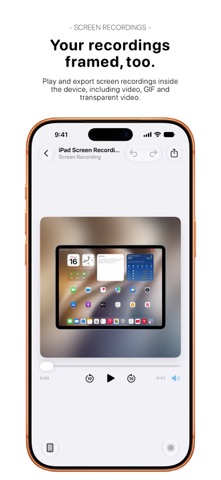
Screen recordings work just like screenshots. Play them back inside the device frame, then export with Frames Pro as video, an animated GIF or even HEVC video with a real alpha channel for transparent backgrounds.
SAVE YOUR FAVORITE LOOKS
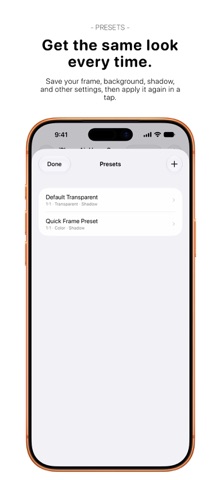
Turn your setup into a preset and reuse it whenever you want. Presets remember your frame, background, shadow, corners, canvas and placement.
Quick Frame makes things even faster. Frame your latest screenshot from Frames, Control Center or your Lock Screen without going through the editor. You can also frame images from the Share Sheet or build Frames into your own workflows with Shortcuts.
MADE FOR APP STORE SCREENSHOTS
Choose canvas presets matching Apple’s accepted App Store sizes for iPhone, iPad, Mac and Apple Watch. App Store canvas sizes always export at their exact pixels, even without Frames Pro.
KEEP PROJECTS TOGETHER
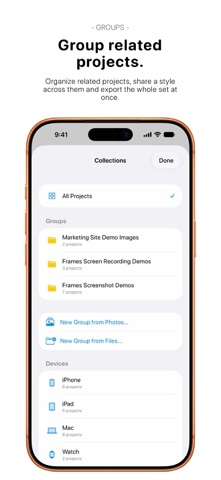
Organize related projects into Groups, carry a style across the entire set and, with Frames Pro, import or export them in batches.
Need more than one device? Frames Pro can put two, three or four devices side by side on a single canvas.
IPHONE, IPAD AND MAC
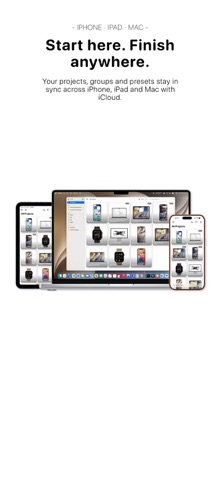
Frames is built for all three. Projects, Groups and presets sync through your iCloud account, so you can start on iPhone and pick up on iPad or Mac.
And the Mac version is a real native Mac app, complete with its own windows, menu bar, file panels, sharing and undo and redo.
A LOT OF FRAMES IS FREE
All 265 device frames and finishes are free, along with backgrounds, shadows, presets, Groups, App Store canvas sizes, Quick Frame, iCloud sync, the Share extension and Shortcuts actions.
Frames Pro is a one-time purchase that unlocks:
• Full-resolution exports
• Video and GIF exports
• Batch importing and Group exports
• Multi-device layouts
You also get 3 free Pro exports before you buy. They never expire.
PRIVATE BY DESIGN
No accounts. No third-party analytics. No advertising or tracking. Your screenshots are processed on your device, and iCloud sync uses your own iCloud account.
Safety and technology
Found in the app by AppBrain- Price
- Free
- App size
- 194.3 MB
- Content rating
- Everyone
Technologies used by Frames - Device Mockups
Releases
Updates seen on the App Store- Version
- 1.1
- Launched
- August 2026
No changelog data
Alternatives
Similar apps and more from Immanuel SabwamiAlternatives to Frames - Device Mockups


Rankings
App Store top chartsApp Store Rankings for Frames - Device Mockups
About the app and developer
About Frames - Device Mockups
Frames - Device Mockups is an overall app developed by Immanuel Sabwami.
User Ratings
Frames - Device Mockups is rated 5.00 out of 5 stars. The rating is based on one rating ratings.
App Information
Frames - Device Mockups is freely available from the App Store. The app size is 194.31 MB. The latest version available is 1.1. The last update was on September 13, 2026.
Technical Requirements
The app has a content rating of Everyone. The app has been available on the App Store since August 2026.
Developer information for Immanuel Sabwami
Address: