

Frametify is made and published by TRAN VAN MANH. AppBrain is an independent app data site and isn't affiliated with TRAN VAN MANH. The app name, icon, screenshots and description belong to TRAN VAN MANH and are shown as published on the App Store.
AppBrain's verdict
- Last updated
- June 15, 2026
- Size
- 73.3 MB
User feedback
Ratings and reviews on the App StoreComments on Frametify for iOS
We don't have enough comments to show example comments. Please check back later.
Store listing
By TRAN VAN MANH, from the App Store


Description by TRAN VAN MANH Written by the developer, not by AppBrain. Click to read.
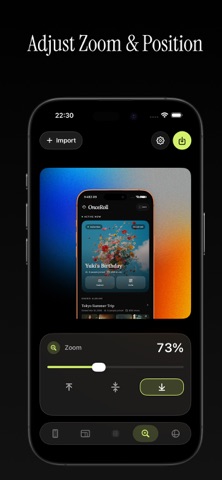
Import screenshots or videos, choose a polished device frame, add vibrant backgrounds, arrange up to three screens side by side, fine-tune spacing, zoom, rotation, and alignment, then export high-quality visuals for App Store updates, product pages, social posts, pitch decks, and launch announcements.
Built for makers, designers, founders, and developers, Frametify keeps the workflow fast and focused: bring in your app screen, style it beautifully, and export a professional mockup in a few taps.
Features:
Import screenshots and videos from Photos or Files
Create single-screen or side-by-side mockups with up to three frames
Choose clean iPhone device mockup styles
Customize backgrounds with colors, gradients, and visual presets
Fine-tune spacing, zoom, padding, rotation, and alignment
Create smooth animated mockups for more engaging posts
Export polished PNG, JPG, MP4, or GIF visuals
Save reusable presets for faster repeat work
Create marketing assets directly on your iPhone
Frametify Pro unlocks unlimited exports, high-resolution output, animations, and all current and future Pro presets.
Whether you are preparing an App Store update, showing a new feature, sharing product progress, or building launch assets, Frametify helps you present your app screens in a clean, beautiful, and professional way.
Terms of Service:
https://www.apple.com/legal/internet-services/itunes/dev/stdeula
Safety and technology
Found in the app by AppBrain- Price
- Free
- App size
- 73.3 MB
- Content rating
- Low
Technologies used by Frametify
Releases
Updates seen on the App Store- Version
- 1.3.4
- Launched
- May 2026
No changelog data
Alternatives
Similar apps and more from TRAN VAN MANHAlternatives to Frametify


More from TRAN VAN MANH


Rankings
App Store top chartsApp Store Rankings for Frametify
About the app and developer
About Frametify
Frametify is a photo & video app developed by TRAN VAN MANH.
User Ratings
The app has no ratings yet.
App Information
Frametify is freely available from the App Store. The app size is 73.31 MB. The latest version available is 1.3.4. The last update was on June 15, 2026.
Technical Requirements
The app has a content rating of Low Maturity. The app has been available on the App Store since May 2026.
Developer information for TRAN VAN MANH
Address:
Frequently asked questions about Frametify
Is Frametify free?
Yes. Frametify is free on the App Store.
Is Frametify still available?
Yes. Frametify is on the App Store, and the last update we saw was on June 15, 2026.
How large is Frametify?
Frametify is 73.31 MB.
Is Frametify suitable for children?
App Store gives Frametify a low maturity rating, so it is meant for older children and up.
Who made Frametify?
Frametify was developed by TRAN VAN MANH. It is listed in the photo & video category on the App Store.
What are the best alternatives to Frametify?
People looking at Frametify also look at these photo & video apps: Campera - Point & Shoot Camera, raw films: aesthetic editor, SubOut - Subtitle Extractor, OneShot Record · Studio · Ship, Racqee: Tennis AI Camera.