AppBrain
AppBrain
  • Apps
  • Apps being viewed right now Trending apps today Most popular apps All-time most installed apps Top rated apps iPhone and iPad apps
  • Intelligence ▾
    Intelligence overview → Track any Android app or your whole market
    Track & analyze
    Keyword Tracker & OptimizerTrack & improve Play rankings App Performance ReportOne-off PDF for any app StatisticsFree Android & Play market stats
    Promote your app
    Featured Apps App Links
  • Intelligence
  • Pricing
  • Dashboard
  • Sign up
  • Log in
App Store Apps > Photo & Video > Framewich: Frame Screenshots
Framewich: Frame Screenshots icon

Framewich: Frame Screenshots

v1.3.0
Lzctrl LLC
0.00
0 reviews
Free

Framewich: Frame Screenshots Screenshot 1 of 5
Framewich: Frame Screenshots Screenshot 2 of 5
Framewich: Frame Screenshots Screenshot 3 of 5
Framewich: Frame Screenshots Screenshot 4 of 5
Framewich: Frame Screenshots Screenshot 5 of 5
Screenshots by Lzctrl LLC, from the the App Store listing
View on the App Store

AppBrain's verdict

Last updated
September 27, 2026
Size
20.6 MB
Official page on the App Store

User feedback

Ratings and reviews on the App Store

Comments on Framewich: Frame Screenshots for iOS

We don't have enough comments to show example comments. Please check back later.

Store listing

By Lzctrl LLC, from the App Store
Description by Lzctrl LLC Written by the developer, not by AppBrain. Click to read.
Framewich turns a plain screenshot into something worth sharing. You can drop any screenshot into a realistic device frame, set it against a background you actually like, and export a polished image in seconds, all without leaving your phone or opening a complicated design tool.

Whether you are showing off your own app, putting together a quick tutorial, sharing a conversation, or building marketing images for the App Store, Framewich gives you a clean and genuinely fast way to make your screenshots look intentional.

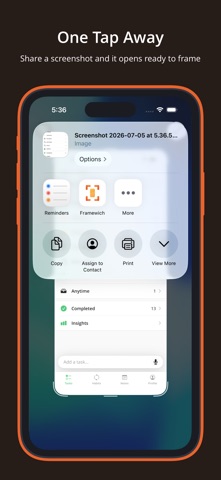
Import in a Tap
You can send a screenshot straight from the share sheet the moment you capture it, or open the app and pick any image from your camera roll. Framewich reads the dimensions of your screenshot and chooses a matching device frame for you, so you are ready to start styling right away.

Realistic Device Frames
Wrap your screenshot in an iPhone or iPad frame that actually fits the shot, from the newest edge to edge models with the pill cutout all the way back to the classic home button look. You can pick a finish that suits the mood, add a soft or a stronger shadow for a sense of depth, and let the frame carry the whole image.

Backgrounds That Fit
Set any background color you want with a full color picker, pull a shade directly from your screen, or reach for one of the curated presets and warm gradients when you would rather move quickly. Everything updates live while you work, so you can settle on the right look without any guesswork.

Sizes for Every Platform
Resize your canvas to whatever ratio you need, whether that is a square for a feed post, a tall format for a story, or a wide format for a slide or a website. Your framed screenshot stays centered and stays sharp at every single size.

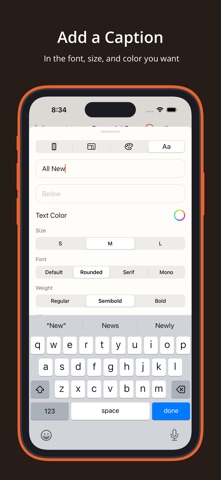
Captions and Text
You can add a line of text above or below your screenshot whenever a shot needs a little context. Choose the font style, the weight, and the color that match your message, and keep the whole thing clean and easy to read.

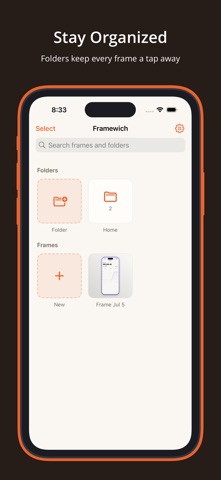
Stay Organized
Name the images you create, group them into folders, and search back through everything you have made. Your work is always waiting for you, so coming back to tweak an old project or spin up a variation takes only a moment.

Export Anywhere
When you are happy with the result, export a high resolution image and send it wherever you like, from your camera roll to a message, a social post, or a design tool. Your images stay on your device the entire time.

Light and Dark
Framewich looks right in whichever appearance you prefer, and you can move between system, light, and dark whenever the mood strikes.

Built to Stay Simple
There are no ads, no clutter, and nothing standing between you and a great looking screenshot. You just open it, frame it, and share it.

Start making your screenshots look their best, and download Framewich today.

Privacy Policy: https://www.lzctrl.com/policies/framewich-privacy-policy
Terms of Use (Apple Standard EULA): https://www.apple.com/legal/internet-services/itunes/dev/stdeula
Additional Terms of Use: https://www.lzctrl.com/policies/framewich-terms-of-use

Safety and technology

Found in the app by AppBrain
Price
Free
App size
20.6 MB
Content rating
Everyone

Technologies used by Framewich: Frame Screenshots

Releases

Updates seen on the App Store
Version
v1.3.0
Launched
July 2026

No changelog data

Alternatives

Similar apps and more from Lzctrl LLC

Alternatives to Framewich: Frame Screenshots

Szelfie: AI Selfie Generator icon Szelfie: AI Selfie Generator
Deniz Toprakkaya
0.0
Free
ShotEdit: Screenshot Frame Pro icon ShotEdit: Screenshot Frame Pro
Ki Tat Chung
0.0
Free
Gridium – Photo Collage icon Gridium – Photo Collage
Patrick Rathjen
0.0
Free
Delete Photo Swipe | PrunePic icon Delete Photo Swipe | PrunePic
Edouard Barbier
0.0
Free
dideye *Flashback video camera icon dideye *Flashback video camera
Filipe Sa
4.8
Free
5 ratings
Framer:bezel,screenshot,framed icon Framer:bezel,screenshot,framed
ILYA BOIKA
0.0
Free
Grab Frame - Video to Photo icon Grab Frame - Video to Photo
先果 邓
4.5
Free
2 ratings
HippoCam: Remember Every Thing icon HippoCam: Remember Every Thing
AI Garden Ltd
5.0
Free
11 ratings

More from Lzctrl LLC

Habite: Productivity Manager icon Habite: Productivity Manager
Lzctrl LLC
4.7
Free
31 ratings
TimeCrunch: Homework Tool icon TimeCrunch: Homework Tool
Lzctrl LLC
4.7
Free
27 ratings
theDay: Priorities icon theDay: Priorities
Lzctrl LLC
4.8
Free
4 ratings
Budgitify: Smarter Spending icon Budgitify: Smarter Spending
Lzctrl LLC
5.0
Free
3 ratings

Rankings

App Store top charts

App Store Rankings for Framewich: Frame Screenshots

This app is not ranked

About the app and developer

About Framewich: Frame Screenshots

Framewich: Frame Screenshots is a photo & video app developed by Lzctrl LLC.

User Ratings

The app has no ratings yet.

App Information

Framewich: Frame Screenshots is freely available from the App Store. The app size is 20.59 MB. The latest version available is v1.3.0. The last update was on September 27, 2026.

Technical Requirements

The app has a content rating of Everyone. The app has been available on the App Store since July 2026.

Framewich: Frame Screenshots is made and published by Lzctrl LLC. AppBrain is an independent app data site and isn't affiliated with Lzctrl LLC. The app name, icon, screenshots and description belong to Lzctrl LLC and are shown as published on the App Store.

Developer information for Lzctrl LLC

Lzctrl LLC

Address:

Share Framewich: Frame Screenshots

Popular Photo & Video Apps Top new apps Price drops on Google Play Apps other people are watching Today's trending apps
Szelfie: AI Selfie Generator icon Szelfie: AI Selfie Generator
ShotEdit: Screenshot Frame Pro icon ShotEdit: Screenshot Frame Pro
Gridium – Photo Collage icon Gridium – Photo Collage
Delete Photo Swipe | PrunePic icon Delete Photo Swipe | PrunePic
dideye *Flashback video camera icon dideye *Flashback video camera
Framer:bezel,screenshot,framed icon Framer:bezel,screenshot,framed
Grab Frame - Video to Photo icon Grab Frame - Video to Photo
HippoCam: Remember Every Thing icon HippoCam: Remember Every Thing
Overview Alternatives Reviews Rankings Technology
AppBrain Intelligence premium content

Subscribe now to get full and unlimited access to AppBrain Intelligence. You'll have access to:

  • App Intelligence dashboard (performance timeline, competitor comparison, country rankings, insight cards)
  • Detailed ranking data per app
  • Full timeline per developer
  • Device market shares data per country
  • Unlimited keyword tracking
1 Month

$75/mo
(billed every month)

SAVE 0%
Subscribe
3 Months

$65/mo
($195 billed every 3 months)

SAVE 13%
Subscribe
1 Year

$57.50/mo
($690 billed every year)

SAVE 23%
Subscribe
Each subscription will automatically renew 3 days before the expiration date for the same time period. Subscriptions can be cancelled at any time before the renewal.

AppBrain is an app data site, we track rankings, ratings, installs for all apps and games on Google Play and the App Store. AppBrain doesn't host app files or APKs, all install links go directly to the official store. All trademarks are owned by their respective owners.

More apps

  • Top Android apps being viewed
  • Insperity Mobile Android App
  • Artmate: Drawing Together Android App
  • File Manager: File Explorer for Android

App statistics

  • Android statistics
  • Google Play Developer stats
  • Trending Android Apps
  • Trending iOS apps
  • Top popular Apps
  • Buy the best Android phone
  • Buy & sell app businesses

About AppBrain

  • Contact
  • Privacy
  • Documentation
  • DMCA takedowns
  • Blog
  • Android App Marketing: Learn how to better market your Android app
© 2010-2026 - AppBrain