

Framr: Video Highlights AI
Framr: Video Highlights AI is made and published by Salvatore Castellitti. AppBrain is an independent app data site and isn't affiliated with Salvatore Castellitti. The app name, icon, screenshots and description belong to Salvatore Castellitti and are shown as published on the App Store.
AppBrain's verdict
- Last updated
- April 20, 2026
- Size
- 61.1 MB
User feedback
Ratings and reviews on the App StoreComments on Framr: Video Highlights AI for iOS
We don't have enough comments to show example comments. Please check back later.
Store listing
By Salvatore Castellitti, from the App Store


Description by Salvatore Castellitti Written by the developer, not by AppBrain. Click to read.
Tired of scrolling through hours of video to find the good parts? Framr's AI automatically extracts your best moments, then lets you style them with beautiful polaroid frames and camera angle edits.
HOW IT WORKS:
1. Upload any video — phone recordings, GoPro footage, event videos
2. AI finds the best moments — automatically detects action, faces, and highlights
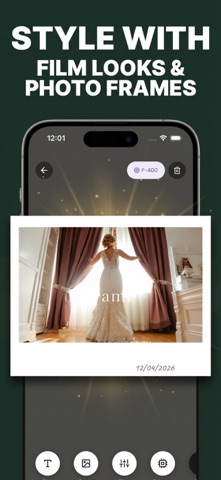
3. Style your clips — apply polaroid frames, retro filters, and vintage aesthetics
4. Change camera angles — switch perspectives for dynamic viewing
5. Save and share — export in high quality, share to any platform
PERFECT FOR:
- Family videos — keep the laughs, skip the awkward silences
- Travel memories — turn hours of footage into highlight reels
- Sports & events — capture the best plays without manual editing
- Content creators — quick clip extraction for TikTok, Reels, Shorts
- Pet videos — automatically find the cute moments
KEY FEATURES:
- AI-Powered Highlight Extraction
Framr analyzes your entire video and automatically identifies the most engaging moments. No manual scrubbing required.
- Frame Styles
Give your video clips that nostalgic instant camera look. Multiple vintage frame templates, from classic white borders to vintage film styles.
- Retro Filters & Vintage Aesthetics
Apply authentic retro color grading, film grain, and vintage effects that make your memories feel timeless.
- One-Tap Processing
No timeline editing, no complicated tools. Upload, process, and export in three taps.
- Optimized for iPhone
Built for iOS with smooth performance on all iPhone models.
WHY FRAMR IS DIFFERENT:
Unlike traditional video editors that give you 100+ tools you'll never use, Framr does one thing perfectly: it finds your best moments and makes them beautiful.
CapCut and InShot are manual editors, you do all the work. Framr's AI does the heavy lifting automatically.
GoPro Quik only works with GoPro cameras. Framr works with ANY video source.
Polaroid apps only handle photos. Framr brings polaroid style to VIDEO.
PRICING:
• Free tier: Limited Video processing, and 2 enhancing
• Framr Pro: Higher usage based on the plan, all frame styles, no watermark, enhancements based on plan chosen
SUPPORT:
Have questions or feature requests? contact us via the app settings, We read every review and respond within 24 hours.
Term of Service: https://salvatorecastellitti.github.io/Framr/termOfService
Privacy Policy: https://salvatorecastellitti.github.io/Framr/privacy
Keywords: video highlights extractor, AI video editor, polaroid video, memory keeper, automatic clip picker, best moments finder, retro video filter, family video editor, travel memories, moment extractor
Video credits Vimeo-Free-Videos on Pixabay
Safety and technology
Found in the app by AppBrain- Price
- Free
- App size
- 61.1 MB
- Content rating
- Medium
Technologies used by Framr: Video Highlights AI
Releases
Updates seen on the App Store- Version
- 1.1.0
- Launched
- April 2026
No changelog data
Alternatives
Similar apps and more from Salvatore CastellittiAlternatives to Framr: Video Highlights AI


More from Salvatore Castellitti





Rankings
App Store top chartsApp Store Rankings for Framr: Video Highlights AI
About the app and developer
About Framr: Video Highlights AI
Framr: Video Highlights AI is a photo & video app developed by Salvatore Castellitti.
What is the rating of Framr: Video Highlights AI?
Framr: Video Highlights AI has no ratings yet.
Is Framr: Video Highlights AI free?
Framr: Video Highlights AI is free. The app size is 61.13 MB. The latest version available is 1.1.0. The last update was on April 20, 2026.
What are the requirements for Framr: Video Highlights AI?
The app has a content rating of Medium Maturity. The app has been available on the App Store since April 2026.
Developer information for Salvatore Castellitti
Address:
Frequently asked questions about Framr: Video Highlights AI
Is Framr: Video Highlights AI free?
Yes. Framr: Video Highlights AI is free on the App Store.
Is Framr: Video Highlights AI still available?
Yes. Framr: Video Highlights AI is on the App Store, and the last update we saw was on April 20, 2026.
How large is Framr: Video Highlights AI?
Framr: Video Highlights AI is 61.13 MB.
Is Framr: Video Highlights AI suitable for children?
App Store gives Framr: Video Highlights AI a medium maturity rating, so it is not meant for young children.
Who made Framr: Video Highlights AI?
Framr: Video Highlights AI was developed by Salvatore Castellitti. It is listed in the photo & video category on the App Store.
What are the best alternatives to Framr: Video Highlights AI?
People looking at Framr: Video Highlights AI also look at these photo & video apps: Hikarista – Best Video Moments, KeeperTake: Video Frame Picker, ProducerPad, Video to Photo - Vid2Pix Bulk, Cut.Pro: AI Video Clip Maker.