




AppBrain's verdict
Well rated- Rating on App Store
- 4.31
- 176 ratings
- Last updated
- November 4, 2026
- Size
- 311.9 MB
Users rate it well: 4.3 stars from 176 ratings.
User feedback
Ratings and reviews on the App StoreComments on Free PDF Editor, Converter App for iOS
We don't have enough comments to show example comments. Please check back later.
Store listing
By AMPLIFY VENTURES, from the App StoreDescription by AMPLIFY VENTURES Written by the developer, not by AppBrain. Click to read.
Easily convert scanned images and documents to PDFs, and merge, split, format layouts as needed or explore our new, AI voice transcription, voice to PDF, feature. Import existing recordings to generate high-quality PDF documents instantly.
Start now with Free PDF Editor, and discover the endless possibilities of what you can do with your documents!
Whether you need a powerful file editor for contracts, a secure document filler for tax e-filing, or a complete toolkit for school coursework, get everything you need to keep your tasks moving, wherever you go.
1. Start With Our Advanced PDF Editing Tools
- Edit text, add paragraphs, and modify layouts
- Add, delete, or rotate images within your PDF easily
- Compress PDFs without losing quality
2. Merge, Split, & Reorder Files
- Merge multiple PDFs into one file
- Split large files into smaller ones
- Reorder, organise, or delete pages to streamline your PDFs
3. Secure Your PDFs
- Lock PDFs with passwords and permissions
- Unlock PDFs to remove restrictions when needed
- Add custom watermarks for identity and safety
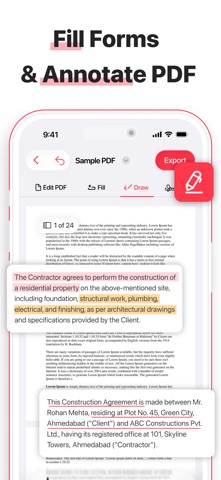
4. Fill PDF Forms Easily
- Fill out forms directly on your device. Type, check boxes, sign, & save filled forms with ease
- Complete any form filler task in seconds, without printing a single page
5. Request Instant E-Signatures
- Create & add digital signatures in seconds
- Save frequently used signatures for quicker signing
- Request Signature on-the-go. Send documents to others & collect their signatures remotely
- Close deals & sign approvals anytime, anywhere
6. Zoom, Search, & Annotate Content
- Use it as an advanced PDF reader for easy viewing
- Highlight & underline important content
- Find specific details with built-in search tools
- Zoom-in for a high-quality viewing experience
7. Scan or Import to PDF
- Scan paper documents, receipts, or notes
- Import files from your device or cloud storage
- Convert instantly to high-quality PDFs
8. OCR Text Extraction
- Turn scanned PDFs into fully searchable, editable text
- Extract content from scanned files and images with built-in OCR technology
- Turn non-editable scans into fully customizable PDF documents
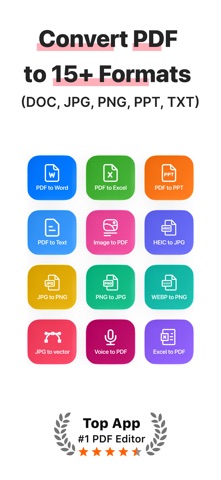
9. Convert Files
- PDF ↔ Word — convert PDF to Word and Word documents back to PDF
- PDF ↔ Excel — export spreadsheet data or import Excel files as PDF
- PDF ↔ PowerPoint — turn presentations into PDFs or PDFs into editable slides
- PDF ↔ Text — convert back into editable formats when needed
- Image to PDF — convert JPG, PNG, HEIC, and WEBP files into polished PDFs
- JPG to Vector — scale images without quality loss
- Voice to PDF — record or import audio and convert it directly to a PDF document
10. Share & Export PDFs
- Share via email or messaging apps
- Save to cloud storage or local device
- Export PDFs in various available formats
Why Free PDF Editor?
With our all-in-one PDF editor, effortlessly combine multiple documents into one file, extract specific pages or split files by range, and organize your content exactly as you need. You can also digitize paper documents and save them as high-quality, polished PDFs.
Our ultimate PDF toolkit empowers students, professionals, travelers, and anyone requiring document editing on-the-go, by streamlining their most critical workflows.
Download Free PDF Editor today & experience a better way to work with your files. Try our free version or unlock full potential with premium features.
Subscription Policy:
Subscribe for unlimited access to all premium features. Subscriptions are billed weekly and automatically renew unless auto-renew is turned off at least 24 hours before the end of the current period.
Ref: https://www.freelabs.ai/terms-freepdf
Safety and technology
Found in the app by AppBrain- Price
- Free
- App size
- 311.9 MB
- Content rating
- Everyone
Technologies used by Free PDF Editor, Converter App
Releases
Updates seen on the App Store- Version
- 1.14
- Launched
- June 2025
No changelog data
Alternatives
Similar apps and more from AMPLIFY VENTURESAlternatives to Free PDF Editor, Converter App


More from AMPLIFY VENTURES


Rankings
App Store top chartsApp Store Rankings for Free PDF Editor, Converter App
About the app and developer
About Free PDF Editor, Converter App
Free PDF Editor, Converter App is a productivity app developed by AMPLIFY VENTURES.
What is the rating of Free PDF Editor, Converter App?
Free PDF Editor, Converter App is rated 4.31 out of 5 stars, based on 180 ratings.
Is Free PDF Editor, Converter App free?
Free PDF Editor, Converter App is free. The app size is 311.91 MB. The latest version available is 1.14. The last update was on November 4, 2026.
What are the requirements for Free PDF Editor, Converter App?
The app has a content rating of Everyone. The app has been available on the App Store since June 2025.
Free PDF Editor, Converter App is made and published by AMPLIFY VENTURES. AppBrain is an independent app data site and isn't affiliated with AMPLIFY VENTURES. The app name, icon, screenshots and description belong to AMPLIFY VENTURES and are shown as published on the App Store.
Developer information for AMPLIFY VENTURES
Address: