
FreeFlight is made and published by Parrot SA. AppBrain is an independent app data site and isn't affiliated with Parrot SA. The app name, icon, screenshots and description belong to Parrot SA and are shown as published on the App Store.
AppBrain's verdict
EstablishedPoorly rated- Rating on App Store
- 2.83
- 1,019 ratings
- Last updated
- October 16, 2015
Users are critical: 2.8 stars from 1,019 ratings.
Rankings
App Store top chartsApp Store Rankings for FreeFlight
Competitors
Similar apps and more from Parrot SA












Releases
Updates seen on the App Store- Version
- 2.4.22
- Launched
- May 2010
No changelog data
User feedback
Ratings and reviews on the App StoreComments on FreeFlight for iOS
We don't have enough comments to show example comments. Please check back later.
Technology
Found in the app by AppBrain- Price
- Free
- App size
- 56.6 MB
- Content rating
- Everyone
Technologies used by FreeFlight
About the app and developer
About FreeFlight
FreeFlight is an entertainment app developed by Parrot SA.
What is the rating of FreeFlight?
FreeFlight is rated 2.83 out of 5 stars, based on 1 thousand ratings.
Is FreeFlight free?
FreeFlight is free. The app size is 56.60 MB. The latest version available is 2.4.22. The last update was on October 16, 2015.
What are the requirements for FreeFlight?
The app has a content rating of Everyone. The app has been available on the App Store since May 2010.
Developer information for Parrot SA
Address:
Frequently asked questions about FreeFlight
Is FreeFlight free?
Yes. FreeFlight is free on the App Store.
Is FreeFlight still available?
Yes. FreeFlight is on the App Store, and the last update we saw was on October 16, 2015.
How large is FreeFlight?
FreeFlight is 56.60 MB.
Is FreeFlight suitable for children?
App Store rates the content of FreeFlight as suitable for everyone.
How do people rate FreeFlight?
FreeFlight scores 2.83 out of 5 stars, from 1,019 ratings on the App Store.
Who made FreeFlight?
FreeFlight was developed by Parrot SA. It is listed in the entertainment category on the App Store.
What are the best alternatives to FreeFlight?
People looking at FreeFlight also look at these entertainment apps: WiFi UFO, Traxxas Link, EZ-Peak Live, X-Hubsan, Spektrum Dashboard.
Store listing
By Parrot SA, from the App Store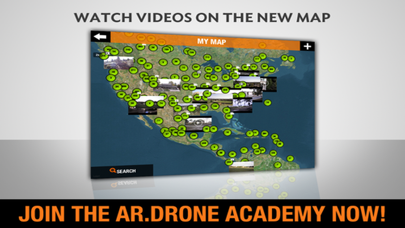

Description by Parrot SA Written by the developer, not by AppBrain. Click to read.
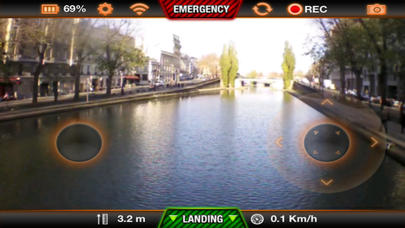
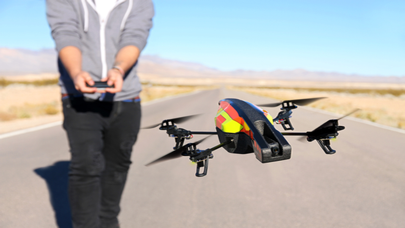
INTUITIVE – Download AR.FreeFlight 2.2, the free control application, and you are ready to fly! By tilting your iPhone, iPod or iPad you control the direction of your AR.Drone. When you release control, the AR.Drone is instantly stabilized in the air. AR.FreeFlight 2.2 is compatible with the Parrot AR.Drone and the Parrot AR.Drone 2.0
FLY LIKE A CHAMPION – The AR.Drone is equipped with intuitive sensors that allow it to remain stable in the air, virtually flying itself. Anyone can fly like a champion as the embedded sensors allow for easy take-off and landing. With the AR.Drone 2.0 and AR.FreeFlight 2.2, you can access the exclusive and patented Absolute Control piloting mode for beginners that can be adjusted with your growing expertise.
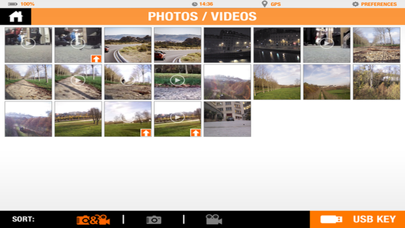
RECORD HIGH DEFINITION VIDEO - As you fly, the HD video is recorded and sent via WiFi directly to your device after you land. With one click, upload your video from the user-friendly interface seamlessly to Youtube or share your pictures on Picasa.
AR.DRONE 2.0 EXCLUSIVE… PERFORM ACROBATICS – Make your AR.Drone 2.0 flip in mid-flight using a simple control.
AR.DRONE ACADEMY
Improve your flying experience with AR.Drone Academy. See all your flights on the AR.Drone Academy map, watch your videos, enhanced with in-flight data and share them with pilots throughout the world.
DIRECTOR MODE LAUNCH
Launch automatic movements to get stabilized and smooth trajectories. Panorama, travellings, crane and static point are available and you can change the speed during the movements to adjust it to your needs
Front camera settings such as white balance, saturation and exposure can be adjusted to scene you want to shoot
Post production options developed especially for the AR.Drone 2.0 videos are available to stabilize the video on your iDevice. Choose the rate of correction that fits and it creates a new additional version of the video directly visible from the app. It is also stored into the Camera Roll.
Your video is too long? Some parts are not of interest? Thanks to the sequence edition option you can cut some parts of your video to select only the ones you want and create a new video with only the selected sequences.
FLIGHT RECORDER COMPATIBILITY
To use all the features linked to the Flight Recorder, you need to plug it above the battery. It is extremely important that the Flight Recorder is exactly just above the battery and not elsewhere to get the best of it. Please check our videos on www.parrot.com
A new piloting mode has been developed. When you click on the earth icon on top right corner of the piloting interface, a map appears on the screen. This is the map around your location. Choose a point on the map, set the speed, set the altitude and click “GO”. The AR.Drone 2.0 starts its flight to get to this point. The AR.Drone 2.0 stays within the Wi-Fi range from your iDevice.
The “Return Home” functionality helps to get his AR.Drone 2.0 back to the take-off location automatically.
Review in 3D all your flights made with the Flight Recorder connected to your AR.Drone 2.0 on the AR.Drone Academy map.
Get a better stabilization for the static point when you fly in high altitudes thanks to the GPS positioning of the Flight Recorder.
The Flight Recorder registers more than 350 different flight data.
RESCUE MODE
Stuck in a tree? Just try the “Rescue mode” directly from the piloting interface to try to unblock the AR.Drone 2.0 from the branches. Even if it is upside down, the propellers will spin so you have new possibilities to make an action while your AR.Drone is not reachable.
This app is for iOS 6 and higher.
Enjoy your flights