FreeMouse: Trackpad & Keyboard is made and published by
BartMolk.
AppBrain is an independent app data site and isn't affiliated with BartMolk.
The app name, icon, screenshots and description belong to BartMolk and are shown as
published on the App Store.
About FreeMouse: Trackpad & Keyboard
FreeMouse: Trackpad & Keyboard is an utilities app developed by BartMolk.
What is the rating of FreeMouse: Trackpad & Keyboard?
FreeMouse: Trackpad & Keyboard has no ratings yet.
Is FreeMouse: Trackpad & Keyboard free?
FreeMouse: Trackpad & Keyboard is free. The app size is 2.11 MB. The latest version available is 1.0.0. The last update was on October 13, 2026.
What are the requirements for FreeMouse: Trackpad & Keyboard?
The app has a content rating of Everyone. The app has been available on the App Store since October 2026.
Description by BartMolk(from the App Store)
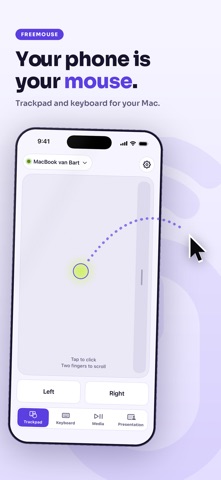
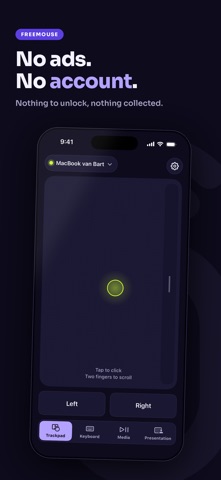
FreeMouse turns your iPhone or iPad into a mouse, trackpad and keyboard for your Mac. Control your Mac from the couch, from across the table or from the back of the room during your presentation. Free, with no ads, no subscription and no account.
FEELS LIKE A TRACKPAD • Move with one finger, tap to click, tap with two fingers to right click. • Scroll with two fingers, with the same glide as on a MacBook. • Drag windows, pinch to zoom, and swipe with three fingers to Mission Control or another desktop. • Set your own speed. Left-handed? Put the scroll strip on the left.
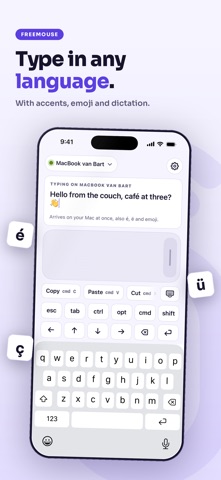
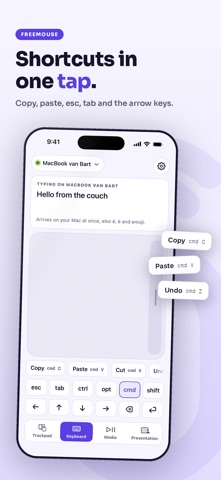
TYPE IN ANY LANGUAGE What you type on your phone appears on your Mac straight away. Accents, emoji and dictation included. Plus a row for esc, tab, cmd, option, control, shift and the arrow keys, and buttons for copy, paste, undo, select all and find.
MUSIC AND PRESENTATIONS Play, pause, next and previous, make your screen brighter or dimmer, and mute the sound. Giving a talk? Big buttons for the next and previous slide, a black screen and a timer.
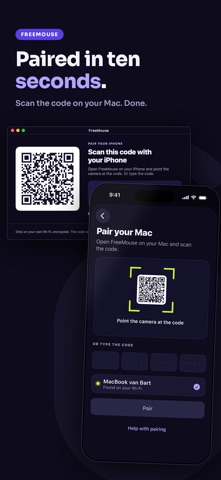
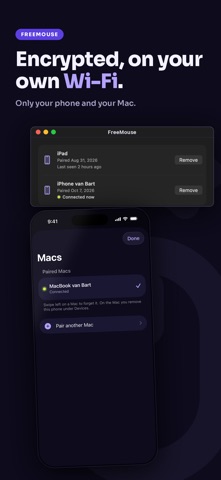
PAIRED WITH ONE SCAN 1. Install the free FreeMouse helper on your Mac, from freemouse.abn.company. 2. Give it permission once. It shows you exactly where. 3. Scan the code on your Mac, or type it in. After that your phone connects by itself as soon as you open the app.
SAFE ON YOUR OWN WI-FI Pairing uses a one-time code and everything you send is encrypted. Nobody else on your Wi-Fi can take over your Mac. The menu bar on your Mac shows when your phone is connected, and one click there pauses it.
PRACTICE WITHOUT A MAC FIRST Practice mode lets you try every gesture and the keyboard on a small desktop inside the app.
WHY IT COSTS NOTHING FreeMouse is made by A Brand New Company as our calling card. There are no ads, nothing to unlock, no account to make, and we collect no data.
WHAT YOU NEED • An iPhone or iPad with iOS 17 or later • A Mac with macOS 14 or later • The free FreeMouse helper from freemouse.abn.company • The same Wi-Fi network for your phone and your Mac
Each subscription will automatically renew 3 days before the expiration date for
the same time period. Subscriptions can be cancelled at any time before the renewal.