

Fretica is made and published by Julien PLAYE. AppBrain is an independent app data site and isn't affiliated with Julien PLAYE. The app name, icon, screenshots and description belong to Julien PLAYE and are shown as published on the App Store.
AppBrain's verdict
- Last updated
- September 23, 2026
Rankings
App Store top chartsApp Store Rankings for Fretica
Competitors
Similar apps and more from Julien PLAYEAlternatives to Fretica





Releases
Updates seen on the App Store- Version
- 1.1.0
- Launched
- June 2026
No changelog data
User feedback
Ratings and reviews on the App StoreComments on Fretica for iOS
We don't have enough comments to show example comments. Please check back later.
Technology
Found in the app by AppBrain- Price
- Free
- App size
- 5.86 MB
- Content rating
- Everyone
Technologies used by Fretica
About the app and developer
About Fretica
Fretica is a music app developed by Julien PLAYE.
User Ratings
The app has no ratings yet.
App Information
Fretica is freely available from the App Store. The app size is 5.86 MB. The latest version available is 1.1.0. The last update was on September 23, 2026.
Technical Requirements
The app has a content rating of Everyone. The app has been available on the App Store since June 2026.
Developer information for Julien PLAYE
Address:
Frequently asked questions about Fretica
Is Fretica free?
Yes. Fretica is free on the App Store.
Is Fretica still available?
Yes. Fretica is on the App Store, and the last update we saw was on September 23, 2026.
How large is Fretica?
Fretica is 5.86 MB.
Is Fretica suitable for children?
App Store rates the content of Fretica as suitable for everyone.
Who made Fretica?
Fretica was developed by Julien PLAYE. It is listed in the music category on the App Store.
What are the best alternatives to Fretica?
People looking at Fretica also look at these music apps: Harmodus Piano - Pure Tuning, Voice Pitch, Circle of Fifths Xtra C, Tuner, Vocal remover & Separator Tunz.
Store listing
By Julien PLAYE, from the App Store


Description by Julien PLAYE Written by the developer, not by AppBrain. Click to read.
IS THIS FOR ME?
Fretica is designed for:
- beginners discovering an instrument and playing their first chords;
- experienced musicians switching styles — from metal to jazz, for example — and exploring new chords;
- Hawaiian, country, or alternative musicians who play in open tunings and need to navigate a wide variety of different tunings.
TUNER
Chromatic and instrument-specific tuning. Fretica optimizes its pitch detection for each instrument for faster, more accurate results. Long press to activate Live mode for instant response while playing.
Three visualisations to choose from, all free: classic gauge, real-time pitch trace, and strobe — the reference method for pinpoint accuracy down to the cent.
Built-in capo: set the capo position and the tuner recalibrates automatically, string by string.
Adjustable reference pitch: tune to A 440 by default, or pick 432, 415 and other frequencies for baroque, orchestras, or alternative tunings.
METRONOME
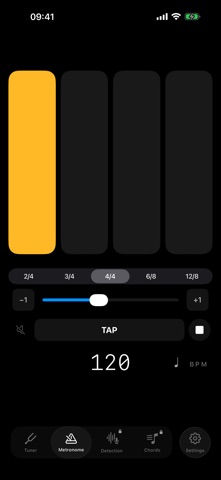
Clean and reliable, with adjustable tempo and time signature. Tap the display to set your tempo on the fly. Displays on the Dynamic Island and lock screen while you play — iPhone 14 Pro and later.
-- FRETICA PREMIUM --
Unlock all premium features with a single purchase — yours forever, no subscription.
CHORD LIBRARY
Browse 220 chords with 1,430 guitar fingerings, 647 ukulele fingerings, and 533 bass fingerings — each shown as an optimised diagram.
Create your own instruments: freely choose the number of strings and tuning — Open G, DADGAD, Tenor Guitar, Nashville, and many more. Fretica automatically calculates fingering diagrams for every chord, whatever your tuning. Perfect for musicians who play in open tunings or explore non-standard tunings.
Group your instruments into sets — Rock, Country, Jazz, or any other musical context — and switch between them in one tap.
Save your favourite chords directly to your home screen widget.
CHORD DETECTOR
Play a chord and let Fretica identify it in real time, string by string. Colour-coded diagrams help you visualise the chord structure at a glance.
WIDGET
Keep a chord diagram on your home screen or lock screen — a great way to review fingerings between practice sessions, without even opening the app.
Terms of Use (EULA): https://www.apple.com/legal/internet-services/itunes/dev/stdeula/