

Fridge: Shared Bookmarks
Fridge: Shared Bookmarks is made and published by YOSHIKI MIYAMOTO. AppBrain is an independent app data site and isn't affiliated with YOSHIKI MIYAMOTO. The app name, icon, screenshots and description belong to YOSHIKI MIYAMOTO and are shown as published on the App Store.
AppBrain's verdict
- Last updated
- June 4, 2026
Rankings
App Store top chartsApp Store Rankings for Fridge: Shared Bookmarks
Competitors
Similar apps and more from YOSHIKI MIYAMOTOAlternatives to Fridge: Shared Bookmarks


More from YOSHIKI MIYAMOTO


Releases
Updates seen on the App Store- Version
- 1.3
- Launched
- May 2026
No changelog data
User feedback
Ratings and reviews on the App StoreComments on Fridge: Shared Bookmarks for iOS
We don't have enough comments to show example comments. Please check back later.
Technology
Found in the app by AppBrain- Price
- Free
- App size
- 53.6 MB
- Content rating
- High
Technologies used by Fridge: Shared Bookmarks
About the app and developer
About Fridge: Shared Bookmarks
Fridge: Shared Bookmarks is a productivity app developed by YOSHIKI MIYAMOTO.
User Ratings
The app has no ratings yet.
App Information
Fridge: Shared Bookmarks is freely available from the App Store. The app size is 53.64 MB. The latest version available is 1.3. The last update was on June 4, 2026.
Technical Requirements
The app has a content rating of High Maturity. The app has been available on the App Store since May 2026.
Developer information for YOSHIKI MIYAMOTO
Address:
Frequently asked questions about Fridge: Shared Bookmarks
Is Fridge: Shared Bookmarks free?
Yes. Fridge: Shared Bookmarks is free on the App Store.
Is Fridge: Shared Bookmarks still available?
Yes. Fridge: Shared Bookmarks is on the App Store, and the last update we saw was on June 4, 2026.
How large is Fridge: Shared Bookmarks?
Fridge: Shared Bookmarks is 53.64 MB.
Is Fridge: Shared Bookmarks suitable for children?
App Store gives Fridge: Shared Bookmarks a high maturity rating. It is meant for adults.
Who made Fridge: Shared Bookmarks?
Fridge: Shared Bookmarks was developed by YOSHIKI MIYAMOTO. It is listed in the productivity category on the App Store.
What are the best alternatives to Fridge: Shared Bookmarks?
People looking at Fridge: Shared Bookmarks also look at these productivity apps: Bookmarks - URL Manager, Power Focus - Work Break Timer, Daily Note - Day One Diary, Any Planner - ADHD Day Planner, FirstSeed Tasks - AI + Todo.
Store listing
By YOSHIKI MIYAMOTO, from the App Store



Description by YOSHIKI MIYAMOTO Written by the developer, not by AppBrain. Click to read.
Fridge is an app that lets you easily share URLs for articles, videos, products, and more with your family and friends.
You can share the things you are interested in, just like sticking a note on a refrigerator.
【Recommended for those who】
- Want to neatly organize their favorite articles and links by category.
- Want to easily share interesting articles with family and friends.
- Want to share information privately, away from social media.
- Have a backlog of articles and links they intended to "read later."
【Main Features】
- Create Groups
Create a group of up to 5 members using an invitation code. Algorithms and like counts do not matter here. Just share the things you like with your members.
- One-tap Sharing
Save articles with a single tap of the share button from apps like X (Twitter), YouTube, Amazon, Safari, note, and others. Titles and thumbnails are retrieved automatically.
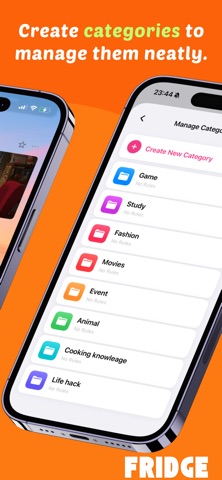
- Category Classification
Create categories to neatly store bookmarks, articles, and video URLs that tend to get cluttered.
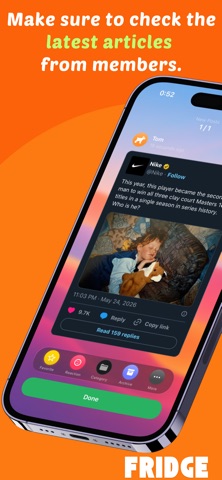
- Check New Items
You can check new articles shared by members one by one in a card format.
- Random Pick
Displays past saved articles randomly when launching the app. Enjoy reuniting with articles you may have forgotten. You can set the display interval from 26 different options.
- Sharing Scope
Easily set whether an article should be visible to members or kept private just for yourself.
- X (Twitter) & YouTube Embedding
Play and view videos and posts directly within the app. Check the content without opening external links.
- Favorites & Reactions
Favorite articles you are interested in or react with simple emojis.
- Short Memos
Leave simple memos on articles. Use them as titles or to jot down your thoughts.
【Premium Features】
- Automatic Category Classification
Set keywords to automatically categorize your items.
- Reminder Settings
Set notifications for articles you want to read later.
- Calendar Registration
Link articles to your calendar.
Don't forget important dates by linking articles such as game release dates, opening dates for cafes you are interested in, or event schedules to your calendar.
- Binder Function
Manage articles across different categories in one place.
You can organize items differently than by category, such as restaurant information for a trip, life-hack tweets for travel, or the release dates of clothes you want to wear on your trip.
Terms of Service(EULA): https://www.apple.com/legal/internet-services/itunes/dev/stdeula/
Privacy Policy: https://www.notion.so/Fridge-Board-33f772ce59e38022bd0ec19c841b02e3?source=copy_link