

Funimate Video & Motion Editor
Funimate Video & Motion Editor is made and published by Pixery Bilgi Teknolojileri. AppBrain is an independent app data site and isn't affiliated with Pixery Bilgi Teknolojileri. The app name, icon, screenshots and description belong to Pixery Bilgi Teknolojileri and are shown as published on the App Store.
AppBrain's verdict
EstablishedLoved by users- Rating on App Store
- 4.68
- 672,719 ratings
- Last updated
- July 23, 2026
Users love it: 4.7 stars from 672,719 ratings.
Rankings
App Store top chartsApp Store Rankings for Funimate Video & Motion Editor
Competitors
Similar apps and more from Pixery Bilgi TeknolojileriAlternatives to Funimate Video & Motion Editor






More from Pixery Bilgi Teknolojileri





Releases
Updates seen on the App Store- Version
- 18.8
- Launched
- April 2014
No changelog data
User feedback
Ratings and reviews on the App StoreComments on Funimate Video & Motion Editor for iOS
We don't have enough comments to show example comments. Please check back later.
Technology
Found in the app by AppBrain- Price
- Free
- App size
- 423.1 MB
- Content rating
- Medium
Technologies used by Funimate Video & Motion Editor
About the app and developer
About Funimate Video & Motion Editor
Funimate Video & Motion Editor is a photo & video app developed by Pixery Bilgi Teknolojileri.
User Ratings
Funimate Video & Motion Editor is rated 4.68 out of 5 stars. The rating is based on 670 thousand ratings.
App Information
Funimate Video & Motion Editor is freely available from the App Store. The app size is 423.11 MB. The latest version available is 18.8. The last update was on July 23, 2026.
Technical Requirements
The app has a content rating of Medium Maturity. The app has been available on the App Store since April 2014.
Developer information for Pixery Bilgi Teknolojileri
Address:
Frequently asked questions about Funimate Video & Motion Editor
Is Funimate Video & Motion Editor free?
Yes. Funimate Video & Motion Editor is free on the App Store.
Is Funimate Video & Motion Editor still available?
Yes. Funimate Video & Motion Editor is on the App Store, and the last update we saw was on July 23, 2026.
How large is Funimate Video & Motion Editor?
Funimate Video & Motion Editor is 423.11 MB.
Is Funimate Video & Motion Editor suitable for children?
App Store gives Funimate Video & Motion Editor a medium maturity rating, so it is not meant for young children.
How do people rate Funimate Video & Motion Editor?
Funimate Video & Motion Editor scores 4.68 out of 5 stars, from 672,719 ratings on the App Store.
Who made Funimate Video & Motion Editor?
Funimate Video & Motion Editor was developed by Pixery Bilgi Teknolojileri. It is listed in the photo & video category on the App Store.
What are the best alternatives to Funimate Video & Motion Editor?
People looking at Funimate Video & Motion Editor also look at these photo & video apps: Video Star, Time Cut: Smooth Slow Motion, TimeFreeze, Ultralight: Photo Video Editor, 24FPS: Aesthetic Video Effects.
Store listing
By Pixery Bilgi Teknolojileri, from the App Store


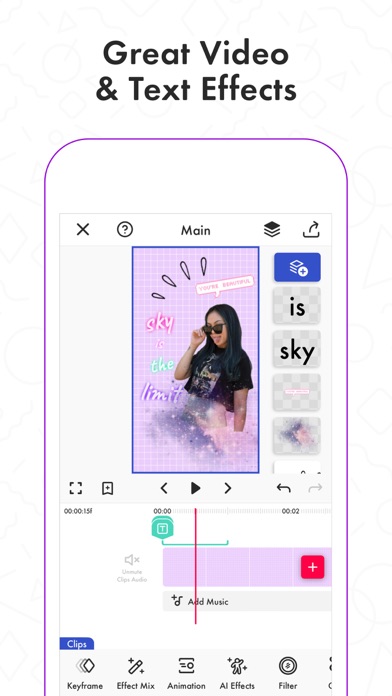


Description by Pixery Bilgi Teknolojileri Written by the developer, not by AppBrain. Click to read.
Awesome video editor with great effects and transitions.
Funimate is the best video editing app you can find on mobile! Join millions of Funimate users who create advanced video edits easily. With Funimate, you’ll be able to create PRO edits very quickly with the help of unique and advanced editing features we have.
Create amazing Fan Edits or spice up your freestyle videos with unique video features like transitions, custom animations, video and text effects and filters. Add stickers, backgrounds and overlays to your video to show off your creativity and amaze your friends from our element library with thousands of options.
You can share the videos you create on Funimate on TikTok, Instagram, Snapchat, Musically and amaze your friends and gain followers! Don’t forget to post on Funimate as well to join the Funimate community and even get featured!
P.S: Funimate users get featured more often on social media like TikTok because of creative videos they make by using unique Funimate video effects!
Even if you are not an expert, Funimate lets you create advanced multi-layered edits that look really PRO just with your mobile phone.
On Funimate you can find:
Fan Edit videos to show their appreciation and love to influencers and celebrities;
Lip sync, dance and freestyle videos with awesome text effects, AI effects & video effects;
Awesome anime edits our users make with their favorite anime & manga characters;
Game edits to show off your gaming skills;
And MANY MORE...
TOP VIDEO EDITING FEATURES
TRANSITIONS: Awesome transitions for your edits that you can add with a single tap! We have the best video transitions to wow your followers. Just add your pictures & videos and just by using a few taps you create a cool video with professional looking video transitions.
ELEMENT LIBRARY: Video editing is even more fun with overlays, stickers & backgrounds from our element library that has thousands of elements.
KEYFRAMES: You’re not limited to our effects when it comes to making your videos unique. It’s super easy to animate your layers using keyframes! Discover custom animations to show off your creative skills to your followers.
VIDEO MASK & AI EFFECTS:You can change the background of your videos and add cool mask effects to your videos with just a click! To try this out, add a dance/freestyle video, tap AI Effects button and choose the effect you want.
EFFECT MIX: You can try more than 100 advanced video effects on Funimate video editor.
INTRO & OUTRO EFFECTS: Tens of intro and outro animations.
TEXT EFFECTS: Tens of different fonts and styles available !
ADD MUSIC TO VIDEOS: Add your favorite music to videos to make short music video clips.
VIDEO MERGE, CUT & TRIM: Besides all the awesome features, you’ll also have classic video editor app features like cropping, merging, cutting, trimming and editing videos. Funimate is the only video editor you need. You can also create reverse videos and slow motion videos just with a tap!
BE A PART OF FUNIMATE VIDEO EDITING COMMUNITY: Shoot videos for weekly challenges, show your creativity by using video effects, hot music and get featured to grow your fan base on Funimate. Share your creativity on TikTok, Instagram, Youtube and Musically and boost your likes: best way to amaze your friends and get new followers.
Payment for your Funimate Pro subscription will be charged to your iTunes Account at confirmation of purchase. Your subscription will automatically renew and your account will be charged for renewal within 24-hours prior to the end of the current period. You can turn off auto-renew at any time from your iTunes account settings but refunds will not be provided for any unused portion of the term. If you purchase your subscription during the free trial period, any unused portion of the free trial period will be forfeited.
Funimate privacy policy and terms: http://funimate.com/terms