FuryPath for HDFury Devices is made and published by
MiyaraHub Technologies LLC.
AppBrain is an independent app data site and isn't affiliated with MiyaraHub Technologies LLC.
The app name, icon, screenshots and description belong to MiyaraHub Technologies LLC and are shown as
published on the App Store.
About FuryPath for HDFury Devices
FuryPath for HDFury Devices is an utilities app developed by MiyaraHub Technologies LLC.
What is the rating of FuryPath for HDFury Devices?
FuryPath for HDFury Devices has no ratings yet.
Is FuryPath for HDFury Devices free?
FuryPath for HDFury Devices costs $9.99. The app size is 40.00 MB. The latest version available is 2.3.2. The last update was on October 19, 2026.
What are the requirements for FuryPath for HDFury Devices?
The app has a content rating of Everyone. The app has been available on the App Store since April 2026.
Description by MiyaraHub Technologies LLC(from the App Store)
FuryPath is a controller for HDFury HDMI processors. It talks to your device over your own local network and puts every setting in one app, so you can see what your HDMI chain is actually doing and change it without opening a browser.
WHAT YOU SEE
Live signal readout for every input and output: resolution, colour space, bit depth, HDR format, audio codec and channel count, refreshed as the device reports them.
WHAT YOU CAN CHANGE
EDID: pick the mode, choose the audio source and set the advanced flags. The selected EDID is read from the device and written back, and the device re-syncs. A file with a wrong size, header or checksum is refused before it reaches the unit. HDR and Dolby Vision: HDR10, HLG, LLDV and infoframe control, including Automix. CEC, eARC and ARC: modes, speaker map, mute mode, RS232 baud rate and an ASCII and binary console. Source routing, JVC macros (VRRooM), OSD overlay, OLED panel and device configuration. Network changes such as DHCP, IP address and TCP port ask you to confirm first.
YOUR APP, YOUR WAY
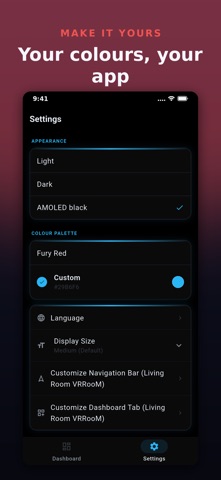
Customizable Home: pin any card from any screen and arrange it as you like. Reorder the navigation bar. Rename devices and switch between several units quickly. Choose a colour theme. Back up and restore your settings and your device's own web portal configuration.
TRY IT FIRST
Demo Mode runs the whole app against a simulated device, so you can explore before you connect anything.
HOME SCREEN
On phones, widgets and shortcuts put input switching, output on and off, profile switching, EDID reset, HDR and LLDV toggles and a connection check one tap away.
SUPPORTED DEVICES
VRRooM, VERTEX2, VERTEX, DIVA, Maestro, ARCANA2, Arcana and Dr.HDMI 8K. Only the features each model really has are offered.
PRIVATE BY DESIGN
No account and no ads. FuryPath reaches your device directly on your local network. The mobile apps send crash logs and diagnostics through Firebase, not linked to you and not used for tracking, so a bug can be fixed. The desktop apps send nothing.
Available in 29 languages. Questions: admin@miyarahub.com
FuryPath is made by MiyaraHub Technologies LLC and is not affiliated with or endorsed by HDFury.
Each subscription will automatically renew 3 days before the expiration date for
the same time period. Subscriptions can be cancelled at any time before the renewal.