

Game Controller for Smart TV
Game Controller for Smart TV is made and published by 庆源 郭. AppBrain is an independent app data site and isn't affiliated with 庆源 郭. The app name, icon, screenshots and description belong to 庆源 郭 and are shown as published on the App Store.
AppBrain's verdict
- Last updated
- September 8, 2026
Rankings
App Store top chartsApp Store Rankings for Game Controller for Smart TV
Competitors
Similar apps and more from 庆源 郭Alternatives to Game Controller for Smart TV


Releases
Updates seen on the App Store- Version
- 1.2
- Launched
- August 2026
No changelog data
User feedback
Ratings and reviews on the App StoreComments on Game Controller for Smart TV for iOS
We don't have enough comments to show example comments. Please check back later.
Technology
Found in the app by AppBrain- Price
- Free
- App size
- 10.7 MB
- Content rating
- Everyone
Technologies used by Game Controller for Smart TV
About the app and developer
About Game Controller for Smart TV
Game Controller for Smart TV is an utilities app developed by 庆源 郭.
User Ratings
The app has no ratings yet.
App Information
Game Controller for Smart TV is freely available from the App Store. The app size is 10.69 MB. The latest version available is 1.2. The last update was on September 8, 2026.
Technical Requirements
The app has a content rating of Everyone. The app has been available on the App Store since August 2026.
Developer information for 庆源 郭
Address:
Store listing
By 庆源 郭, from the App Store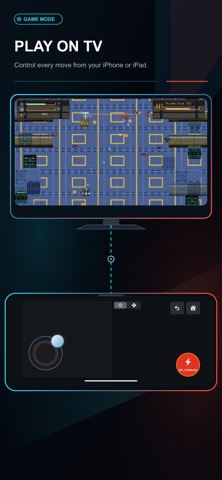


Description by 庆源 郭 Written by the developer, not by AppBrain. Click to read.
Connect to a device on the same Wi-Fi network and start controlling your TV from your phone.
KEY FEATURES
• Complete Remote Control
Navigate with directional buttons, confirm selections, return to the previous screen, go Home, control playback, adjust volume, and mute audio on supported devices.
• Responsive Touchpad
Swipe in any direction to move through menus and tap to select. Haptic feedback makes every gesture feel clear and responsive.
• Dedicated Game Mode
Use a virtual joystick for smooth multidirectional movement, including diagonal control in supported games. A separate action button provides quick access to in-game commands. You can also switch to a traditional button layout when playing games that work better with standard remote input.
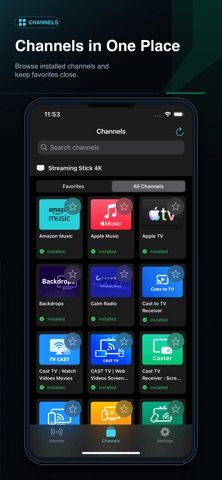
• Channel Launcher
Browse the channels installed on your connected device and open them directly from your phone.
• Channel Favorites
Save frequently used channels for faster access without searching through the full list every time.
• Automatic Device Discovery
Quickly find compatible devices connected to your local Wi-Fi network. You can also refresh the device list whenever your network changes.
• Multiple Control Styles
Choose between physical-style buttons, touchpad gestures, and game controls to match what you are watching or playing.
Game Controller is designed for comfortable one-handed navigation, casual TV control, and more responsive gameplay. Whether you are browsing channels, watching entertainment, or playing a game, the controls you need stay close at hand.
REQUIREMENTS
• Your iPhone or iPad and the TV or streaming device must be connected to the same Wi-Fi network.
• Local Network access is required to discover and communicate with nearby devices.
• Some buttons and features may vary depending on the connected device or TV model.
Game Controller is an independent application and is not affiliated with, endorsed by, or sponsored by Roku, Inc. Roku is a trademark of Roku, Inc.
Terms of Use (EULA): https://www.apple.com/legal/internet-services/itunes/dev/stdeula/
Privacy Policy: https://chandlerbin-1213.github.io/rokugame.github.io/RokuPliotWeb/static/PrivacyPolicy/index.html