Gamepad Tester: Input & Drift is an utilities app developed by selvasundar m.
User Ratings
Gamepad Tester: Input & Drift is rated 5.00 out of 5 stars. The rating is based on 7 ratings.
App Information
Gamepad Tester: Input & Drift is freely available from the App Store. The app size is 5.10 MB. The latest version available is 1.0. The last update was on July 10, 2026.
Technical Requirements
The app has a content rating of Everyone. The app has been available on the App Store since July 2026.
Description by selvasundar m(from the App Store)
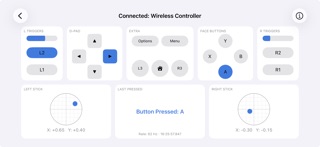
Gamepad Tester is the fast, no-setup way to check that your game controller works correctly on iPhone and iPad. Connect over Bluetooth or a cable, and every button, trigger, analog stick, and d-pad direction lights up on screen in real time.
Whether you are buying a used controller, hunting down stick drift, or just making sure a new gamepad is fully functional, Gamepad Tester shows you exactly what your controller is sending.
WHAT YOU CAN TEST
• Buttons and triggers: see every press register instantly, with live trigger pressure values. • Analog sticks: precise X and Y readouts make stick drift easy to spot. Leave the sticks centered and watch for unwanted movement. • D-pad: confirm all four directions and the diagonals. • Rumble and haptics: fire built-in vibration presets, or set the left and right motor strength and duration yourself. • Battery: see your controller's charge level when it reports one. • Controller light: change the LED color on DualShock 4 and DualSense controllers.
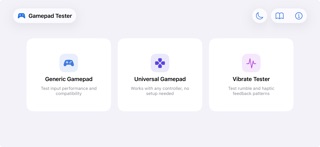
THREE TEST MODES
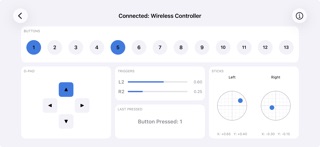
• Generic Gamepad: a clear, labeled layout with live values and a live input update rate readout. • Universal Gamepad: works with any controller by mapping every input to a numbered slot, ideal when a controller is not fully recognized. • Vibrate Tester: presets and manual controls for rumble and haptics.
WORKS WITH
• MFi-certified controllers, such as Backbone One and Razer Kishi • Xbox controllers over Bluetooth • PlayStation DualShock 4 and DualSense
Controllers that iOS does not recognize natively may not appear, even if they work on other platforms.
NO SETUP, NO ACCOUNT
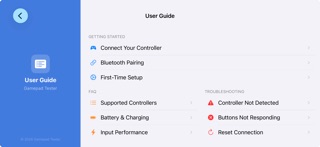
Just connect a controller and start testing. There is no sign-in and no configuration, and your controller input is processed on your device. A built-in User Guide covers pairing, supported controllers, battery, stick drift, vibration, and troubleshooting.
Each subscription will automatically renew 3 days before the expiration date for
the same time period. Subscriptions can be cancelled at any time before the renewal.