AppBrain
AppBrain
  • Apps
  • Apps being viewed right now Trending apps today Most popular apps All-time most installed apps Top rated apps iPhone and iPad apps
  • Intelligence ▾
    Intelligence overview → Track any Android app or your whole market
    Track & analyze
    Keyword Tracker & OptimizerTrack & improve Play rankings App Performance ReportOne-off PDF for any app StatisticsFree Android & Play market stats
    Promote your app
    Featured Apps App Links
  • Intelligence
  • Pricing
  • Dashboard
  • Sign up
  • Log in
App Store Apps > Productivity > Gantt Chart: Project Timeline
App profile & analytics · Productivity · Data updated 2026-10-21
Gantt Chart: Project Timeline icon

Gantt Chart: Project Timeline

by YOSHIYUKI UEMATSU · Free · Version 1.7
Availability On the App Store since September 2026 ↗
Rating on App Store
–
Rating
–
0 reviews
Best rank
–
not in the top lists
Last updated
October 16, 2026
1.7

Gantt Chart: Project Timeline is made and published by YOSHIYUKI UEMATSU. AppBrain is an independent app data site and isn't affiliated with YOSHIYUKI UEMATSU. The app name, icon, screenshots and description belong to YOSHIYUKI UEMATSU and are shown as published on the App Store.

About Gantt Chart: Project Timeline

Gantt Chart: Project Timeline is a productivity app developed by YOSHIYUKI UEMATSU.

User Ratings

The app has no ratings yet.

App Information

Gantt Chart: Project Timeline is freely available from the App Store. The app size is 3.31 MB. The latest version available is 1.7. The last update was on October 16, 2026.

Technical Requirements

The app has a content rating of Everyone. The app has been available on the App Store since September 2026.

Description by YOSHIYUKI UEMATSU (from the App Store)
A simple, easy-to-read Gantt chart app for iPhone and iPad.
See your project schedule as bars and adjust dates directly with your finger.

■ Pro Schedules for Real Work (Pro, NEW)
• Turn your schedule into a PDF to share with clients, managers, or partners, or print it
• Start from templates: home renovation, website project, event, moving, and exam prep
• Task dependencies: when a task runs long, the tasks after it shift automatically (shown with arrows)
• Pro includes everything in Premium. Premium owners can upgrade to Pro at a reduced price

■ Send as a File or Link (Premium)
• Send a project as a file or a link by AirDrop, Mail or Messages
• Open or paste the link and the project is added in the other person’s app (no server needed)
• Save to File exports the project as JSON wherever you like

■ Attach Images (Premium)
• Attach images to tasks (up to 10 per project)
• See every task’s images together in the Images view
• In projects shared via Google Drive, images reach the other person too

■ Now on Mac too
• The same app runs on your Mac. If you already own Premium, everything is unlocked there as well

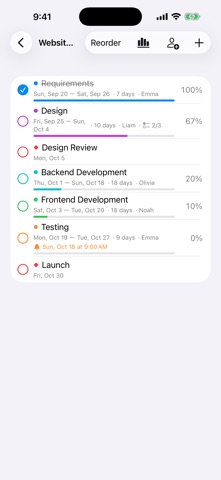
■ Clear Gantt chart
• Switch between day, week and month views
• Today is marked with a red line; weekends are shaded
• Task names and dates stay pinned while you scroll in any direction
• Milestones (◆) supported

■ Adjust schedules by touch
• Touch and hold a bar and drag to move it by days
• Drag either end of a bar to lengthen or shorten it
• Tap to edit details

■ Progress and checklists (checklists: Premium)
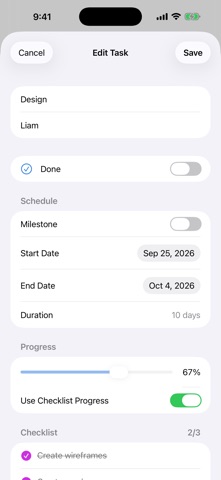
• Completion checkmarks and progress for every task
• Add a checklist to a task and let its completion drive progress automatically
• Overall project progress is calculated for you

■ Reminders (Premium)
• Get notified on the start date, the day before, the end date, the day before the end, or at a custom time
• Move the schedule and reminders follow along

■ Share with your team (Premium)
• Share and sync projects with others using Google Drive
• Edits to different tasks made at the same time are both kept
• Each person who shares needs Premium

■ Delay tracking & working days (Premium)
• Tasks behind schedule turn red, and overdue tasks stand out
• Skip weekends and public holidays (about 250 countries and regions) and count durations in working days
• Bars snap to working days when you move them

■ Designed for iPad too
• Project list and Gantt chart side by side
• Dark Mode supported

The free version includes 1 project with up to 5 tasks. Premium (one-time in-app purchase) unlocks unlimited projects and tasks, plus checklists, reminders and sharing. No account needed. Your data stays on your device.
Show more Show less

More data about Gantt Chart: Project Timeline

Price Free
Rating No ratings
Ranking Not ranked
Version 1.7
App size 3.31 MB
Suitable for Everyone

Screenshots

Gantt Chart: Project Timeline Screenshot 1 of 3
Gantt Chart: Project Timeline Screenshot 2 of 3
Gantt Chart: Project Timeline Screenshot 3 of 3
Screenshots by YOSHIYUKI UEMATSU, from the the App Store listing
Official page on the App Store

Alternatives to Gantt Chart: Project Timeline

NearbiGantt: Gantt & Tasks icon NearbiGantt: Gantt & Tasks
INX Company Limited
0.0
Free
Aimward: Goal & Focus Planning icon Aimward: Goal & Focus Planning
Hangzhou Clearflux Information Technology Co., Ltd.
0.0
Free
期限カレンダー icon 期限カレンダー
Tatsuto Kojo
0.0
Free
Yoko Timeline icon Yoko Timeline
katsuyasu sakita
0.0
Free
MPP Viewer icon MPP Viewer
Cardinate Consulting LLC
0.0
$9.99
Deadline Countdown Tracker icon Deadline Countdown Tracker
Phuc Pham
0.0
Free
TaskFlow - タスク&タイムライン icon TaskFlow - タスク&タイムライン
Yusuke Nakashima
0.0
Free
LittleMarks: Life Tracker icon LittleMarks: Life Tracker
Nathan Guo
0.0
Free

More from YOSHIYUKI UEMATSU

Loop Timer - HIIT icon Loop Timer - HIIT
YOSHIYUKI UEMATSU
0.0
Free

Changelog of Gantt Chart: Project Timeline

No changelog data

Developer information for YOSHIYUKI UEMATSU

YOSHIYUKI UEMATSU

Address:

Share Gantt Chart: Project Timeline

Comments on Gantt Chart: Project Timeline for iOS

We don't have enough comments to show example comments. Please check back later.

App Store Rankings for Gantt Chart: Project Timeline

This app is not ranked

Technologies used by Gantt Chart: Project Timeline

Price drops on Google Play Today's trending apps Top new apps Apps other people are watching Popular Productivity Apps
NearbiGantt: Gantt & Tasks icon NearbiGantt: Gantt & Tasks
Aimward: Goal & Focus Planning icon Aimward: Goal & Focus Planning
期限カレンダー icon 期限カレンダー
Yoko Timeline icon Yoko Timeline
MPP Viewer icon MPP Viewer
Deadline Countdown Tracker icon Deadline Countdown Tracker
TaskFlow - タスク&タイムライン icon TaskFlow - タスク&タイムライン
LittleMarks: Life Tracker icon LittleMarks: Life Tracker
Overview Alternatives Reviews Rankings Technology
AppBrain Intelligence premium content

Subscribe now to get full and unlimited access to AppBrain Intelligence. You'll have access to:

  • App Intelligence dashboard (performance timeline, competitor comparison, country rankings, insight cards)
  • Detailed ranking data per app
  • Full timeline per developer
  • Device market shares data per country
  • Unlimited keyword tracking
1 Month

$75/mo
(billed every month)

SAVE 0%
Subscribe
3 Months

$65/mo
($195 billed every 3 months)

SAVE 13%
Subscribe
1 Year

$57.50/mo
($690 billed every year)

SAVE 23%
Subscribe
Each subscription will automatically renew 3 days before the expiration date for the same time period. Subscriptions can be cancelled at any time before the renewal.

AppBrain is an app data site, we track rankings, ratings, installs for all apps and games on Google Play and the App Store. AppBrain doesn't host app files or APKs, all install links go directly to the official store. All trademarks are owned by their respective owners.

More apps

  • Top Android apps being viewed
  • LinkEasy
  • Avia Weather - METAR & TAF
  • CCD Cam-Y2K Retro Photo Editor

App statistics

  • Android statistics
  • Google Play Developer stats
  • Trending Android Apps
  • Trending iOS apps
  • Top popular Apps
  • Buy the best Android phone
  • Buy & sell app businesses

About AppBrain

  • Contact
  • Privacy
  • Documentation
  • DMCA takedowns
  • Blog
  • Tips to improve your Android promotional campaign
© 2010-2026 - AppBrain