

GATE CAM: Open Gate Camera
GATE CAM: Open Gate Camera is made and published by Takayuki Aoki. AppBrain is an independent app data site and isn't affiliated with Takayuki Aoki. The app name, icon, screenshots and description belong to Takayuki Aoki and are shown as published on the App Store.
AppBrain's verdict
- Last updated
- September 29, 2026
Rankings
App Store top chartsApp Store Rankings for GATE CAM: Open Gate Camera
Competitors
Similar apps and more from Takayuki AokiAlternatives to GATE CAM: Open Gate Camera


More from Takayuki Aoki

Releases
Updates seen on the App Store- Version
- 1.2.2
- Launched
- April 2026
No changelog data
User feedback
Ratings and reviews on the App StoreComments on GATE CAM: Open Gate Camera for iOS
We don't have enough comments to show example comments. Please check back later.
Technology
Found in the app by AppBrain- Price
- Free
- App size
- 17.3 MB
- Content rating
- Everyone
Technologies used by GATE CAM: Open Gate Camera
About the app and developer
About GATE CAM: Open Gate Camera
GATE CAM: Open Gate Camera is a photo & video app developed by Takayuki Aoki.
User Ratings
The app has no ratings yet.
App Information
GATE CAM: Open Gate Camera is freely available from the App Store. The app size is 17.31 MB. The latest version available is 1.2.2. The last update was on September 29, 2026.
Technical Requirements
The app has a content rating of Everyone. The app has been available on the App Store since April 2026.
Developer information for Takayuki Aoki
Address:
Store listing
By Takayuki Aoki, from the App Store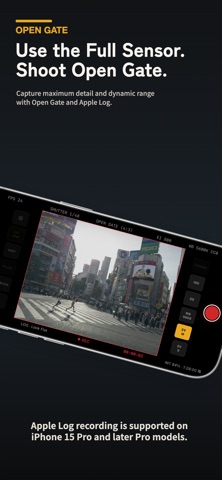



Description by Takayuki Aoki Written by the developer, not by AppBrain. Click to read.
Requires iPhone 15 Pro or later Pro models (Apple Log capable).
Not available on other iPhone models or iPad.
Don't stop at just recording and saving.
Shape the color, texture, and space of a single shot or a whole set of clips, and finish them into complete films right on your iPhone.
Record in 4:3 Open Gate, using more of the sensor.
Keep a wider view and more room than regular video, and capture the whole feel of the moment.
Record in ProRes with Apple Log to keep the tonal range,
so you can build your own look after the shoot.
SLOW capture is built in.
Match a 24 / 25 / 30 fps playback base and shoot SLOW at up to 60 fps.
Everyday motion becomes cinematic and dramatic in slow motion.
■ FEATURES
▶ Shoot wide with Open Gate
Record in 4:3 Open Gate.
Use more of the sensor and fill the frame edge to edge.
Keep people, light, background, and the sense of space in a single shot.
ProRes and Apple Log keep the tonal range, so you can shape the color afterward.
▶ SLOW capture
Supports 24 / 25 / 30 fps playback bases.
Shoot SLOW at up to 60 fps, matched to the base you choose.
Clips play back in slow motion automatically inside GATE CAM.
Turn small everyday moments into cinematic, dramatic shots.
(Free: up to 10 takes. Unlimited with GATE CAM+.)
▶ From capture to finish in CLIPS
Your footage is saved to CLIPS inside GATE CAM.
Spot SLOW and graded clips at a glance, then review, pick, and finish right after shooting.
Rotate footage inside CLIPS.
Export only the finished pieces to your Camera Roll.
Raw footage and finished work stay separate, so your Camera Roll doesn't fill up while you work.
▶ Turn Log into your look
Choose a Base LUT and a Creative LUT, then adjust exposure, highlights, shadows, contrast, temperature, tint, and saturation.
Add Mist, Grain, Fade, and vignette to take plain footage to the color you want to show.
▶ Keep your go-to look
Save the grade for each clip.
Store the settings you use most as presets and get the same mood every time.
▶ One look across many clips
Pick two or more clips and match their color and frames to finish them together.
Give the cuts from a trip or a vlog the same tone in one pass.
(Exporting them together requires GATE CAM+.)
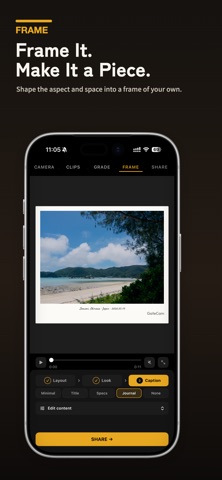
▶ Finish like a piece of work
Frames with metadata, rounded corners, still capture, and video export — all inside GATE CAM.
Turn your footage from a plain file into a still or a clip you want to share.
■ SUPPORTED FEATURES
・4:3 Open Gate capture
・ProRes recording (LT / 422 / HQ)
・Apple Log capture
・SLOW capture (1.5x / 2x / 2.5x)
・LUT preview
・Histogram
・EV / WB / SS / ISO controls
・Lens switching
・Base LUT / Creative LUT
・Mist / Grain / Fade / Vignette
・Grade saving / Preset saving
・Rotate footage in CLIPS
・Finish multiple clips together
・Frames / Metadata display
・Video export / Still capture
・Standard HEVC 8-bit export
■ GATE CAM+ (ONE-TIME PURCHASE, NO SUBSCRIPTION)
Capture, grading, and frame finishing are free.
GATE CAM+ adds:
・Unlimited SLOW capture (free: up to 10 takes)
・ProRes 422 / HQ recording (free: ProRes LT)
・Recording to an external SSD
・Saving directly to your Camera Roll
・Exporting multiple clips together
・Unlimited presets
・Frame export without the logo
・High-quality export (HEVC 10-bit, 50 Mbps)
- Available features vary by device, lens, resolution, and selected format.
- For iPhone 15 Pro or later Pro models (Apple Log capable) only.
- On iPhone 18 Pro (iOS 27), recording ProRes to the iPhone requires reserving Pro Video Storage in iPhone Settings (GATE CAM guides you). Not needed when recording to an external SSD.