





AppBrain's verdict
- Last updated
- November 2, 2026
- Size
- 24.9 MB
User feedback
Ratings and reviews on the App StoreComments on Gelim AI for iOS
We don't have enough comments to show example comments. Please check back later.
Store listing
By Mohsen Arjmandi, from the App StoreDescription by Mohsen Arjmandi Written by the developer, not by AppBrain. Click to read.
ASK ABOUT A SCREENSHOT
See something you want to understand, translate or copy? Ask about it in one press.
• Add the Gelim screen shortcut and put it on the Action button or Back Tap: one press takes the screenshot and opens it in Gelim.
• Or run Ask about a screenshot, ready from the install, and choose one of your recent screenshots.
• Tap Annotate to draw, highlight or add text first. Nothing is sent until you ask.
ASK ABOUT A PHOTO
A sign you can't read, a plant you don't know, a label in another language. Add the Gelim camera shortcut and put it on the Action button or Back Tap, or say "Ask Gelim about a photo". Gelim's camera opens: take the photo, then ask.
YOUR ACTIONS, ON ANY PICTURE
Tap Describe, Extract text, Translate image, Explain or Look up highlighted text, or type your own question. These are your iPhone actions: change them, switch them off, or write your own. Each answer opens as a chat, so you can keep asking, here or on your Mac.
THE KEYBOARD, IN EVERY APP
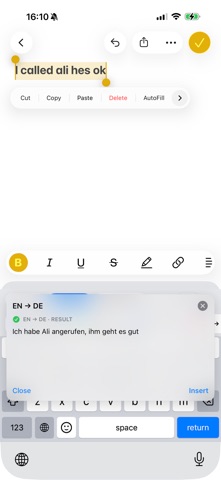
• Select text and tap Summarize, Formal, Grammar, Shorten, EN → DE and more. See the result first, then replace, insert or copy. Undo if you change your mind.
• Chat without leaving the app: the keys type into Gelim, not the app below.
• Paste what you copied here, on your Mac or in the browser.
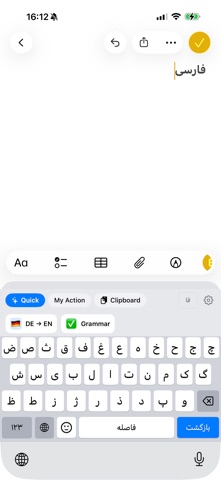
• Types English and Persian. Typing never needs Full Access and never sends anything.
CHAT AND CANVAS
• Ask anything. Gelim searches the web when a question needs it and lists its Sources. Deep research writes a report.
• Add a picture, a PDF, a Word, Excel or PowerPoint file, or a recording.
• Ask for an Excel sheet, a Word report, slides or a PDF, and get the file in the chat.
• A canvas turns a subject into a map of conversations. Branch from any sentence to go deeper.
• Everything is saved to your Gelim Account, ready on your Mac and the web.
RECORDINGS
• Record a meeting with live text, and live translation if you want it. Choose the microphone, AirPods included.
• The audio is saved on your iPhone first, so nothing is lost if the connection drops or a call comes in. Record offline, or send over Wi‑Fi only.
• The Lock Screen and the Dynamic Island show the clock while you record.
• Read the transcript with speakers, then run Meeting minutes, Action items or Follow-up questions, or chat about it.
• Import audio or video up to 4 hours, or share in voice memos.
• Share a public link, export, or email a recap.
ACTIONS, YOUR WAY
Make your own action: a name, your instructions, a model, and the answer's shape (prose, a list or a table). Run it in the keyboard, on screenshots and photos, or on meetings. It reaches your other devices within seconds.
SHORTCUTS, SIRI AND WIDGETS
Gelim's shortcuts are there from the install: "Ask Gelim about a screenshot", "Ask Gelim about a photo", "New chat in Gelim", "Start recording in Gelim", "Get meeting minutes in Gelim", and Run a Gelim Action on any text. Add the Record, Ask Gelim and Time saved widgets, and Record in Control Center.
WHAT'S SENT, AND WHEN
• A screenshot or photo is sent only when you ask about it.
• The keyboard sends only the text you select, or up to 700 characters around the cursor, and only when you tap an action.
• Chats and clips are sealed with a key of your own. Gelim's operators see counts and sizes, never what you wrote.
• Passwords and one-time codes never go to the cloud clipboard.
• Delete everything on this iPhone, or your whole account, in Settings → Privacy & data.
PAY FOR WHAT YOU USE
Gelim has no subscription. You sign in with your Gelim Account, and each answer, transcript, search or report is charged to the credit in it. Set monthly limits for each kind of work in your Gelim Account.
Requires iOS 17 or later and a Gelim Account.
Safety and technology
Found in the app by AppBrain- Price
- Free
- App size
- 24.9 MB
- Content rating
- Everyone
Technologies used by Gelim AI
Releases
Updates seen on the App Store- Version
- 2.0
- Launched
- July 2026
No changelog data
Alternatives
Similar apps and more from Mohsen ArjmandiAlternatives to Gelim AI


Rankings
App Store top chartsApp Store Rankings for Gelim AI
About the app and developer
About Gelim AI
Gelim AI is a productivity app developed by Mohsen Arjmandi.
User Ratings
The app has no ratings yet.
App Information
Gelim AI is freely available from the App Store. The app size is 24.94 MB. The latest version available is 2.0. The last update was on November 2, 2026.
Technical Requirements
The app has a content rating of Everyone. The app has been available on the App Store since July 2026.
Gelim AI is made and published by Mohsen Arjmandi. AppBrain is an independent app data site and isn't affiliated with Mohsen Arjmandi. The app name, icon, screenshots and description belong to Mohsen Arjmandi and are shown as published on the App Store.
Developer information for Mohsen Arjmandi
Address: