

GeoFix GPS – Tracks - Waypoint
GeoFix GPS – Tracks - Waypoint is made and published by Andrea Guerrini. AppBrain is an independent app data site and isn't affiliated with Andrea Guerrini. The app name, icon, screenshots and description belong to Andrea Guerrini and are shown as published on the App Store.
AppBrain's verdict
- Last updated
- October 10, 2026
Rankings
App Store top chartsApp Store Rankings for GeoFix GPS – Tracks - Waypoint
Competitors
Similar apps and more from Andrea GuerriniAlternatives to GeoFix GPS – Tracks - Waypoint







Releases
Updates seen on the App Store- Version
- 2.26
- Launched
- April 2026
No changelog data
User feedback
Ratings and reviews on the App StoreComments on GeoFix GPS – Tracks - Waypoint for iOS
We don't have enough comments to show example comments. Please check back later.
Technology
Found in the app by AppBrain- Price
- Free
- App size
- 26.0 MB
- Content rating
- Everyone
Technologies used by GeoFix GPS – Tracks - Waypoint
About the app and developer
About GeoFix GPS – Tracks - Waypoint
GeoFix GPS – Tracks - Waypoint is a navigation app developed by Andrea Guerrini.
What is the rating of GeoFix GPS – Tracks - Waypoint?
GeoFix GPS – Tracks - Waypoint has no ratings yet.
Is GeoFix GPS – Tracks - Waypoint free?
GeoFix GPS – Tracks - Waypoint is free. The app size is 25.96 MB. The latest version available is 2.26. The last update was on October 10, 2026.
What are the requirements for GeoFix GPS – Tracks - Waypoint?
The app has a content rating of Everyone. The app has been available on the App Store since April 2026.
Developer information for Andrea Guerrini
Address:
Store listing
By Andrea Guerrini, from the App Store



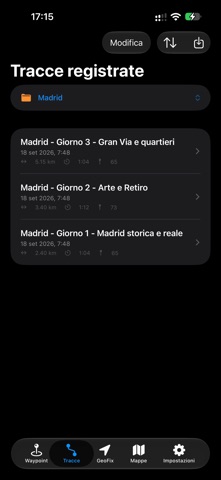
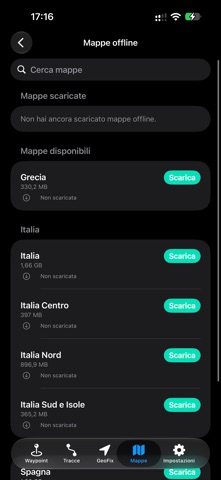
Description by Andrea Guerrini Written by the developer, not by AppBrain. Click to read.
With GeoFix AR, view waypoints and navigation guidance directly in your surroundings using the camera.
With GeoFix Safety, access information about earthquakes, floods, wildfires and satellite thermal detections.
Designed for hiking, mountain biking, boating, fishing, travel and fieldwork, GeoFix keeps its main GPS features available offline.
MAIN FEATURES
• GeoFix AR
Explore your surroundings with the camera and view waypoints, direction and distance in the real world. Use AR when navigating to a waypoint, following a track or using Track Back. Camera images are not recorded, saved or transmitted.
• GeoFix Safety
View information available for your location, a waypoint or a route. GeoFix integrates specialised sources for earthquakes, floods, wildfires and satellite thermal detections.
GeoFix Safety is an information tool and does not replace official sources, warning systems or emergency services.
• Plan routes
Create a route on the map, edit the track, add waypoints and save it. You can also start from a recorded track or GPX file.
• Routes
Organise tracks and waypoints within the same route.
• GeoFix Home
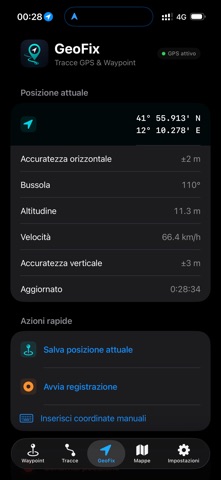
View GPS status, coordinates, compass, altitude, speed and accuracy. Save, record and share your location.
• Waypoints
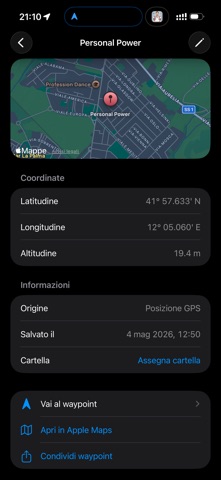
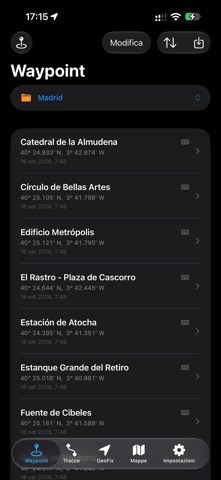
Save car parks, shelters, bivouacs, water sources, viewpoints or any location you want to find again, then start navigation.
• GPS track recording
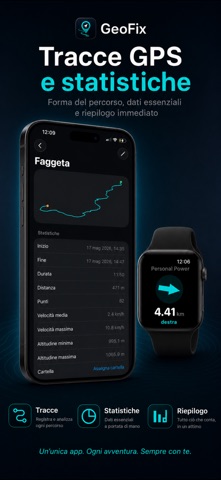
Record your journeys and view distance, duration, speed, elevation gain and other information.
• Explore Map
View your position and direction together with tracks and waypoints from the selected route.
• Navigation
Follow a GPX route with position, direction, distance from the track and remaining distance, or navigate to a saved location.
• Track Back
Retrace your journey by following your track in reverse.
• Apple CarPlay
Use GeoFix on your car display and CarPlay Dashboard. View maps, waypoints and routes, follow tracks Forward or with Track Back, and navigate to waypoints with guidance and voice instructions.
• GPX and GeoFix format
Import and export GPX tracks and waypoints. With GeoFix Premium, export routes in .geofix format while preserving tracks, waypoints and organisation.
• Online and offline maps
View maps online or, with GeoFix Premium, download them to your device for offline use.
• Offline use
Recording, navigation, Track Back, waypoints and key GPS features work without a data connection.
• Location sharing
Quickly share your location. SOS tools do not replace or automatically contact emergency services.
• Apple Watch and iPad
Record tracks, save waypoints and navigate from Apple Watch. On iPad, manage routes, tracks, waypoints and maps.
GEOFIX PREMIUM
GeoFix is available for free. Premium unlocks unlimited waypoints and tracks, offline maps, GeoFix packages and advanced features.
Choose a monthly or annual subscription, or a one-off Lifetime purchase.
WHY CHOOSE GEOFIX
GeoFix brings together GPX navigation, track recording, waypoints, augmented reality, Track Back, offline maps, CarPlay and information about your surroundings.
A place does not need an address for you to reach, record or find it again.
Available for iPhone, iPad, Apple Watch and Apple CarPlay.
Every journey leaves a track.
GeoFix, wherever you go.
Privacy Policy
https://geofixgps.com/privacy-policy
Terms of Use
https://www.apple.com/legal/internet-services/itunes/dev/stdeula/