

Geometry Calculator lite
Geometry Calculator lite is made and published by V PUGAZHENTHI. AppBrain is an independent app data site and isn't affiliated with V PUGAZHENTHI. The app name, icon, screenshots and description belong to V PUGAZHENTHI and are shown as published on the App Store.
AppBrain's verdict
Established- Rating on App Store
- 4.47
- 79 ratings
- Last updated
- July 30, 2026
It doesn't have enough ratings yet to judge what users think.
Rankings
App Store top chartsApp Store Rankings for Geometry Calculator lite
Competitors
Similar apps and more from V PUGAZHENTHIAlternatives to Geometry Calculator lite




More from V PUGAZHENTHI


Releases
Updates seen on the App Store- Version
- 5.3
- Launched
- August 2021
No changelog data
User feedback
Ratings and reviews on the App StoreComments on Geometry Calculator lite for iOS
We don't have enough comments to show example comments. Please check back later.
Technology
Found in the app by AppBrain- Price
- Free
- App size
- 56.3 MB
- Content rating
- Everyone
Technologies used by Geometry Calculator lite
About the app and developer
About Geometry Calculator lite
Geometry Calculator lite is an education app developed by V PUGAZHENTHI.
What is the rating of Geometry Calculator lite?
Geometry Calculator lite is rated 4.47 out of 5 stars, based on 79 ratings.
Is Geometry Calculator lite free?
Geometry Calculator lite is free. The app size is 56.30 MB. The latest version available is 5.3. The last update was on July 30, 2026.
What are the requirements for Geometry Calculator lite?
The app has a content rating of Everyone. The app has been available on the App Store since August 2021.
Developer information for V PUGAZHENTHI
Address:
Store listing
By V PUGAZHENTHI, from the App Store



Description by V PUGAZHENTHI Written by the developer, not by AppBrain. Click to read.
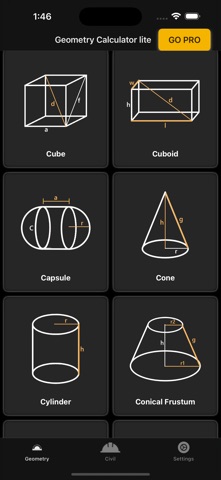
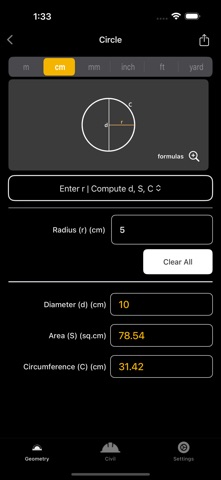
Geometry Calculator is designed to calculate all key parameters of 26 geometric shapes, including both planes and solids. With 783 calculations, this app is perfect for students, engineers, and professionals who need quick, reliable results.
What’s New
• 3D View for Solids – explore shapes like Cube, Sphere, Cylinder, and more in interactive 3D.
Supported Shapes
2D Shapes:
• Circle, Annulus, Ellipse, Torus
• Square, Rectangle, Triangle (Equilateral, Isosceles, Right, Theorems)
• Parallelogram, Rhombus, Trapezoid, Polygon
3D Solids:
• Cube, Cuboid, Capsule, Cone, Cylinder
• Conical Frustum, Square Pyramid, Sphere, Hemisphere, Tube
Available Calculations
• Area & Surface Area
• Perimeter & Semiperimeter
• Volume
• Angles
• Radius, Diameter, Circumference
• Side Length, Diagonal, Height, Width, Altitude, Slant Height
• Inradius & Circumradius
• Median & Thickness
Compatibility
• Works seamlessly on iPhone and iPad
• Available in: English, Français, Español, Italiano, Deutsch, Português, Nederlands, 中文 (Chinese), Türkçe (Turkish), العربية (Arabic), Polski (Polish), 日本語 (Japanese)