

Getwid: Widget Design Studio
Getwid: Widget Design Studio is made and published by Hasan Kilinc. AppBrain is an independent app data site and isn't affiliated with Hasan Kilinc. The app name, icon, screenshots and description belong to Hasan Kilinc and are shown as published on the App Store.
AppBrain's verdict
- Rating on App Store
- 5.00
- 2 ratings
- Last updated
- September 9, 2026
It doesn't have enough ratings yet to judge what users think.
Rankings
App Store top chartsApp Store Rankings for Getwid: Widget Design Studio
Competitors
Similar apps and more from Hasan KilincAlternatives to Getwid: Widget Design Studio


More from Hasan Kilinc

Releases
Updates seen on the App Store- Version
- 2.0.0
- Launched
- March 2026
No changelog data
User feedback
Ratings and reviews on the App StoreComments on Getwid: Widget Design Studio for iOS
We don't have enough comments to show example comments. Please check back later.
Technology
Found in the app by AppBrain- Price
- Free
- App size
- 29.5 MB
- Content rating
- Everyone
Technologies used by Getwid: Widget Design Studio
About the app and developer
About Getwid: Widget Design Studio
Getwid: Widget Design Studio is an utilities app developed by Hasan Kilinc.
What is the rating of Getwid: Widget Design Studio?
Getwid: Widget Design Studio is rated 5.00 out of 5 stars, based on 2 ratings.
Is Getwid: Widget Design Studio free?
Getwid: Widget Design Studio is free. The app size is 29.48 MB. The latest version available is 2.0.0. The last update was on September 9, 2026.
What are the requirements for Getwid: Widget Design Studio?
The app has a content rating of Everyone. The app has been available on the App Store since March 2026.
Developer information for Hasan Kilinc
Address:
Frequently asked questions about Getwid: Widget Design Studio
Is Getwid: Widget Design Studio free?
Yes. Getwid: Widget Design Studio is free on the App Store.
Is Getwid: Widget Design Studio still available?
Yes. Getwid: Widget Design Studio is on the App Store, and the last update we saw was on September 9, 2026.
How large is Getwid: Widget Design Studio?
Getwid: Widget Design Studio is 29.48 MB.
Is Getwid: Widget Design Studio suitable for children?
App Store rates the content of Getwid: Widget Design Studio as suitable for everyone.
How do people rate Getwid: Widget Design Studio?
Getwid: Widget Design Studio scores 5.00 out of 5 stars, from 2 ratings on the App Store.
Who made Getwid: Widget Design Studio?
Getwid: Widget Design Studio was developed by Hasan Kilinc. It is listed in the utilities category on the App Store.
What are the best alternatives to Getwid: Widget Design Studio?
People looking at Getwid: Widget Design Studio also look at these utilities apps: DeviceCheck Key Pair, TravX: AI Voice Translator, BraceJourney, TV Remote Universal Remote, Geotag Photos: Pinfoto.
Store listing
By Hasan Kilinc, from the App Store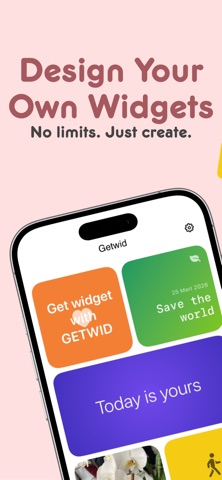


Description by Hasan Kilinc Written by the developer, not by AppBrain. Click to read.
Getwid is a widget design studio, not a template gallery. You start with a blank canvas and build the widget layer by layer: photos from your library, your own text, icons, a live clock, a calendar, a countdown. Move it, rotate it, restyle it, undo it. Up to 24 layers in a single widget.
NEW IN 2.0 — DISCOVER
Browse widgets the community shared, tap a design to see who made it, and add it to your collection in one tap. Share your own designs whenever you want. Like the ones you love. Report or block anything you don't.
WHAT YOU CAN BUILD
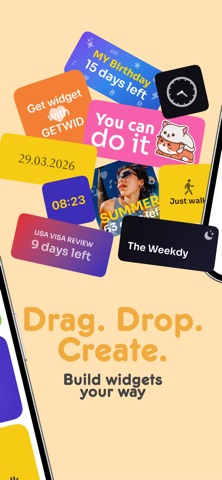
• Photo stickers from your own library, with dim and blur
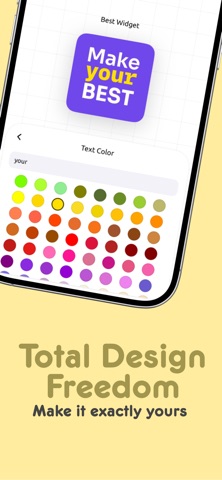
• Text layers — font, size, alignment, color, opacity, effects, rotation
• Analog and digital clocks
• Calendar and date layers
• Countdown and count-up timers
• Icon layers from Apple's SF Symbols
• Backgrounds: solid colors, 5-stop gradients, patterned borders
THREE SIZES
Small, medium and large Home Screen widgets. Pick a size, design for it, and the system widget picker only offers the designs that fit.
FREE, WITH NO CATCH
No subscriptions. No in-app purchases. No ads. No paywalled layers. Nothing is counted, nothing is capped.
YOUR DESIGNS STAY YOURS
Widget designs are stored on your device — not uploaded, not synced, not scanned. Photos you add never leave your phone unless you choose to share that design on Discover. Signing in is optional and unlocks nothing; it's only there for Discover and to sync your language across devices.
NINE LANGUAGES
Turkish, English, German, Spanish, French, Italian, Japanese, Korean and Brazilian Portuguese.
Questions or ideas? There's a support form right inside the app, under Settings → About.