Geunmumoya: Shift Calendar is a productivity app developed by ungbeom lee.
User Ratings
The app has no ratings yet.
App Information
Geunmumoya: Shift Calendar is freely available from the App Store. The app size is 115.15 MB. The latest version available is 1.4.8. The last update was on November 13, 2026.
Technical Requirements
The app has a content rating of Everyone. The app has been available on the App Store since October 2026.
Geunmumoya: Shift Calendar is made and published by
ungbeom lee.
AppBrain is an independent app data site and isn't affiliated with ungbeom lee.
The app name, icon, screenshots and description belong to ungbeom lee and are shown as published on the App Store.
Description by ungbeom lee(from the App Store)
Geunmumoya is a shift calendar made for people who work days, nights and everything in between — nurses, factory and plant workers, firefighters, police, security, care workers and anyone on a rotating roster.
Set it up once • Pick a common pattern (Day/Night, Day/Evening/Night, 4-on-4-off, 24-on/48-off, Mon–Fri) or enter your own rotation. • Your calendar fills itself for months ahead. Changed a shift, swapped with a coworker or took vacation? Just tap the day. • Hospital schedules that change every month? Fill them in right on the calendar. • Fill a month from a roster photo (beta). Text is read on your phone and the photo stays there. Anything it can't read, you fix by hand. • Changed teams or rotation? Pick a start date and your past calendar stays as it was.
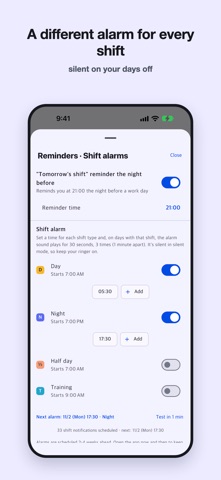
Shift alarms • Shift alarm: a different alarm time for each shift (e.g. 6:30 AM for Days, 6:30 PM for Nights) that only rings on days you work. • "Tomorrow's shift" reminder the night before. • Home screen widgets (plus lock screen widgets on iPhone): today, this week, the whole month.
Days off together • Share links with friends or your partner and see the days you're both off — even if you work at different places. • Shifts are shared through the link. Notes are not sent.
Swaps and leave • Swapped with a coworker? The two days trade places and the swap goes in your notes. • See every team's shifts in the All teams view. • Set how many days each shift takes from your leave, the way your company counts it (e.g. a 12-hour shift = 1.5 days). • Add a half day or hourly leave on top of a shift.
Know your numbers • Total hours, night hours, weekend shifts, overtime and extra shifts, vacation used and left. • Log overtime and extra shifts, with totals for your pay period. • A cute month-end "receipt" summary to share.
No sign-up needed • No account. Your shifts and notes are saved on your phone. • Only if you turn on auto-update sharing, an encrypted copy of your shifts is kept on our server. • Export a backup file when you switch phones.
Also: add shifts to your phone calendar (Google / iPhone Calendar), dark mode, big-text calendar.
Questions or a roster that doesn't fit? Tell us from Settings → Contact us.
Each subscription will automatically renew 3 days before the expiration date for
the same time period. Subscriptions can be cancelled at any time before the renewal.