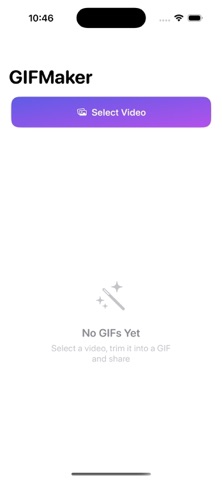
GIFMaker Pro Mo is an overall app developed by 梦 肖.
Download Statistics
User Ratings
The app has no ratings yet.
App Information
GIFMaker Pro Mo is FREE to download. The APK download size is 8.24 MB. The latest version available is 1.0. The last update was on June 2, 2026.
Technical Requirements
The app has a content rating of Medium Maturity. The app has been available on Google Play 2 weeks ago.
Description
GIFMaker — Video to GIF, Clean and Simple
Turn your favorite video moments into high-quality GIFs in seconds. Trim, crop, remove watermarks with intelligent inpainting, and fine-tune every export parameter — all on-device, no uploads, completely private.
WHY GIFMAKER
Most GIF apps either skip editing entirely or bury it behind paywalls. GIFMaker gives you a full editing workflow before export: precise timeline trimming, aspect ratio cropping, and an actual inpainting engine for watermark removal — not just a colored rectangle slapped on top.
CORE FEATURES
Turn your favorite video moments into high-quality GIFs in seconds. Trim, crop, remove watermarks with intelligent inpainting, and fine-tune every export parameter — all on-device, no uploads, completely private.
WHY GIFMAKER
Most GIF apps either skip editing entirely or bury it behind paywalls. GIFMaker gives you a full editing workflow before export: precise timeline trimming, aspect ratio cropping, and an actual inpainting engine for watermark removal — not just a colored rectangle slapped on top.
CORE FEATURES
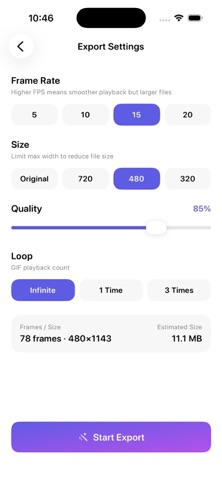
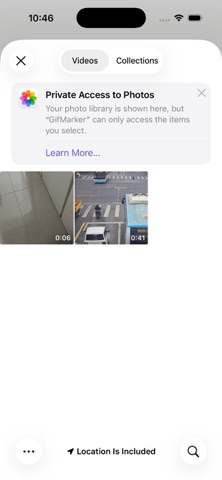
- Import with Ease. Pick any video from your photo library. MP4, MOV, and more. Up to 60 seconds per clip. - Precision Trim. Drag the timeline handles to select exactly the segment you want, down to 0.1-second accuracy. Thumbnail strips show you every beat. - Smart Crop. Free drag or tap to lock popular ratios: 1:1, 16:9, 4:3, 9:16. Real-time preview while you adjust. - Real Watermark Removal. Draw over any watermark, logo, or unwanted object. Our GPU-accelerated inpainting fills the area with surrounding pixels — natural gradients, no ugly blocks. Supports multiple marks at once. - Full Export Control. Set frame rate (5/10/15/20 fps), cap output width (up to original), adjust quality on a slider, and choose loop behavior (infinite, once, or 3 times). Live size estimation updates as you tweak. - Instant Preview. Watch your GIF loop before you commit. See creation date, resolution, duration, and file size at a glance. - Share Anywhere. Save to your photo library, or share directly via the system share sheet to Messages, social apps, AirDrop, and more. - History & Management. Every GIF you create is saved with a thumbnail in your library. Swipe to browse past creations, tap to preview, or delete what you don't need.
PRIVACY FIRST
All processing happens locally on your device. Your videos never leave your phone. No account required, no analytics, no data collection.
WHO IT'S FOR
- Content creators turning short clips into shareable GIFs - Anyone who wants to save a funny or memorable video moment as a looping animation - Designers and social media managers making quick reaction GIFs or demo animations
GIFMaker is free to download and use. No subscriptions, no watermarks on output, no hidden limits.
Each subscription will automatically renew 3 days before the expiration date for
the same time period. Subscriptions can be cancelled at any time before the renewal.