

Gig Songbook is made and published by Petar Gerov. AppBrain is an independent app data site and isn't affiliated with Petar Gerov. The app name, icon, screenshots and description belong to Petar Gerov and are shown as published on the App Store.
AppBrain's verdict
- Last updated
- October 24, 2026
Rankings
App Store top chartsApp Store Rankings for Gig Songbook
This app is not ranked
Competitors
Similar apps and more from Petar GerovMore from Petar Gerov


Releases
Updates seen on the App Store- Version
- 1.4.1
- Launched
- April 2026
No changelog data
User feedback
Ratings and reviews on the App StoreComments on Gig Songbook for iOS
We don't have enough comments to show example comments. Please check back later.
Technology
Found in the app by AppBrain- Price
- Free
- App size
- 8.19 MB
- Content rating
- Everyone
Technologies used by Gig Songbook
About the app and developer
About Gig Songbook
Gig Songbook is a music app developed by Petar Gerov.
What is the rating of Gig Songbook?
Gig Songbook has no ratings yet.
Is Gig Songbook free?
Gig Songbook is free. The app size is 8.19 MB. The latest version available is 1.4.1. The last update was on October 24, 2026.
What are the requirements for Gig Songbook?
The app has a content rating of Everyone. The app has been available on the App Store since April 2026.
Developer information for Petar Gerov
Address:
Store listing
By Petar Gerov, from the App Store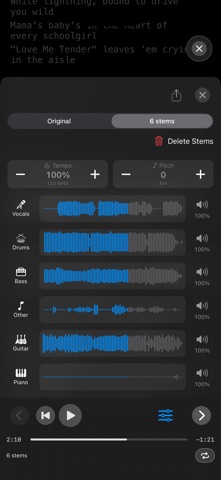



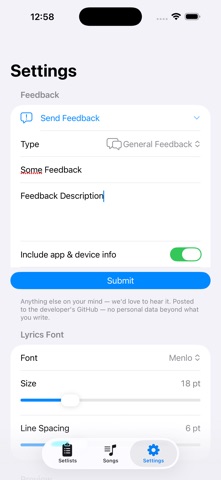
Screenshots by Petar Gerov, from the the App Store listing
Description by Petar Gerov Written by the developer, not by AppBrain. Click to read.
Gig Songbook is a stage-ready lyrics and setlist app for musicians. Keep songs, chords, notes, audio tracks, and score pages in one place — fast to edit, easy to perform with, and available offline.
SONGS & SETLISTS
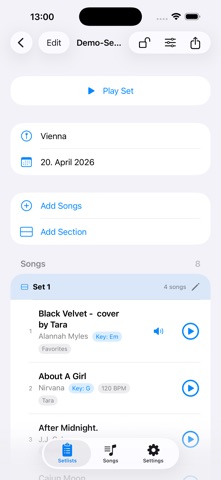
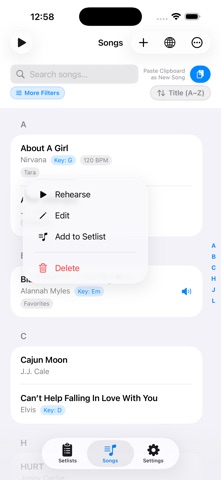
Build your repertoire with title, artist, lyrics, chords, key, BPM, notes, and labels. Sort your library by title, recent changes, artist, or label. Copied lyrics on the clipboard? One tap on Paste as New Song creates a prefilled song — no typing. Create ordered setlists with date/venue, drag to reorder, and lock before gigs to prevent accidental edits. Add songs to setlists with a swipe, and duplicate a setlist with Save As. Split a set into labeled sections — Set 1, Break, Encore — each with its own song count and length, and see the total length of every set at a glance.
PERFORMANCE & REHEARSE
Use full-screen dark mode for live playing and rehearsal. Quick song navigation, seekable audio, and optional lyrics-follow keep your hands free on stage. In a setlist, each song advances to the next automatically when its audio finishes (or when a duration-paced auto-scroll reaches the end), so your set rolls on hands-free. For songs without a backing track, hands-free auto-scroll paces the lyrics from the song's duration (or BPM), with a live speed control. A subtle gig clock shows the current section, time elapsed and remaining, and whether you're running over or ahead of plan.
LYRICS SYNC
Auto Sync uses Shazam + online timed lyrics; Manual Tap Sync lets you tap each line in time. Active lines highlight and auto-scroll during playback.
CHORD TOOLS
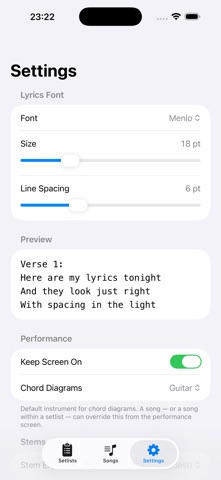
See chord diagrams for guitar and piano — switch instruments with a tap. Guitar shows the standard shapes spread across the neck (open, barre, and mid-neck positions); piano shows root position plus inversions. Your choice is remembered per song and per setlist. Transpose live (Pro) from the performance screen without changing stored lyrics — the transposition is remembered per song, and per song within a setlist.
SCORE PAGES & SONG IMAGES
Attach lyric sheets, chord charts, or full scores. Reorder pages and swipe them in Performance/Rehearse mode. Whether a song shows its images or the text lyrics is remembered per song — and per song within a setlist.
ICLOUD SYNC
Songs and setlists sync across devices via your private iCloud container.
IMPORT WORKFLOWS (PRO)
• Improved TXT/PDF/MD lyrics import with a review step before saving.
• Edit title, artist, and labels before import.
• Preview parsed lyrics.
• Handle duplicates with Overwrite or Skip Existing.
• New Import PDF Score workflow: import one or more PDF scores, review each item, preview rendered pages, and import as swipeable score pages.
• Import audio files as songs with metadata detection and optional Shazam-based identification when tags are missing.
ONLINE SONG CATALOG (PRO)
Search by title or artist and import multiple songs at once.
EXPORT & BACKUP (PRO)
Export your song library or setlists as JSON, including audio, stems, and song images for portable backups.
STEM SEPARATION & PRACTICE TOOLS (PRO)
A practice aid, not studio-quality mixing: create 2-stem, 4-stem, or 6-stem (+guitar, piano) versions, switch Original/Stems, and mix each part on its own waveform — tap an instrument to mute it, tap its speaker for a slider or hold and slide to set the level. Slow a song down or speed it up without changing pitch, shift the pitch in semitones, and set an A-B loop to drill a tricky passage. Locked setlists keep each song's stem mix and play it back as set up.
AuV3 PLUGIN (PRO)
Your lyrics and chords inside Loopy Pro or any AUv3 host. Change songs with a tap or by MIDI from a footswitch.
Every Pro feature is free for 7 days from install. After that, Pro is a one-time purchase.
PRIVACY
No account, no ads, no tracking. Data stays on your device and your private iCloud storage.
Terms of Use:
https://www.apple.com/legal/internet-services/itunes/dev/stdeula/
SONGS & SETLISTS
Build your repertoire with title, artist, lyrics, chords, key, BPM, notes, and labels. Sort your library by title, recent changes, artist, or label. Copied lyrics on the clipboard? One tap on Paste as New Song creates a prefilled song — no typing. Create ordered setlists with date/venue, drag to reorder, and lock before gigs to prevent accidental edits. Add songs to setlists with a swipe, and duplicate a setlist with Save As. Split a set into labeled sections — Set 1, Break, Encore — each with its own song count and length, and see the total length of every set at a glance.
PERFORMANCE & REHEARSE
Use full-screen dark mode for live playing and rehearsal. Quick song navigation, seekable audio, and optional lyrics-follow keep your hands free on stage. In a setlist, each song advances to the next automatically when its audio finishes (or when a duration-paced auto-scroll reaches the end), so your set rolls on hands-free. For songs without a backing track, hands-free auto-scroll paces the lyrics from the song's duration (or BPM), with a live speed control. A subtle gig clock shows the current section, time elapsed and remaining, and whether you're running over or ahead of plan.
LYRICS SYNC
Auto Sync uses Shazam + online timed lyrics; Manual Tap Sync lets you tap each line in time. Active lines highlight and auto-scroll during playback.
CHORD TOOLS
See chord diagrams for guitar and piano — switch instruments with a tap. Guitar shows the standard shapes spread across the neck (open, barre, and mid-neck positions); piano shows root position plus inversions. Your choice is remembered per song and per setlist. Transpose live (Pro) from the performance screen without changing stored lyrics — the transposition is remembered per song, and per song within a setlist.
SCORE PAGES & SONG IMAGES
Attach lyric sheets, chord charts, or full scores. Reorder pages and swipe them in Performance/Rehearse mode. Whether a song shows its images or the text lyrics is remembered per song — and per song within a setlist.
ICLOUD SYNC
Songs and setlists sync across devices via your private iCloud container.
IMPORT WORKFLOWS (PRO)
• Improved TXT/PDF/MD lyrics import with a review step before saving.
• Edit title, artist, and labels before import.
• Preview parsed lyrics.
• Handle duplicates with Overwrite or Skip Existing.
• New Import PDF Score workflow: import one or more PDF scores, review each item, preview rendered pages, and import as swipeable score pages.
• Import audio files as songs with metadata detection and optional Shazam-based identification when tags are missing.
ONLINE SONG CATALOG (PRO)
Search by title or artist and import multiple songs at once.
EXPORT & BACKUP (PRO)
Export your song library or setlists as JSON, including audio, stems, and song images for portable backups.
STEM SEPARATION & PRACTICE TOOLS (PRO)
A practice aid, not studio-quality mixing: create 2-stem, 4-stem, or 6-stem (+guitar, piano) versions, switch Original/Stems, and mix each part on its own waveform — tap an instrument to mute it, tap its speaker for a slider or hold and slide to set the level. Slow a song down or speed it up without changing pitch, shift the pitch in semitones, and set an A-B loop to drill a tricky passage. Locked setlists keep each song's stem mix and play it back as set up.
AuV3 PLUGIN (PRO)
Your lyrics and chords inside Loopy Pro or any AUv3 host. Change songs with a tap or by MIDI from a footswitch.
Every Pro feature is free for 7 days from install. After that, Pro is a one-time purchase.
PRIVACY
No account, no ads, no tracking. Data stays on your device and your private iCloud storage.
Terms of Use:
https://www.apple.com/legal/internet-services/itunes/dev/stdeula/