




AppBrain's verdict
- Rating on App Store
- 4.83
- 6 ratings
- Last updated
- October 19, 2026
- Size
- 94.2 MB
It doesn't have enough ratings yet to judge what users think.
User feedback
Ratings and reviews on the App StoreComments on GluKee: Blood Sugar Tracker for iOS
We don't have enough comments to show example comments. Please check back later.
Store listing
By Glukee Labs LLC, from the App StoreDescription by Glukee Labs LLC Written by the developer, not by AppBrain. Click to read.
Log readings manually, connect a compatible blood glucose meter, or sync supported health data with Apple Health. Scan meals, track carbohydrates, medications, weight and blood pressure, follow trends, and create reports for your healthcare professional.
TRACK BLOOD SUGAR WITH CONTEXT
Log fasting, before-meal, after-meal, and other glucose readings. Add context about meals, sleep, stress, illness, activity, and medications to build a clearer picture over time.
See:
• Average glucose
• Estimated A1C
• Time in Range
• High and low readings
• Daily, weekly, monthly, and yearly trends
CONNECT YOUR BLOOD GLUCOSE METER
Spend less time entering numbers.
Connect a supported Bluetooth blood glucose meter and import readings directly into GluKee. Keep readings alongside your meals, medications, weight, blood pressure, notes, and trends.
SYNC WITH APPLE HEALTH
Bring more of your health data together.
Connect Apple Health to sync supported data including blood glucose, weight, blood pressure, and nutrition.
Supported glucose data available through Apple Health syncs into GluKee when you open the app, keeping compatible glucose data alongside the rest of your GluKee history. You choose which supported data GluKee can read or save.
SCAN AND LOG MEALS
See more than what you ate.
Take a photo of a meal to estimate carbohydrates, protein, fat, fiber, and possible glucose impact. Scan nutrition labels, save meals for faster logging, and compare meals over time.
Meal estimates are educational and may not be exact, especially for mixed dishes, sauces, and hidden ingredients.
FIND YOUR PATTERNS
Stop looking at glucose readings in isolation.
Connect meals with before-and-after readings to see which foods may be linked with larger changes. Review trends to find repeated patterns across your readings, meals, medications, and daily life.
FOLLOW GUIDED DIABETES PLANS
Turn tracking into something you can act on.
Follow simple daily plans built around practical goals:
• Build a blood sugar routine
• Understand morning glucose
• Learn from after-meal readings
• Test meal and movement changes
• Build habits you can repeat
Plans are educational and do not replace advice from your healthcare team.
SEARCH 900+ FOODS
Explore the Glucose Guide with glycemic index and carbohydrate information for more than 900 foods. Compare foods and use the guide alongside your own readings to make more informed meal decisions.
TRACK MORE THAN GLUCOSE
Your blood sugar is only part of the picture.
Keep important health information together:
• Blood pressure and pulse
• Weight and BMI
• Medications
• Meals and nutrition
• Notes and health context
• Saved meals
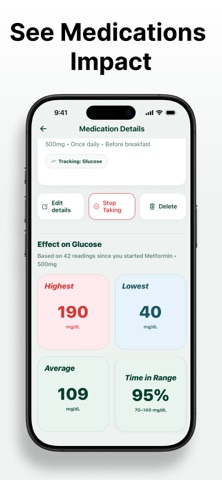
SEE MEDICATION TRENDS
Build a medication timeline and review how your glucose, weight, and blood pressure changed while a medication was being tracked.
GluKee does not recommend starting, stopping, or changing medication.
CREATE DOCTOR-READY REPORTS
Generate reports with glucose trends, averages, Time in Range, estimated A1C, medications, blood pressure, weight, and data coverage to support conversations with your healthcare professional.
STAY CONSISTENT
• Custom glucose reminders
• Medication reminders
• Home screen widgets
• Streaks and progress tracking
• Offline logging
• Secure sync and backup
IMPORTANT
GluKee is an educational tracking tool and is not a medical device. It does not diagnose, treat, cure, or prevent any condition. Do not change medication or treatment based on the app alone. Seek medical care for urgent symptoms or readings according to your care plan.
GLUKEE PRO
Some features require GluKee Pro. Pricing, billing period, and trial availability are shown in the app before purchase.
Support: support@glukee.com
Website: https://glukee.com
Terms: https://glukee.com/terms
Privacy: https://glukee.com/privacy
Safety and technology
Found in the app by AppBrain- Price
- Free
- App size
- 94.2 MB
- Content rating
- Medium
Technologies used by GluKee: Blood Sugar Tracker
Releases
Updates seen on the App Store- Version
- 2.2.1
- Launched
- February 2026
No changelog data
Alternatives
Similar apps and more from Glukee Labs LLCAlternatives to GluKee: Blood Sugar Tracker


Rankings
App Store top chartsApp Store Rankings for GluKee: Blood Sugar Tracker
About the app and developer
About GluKee: Blood Sugar Tracker
GluKee: Blood Sugar Tracker is a health & fitness app developed by Glukee Labs LLC.
User Ratings
GluKee: Blood Sugar Tracker is rated 4.83 out of 5 stars. The rating is based on 6 ratings.
App Information
GluKee: Blood Sugar Tracker is freely available from the App Store. The app size is 94.16 MB. The latest version available is 2.2.1. The last update was on October 19, 2026.
Technical Requirements
The app has a content rating of Medium Maturity. The app has been available on the App Store since February 2026.
GluKee: Blood Sugar Tracker is made and published by Glukee Labs LLC. AppBrain is an independent app data site and isn't affiliated with Glukee Labs LLC. The app name, icon, screenshots and description belong to Glukee Labs LLC and are shown as published on the App Store.
Developer information for Glukee Labs LLC
Address: