


AppBrain's verdict
- Last updated
- November 11, 2026
- Size
- 5.99 MB
User feedback
Ratings and reviews on the App StoreComments on Glyphlock for iOS
We don't have enough comments to show example comments. Please check back later.
Store listing
By Cuong Sam Manh, from the App StoreDescription by Cuong Sam Manh Written by the developer, not by AppBrain. Click to read.
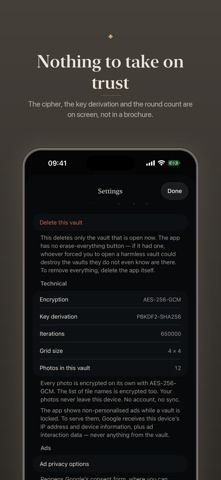
Most "hide my photos" apps move your pictures into another folder and put a passcode at the door. The pictures stay perfectly readable; the app simply declines to show them. Glyphlock works differently. You draw a pattern on a 3×3 or 4×4 grid of dots, and that pattern is run through PBKDF2-HMAC-SHA256, 650,000 rounds, to derive a key that unwraps the vault's AES-256-GCM data key. Without the pattern there is no way to read the files. Not a refusal to display them: no method exists.
The second the app spends thinking after you draw is deliberate: it is the same second anyone guessing patterns spends on every attempt.
WHAT IS ENCRYPTED
Every photo. Every video. And the index of file names, so even the names give nothing away. Videos are encrypted in 1 MB chunks and streamed, each chunk bound to its position and to the total count, so they cannot be reordered, truncated, or swapped in from another file.
SEVERAL VAULTS ON ONE DEVICE
One device can hold several vaults. Each pattern opens exactly one, with its own key, its own photos, its own recovery code. From inside a vault there is no way to learn the others exist: no list, no count, no marker saying which is "real".
That exists for a reason. If someone takes your phone and makes you open the app, you open a vault that holds nothing but landscapes.
RECOVERY CODE
Each vault gets a 30-character recovery code, about 150 bits, shown exactly once at creation and never stored in readable form. Write it down or paste it into a password manager before you close that screen. There is no second showing.
ALSO
Optional Face ID / Touch ID, off by default. Auto-lock the moment you leave the app, or after 30 seconds, or 5 minutes. The screen is covered in the app switcher. Backups export to a .pvault file whose photos stay encrypted: opening it still takes that vault's pattern or recovery code, so it is exactly as strong as your pattern. Your photos do not leave the device: no server, no account, no sync, and the app itself measures nothing about you. English and Vietnamese.
ADVERTISING
Google banner ads, only on the two screens where the vault is still locked: unlock and first-run setup. Never in the gallery, never in the viewer, never on the recovery-code screen — an ad SDK loads remote content, so it must not share a screen with decrypted photos. The ads are not personalised, so the app never asks to track you. To serve an ad, Google receives your IP address and device information: no photos, no file names, nothing from a vault.
WHAT THIS APP DOES NOT DO
A 3×3 grid has only 389,112 possible patterns. Someone who copies the app's files off the device can try every one on a GPU within hours, and 650,000 rounds will not save you. A 4×4 grid has more than 100 trillion patterns and is the app's default: use it. The app says this on the grid-size screen too.
Several vaults hide the content, and which vault matters, but not the number of vaults: anyone with file-system access can count the vault directories. They still cannot open any of them.
While a video plays, a decrypted copy of it exists inside the app's private container, under iOS file protection, and is deleted the moment you close the player or lock the vault. Photos never have this problem: they are only decrypted in memory.
The failed-attempt delay (30 seconds after 5 wrong patterns, then longer) is app-level. Its state file sits outside the encrypted area, so anyone with access to the app's folder can delete it and the delay is gone. The layer that cannot be bypassed is the PBKDF2 cost.
iOS does not let an app delete your originals, so after you add photos to the vault you have to open the Photos app and delete them yourself. Until you do, hiding them has achieved nothing.
And last: lose the pattern and the recovery code, and the photos in that vault are gone. No backdoor, no reset, and nobody can recover them for you, including the developer.
Safety and technology
Found in the app by AppBrain- Price
- Free
- App size
- 5.99 MB
- Content rating
- Everyone
Technologies used by Glyphlock
Releases
Updates seen on the App Store- Version
- 1.0
- Launched
- November 2026
No changelog data
Alternatives
Similar apps and more from Cuong Sam ManhMore from Cuong Sam Manh


Rankings
App Store top chartsApp Store Rankings for Glyphlock
About the app and developer
About Glyphlock
Glyphlock is a photo & video app developed by Cuong Sam Manh.
User Ratings
The app has no ratings yet.
App Information
Glyphlock is freely available from the App Store. The app size is 5.99 MB. The latest version available is 1.0. The last update was on November 11, 2026.
Technical Requirements
The app has a content rating of Everyone. The app has been available on the App Store since November 2026.
Glyphlock is made and published by Cuong Sam Manh. AppBrain is an independent app data site and isn't affiliated with Cuong Sam Manh. The app name, icon, screenshots and description belong to Cuong Sam Manh and are shown as published on the App Store.
Developer information for Cuong Sam Manh
Address:
Frequently asked questions about Glyphlock
Is Glyphlock free?
Yes. Glyphlock is free on the App Store.
Is Glyphlock still available?
Yes. Glyphlock is on the App Store, and the last update we saw was on November 11, 2026.
How large is Glyphlock?
Glyphlock is 5.99 MB.
Is Glyphlock suitable for children?
App Store rates the content of Glyphlock as suitable for everyone.
Who made Glyphlock?
Glyphlock was developed by Cuong Sam Manh. It is listed in the photo & video category on the App Store.