

Go Dictation - Listen & Write
Go Dictation - Listen & Write is made and published by Duy Nguyen Van. AppBrain is an independent app data site and isn't affiliated with Duy Nguyen Van. The app name, icon, screenshots and description belong to Duy Nguyen Van and are shown as published on the App Store.
AppBrain's verdict
- Rating on App Store
- 5.00
- 1 ratings
- Last updated
- October 16, 2024
It doesn't have enough ratings yet to judge what users think.
Rankings
App Store top chartsApp Store Rankings for Go Dictation - Listen & Write
Competitors
Similar apps and more from Duy Nguyen VanAlternatives to Go Dictation - Listen & Write




More from Duy Nguyen Van







Releases
Updates seen on the App Store- Version
- 1.0.2
- Launched
- May 2024
No changelog data
User feedback
Ratings and reviews on the App StoreComments on Go Dictation - Listen & Write for iOS
We don't have enough comments to show example comments. Please check back later.
Technology
Found in the app by AppBrain- Price
- Free
- App size
- 62.8 MB
- Content rating
- Everyone
Technologies used by Go Dictation - Listen & Write
About the app and developer
About Go Dictation - Listen & Write
Go Dictation - Listen & Write is an education app developed by Duy Nguyen Van.
What is the rating of Go Dictation - Listen & Write?
Go Dictation - Listen & Write is rated 5.00 out of 5 stars, based on one rating ratings.
Is Go Dictation - Listen & Write free?
Go Dictation - Listen & Write is free. The app size is 62.80 MB. The latest version available is 1.0.2. The last update was on October 16, 2024.
What are the requirements for Go Dictation - Listen & Write?
The app has a content rating of Everyone. The app has been available on the App Store since May 2024.
Developer information for Duy Nguyen Van
Address:
Frequently asked questions about Go Dictation - Listen & Write
Is Go Dictation - Listen & Write free?
Yes. Go Dictation - Listen & Write is free on the App Store.
Is Go Dictation - Listen & Write still available?
Yes. Go Dictation - Listen & Write is on the App Store, and the last update we saw was on October 16, 2024.
How large is Go Dictation - Listen & Write?
Go Dictation - Listen & Write is 62.80 MB.
Is Go Dictation - Listen & Write suitable for children?
App Store rates the content of Go Dictation - Listen & Write as suitable for everyone.
How do people rate Go Dictation - Listen & Write?
Go Dictation - Listen & Write has one rating of 5.00 stars on the App Store.
Who made Go Dictation - Listen & Write?
Go Dictation - Listen & Write was developed by Duy Nguyen Van. It is listed in the education category on the App Store.
What are the best alternatives to Go Dictation - Listen & Write?
People looking at Go Dictation - Listen & Write also look at these education apps: IELTS Listening - ZIELTS, Learn English: Speak & Grammar, TOEIC Mastery, Ôn thi VSTEP Tiếng Anh cấp tốc, vEnglish – Learn English Smart.
Store listing
By Duy Nguyen Van, from the App Store





Description by Duy Nguyen Van Written by the developer, not by AppBrain. Click to read.
* Listening and copying spelling practice is a commonly used technique to help candidates improve their listening skills effectively.
* The method of listening and copying dictation will help you remember better, expand your vocabulary as well as form English reflexes
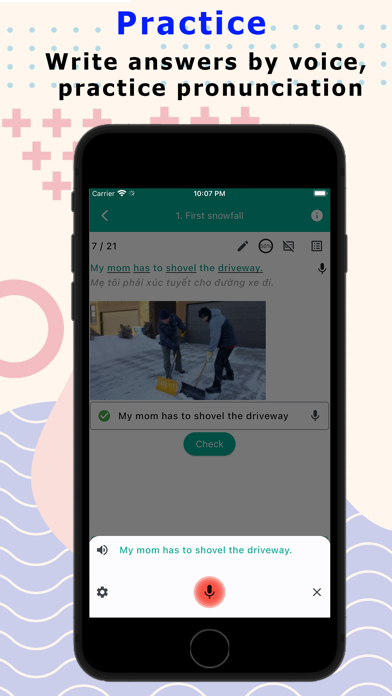
*Dictation is a technique used in language teaching and testing in which a passage is read aloud to learners and they must write down what they hear as accurately as possible.
* Listening sources can be videos, audio, recordings, podcasts that contain native speakers' voices with English - British or English - American accents.
* A variety of easier-to-listen topics such as education, environment, work, school, subjects, ielts, toeic, toefl,...
Step 1 - Start listening: Depending on your listening ability, you will choose the time to stop the video. For example, after a sentence of about 5-10 words, you stop the video and take notes on what you hear. You will do this until the listening ends. Continue listening 1-2 more times to enhance your skills.
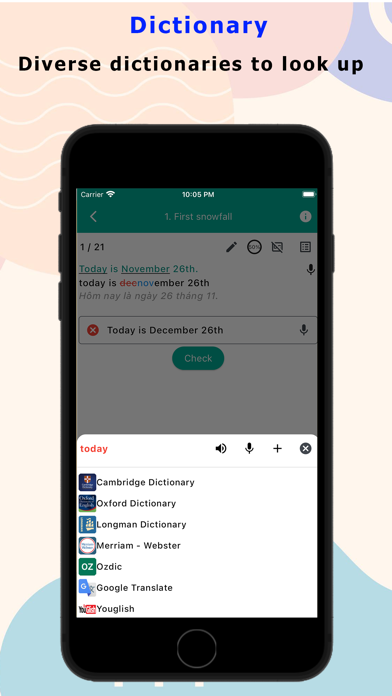
Step 2 - Compare the transcript with your dictation: After listening to the entire lesson about 3 times, you will compare your notes, correct incorrect words and fill in the parts you left blank. This comparison will help you identify the mistakes you often encounter to avoid mistakes in the real test.
Step 3 - Correct pronunciation errors through reading: You should look up words in the dictionary that you do not know how to read or read incorrectly, then read the entire transcript again and record it. Listening back to the recording will help you compare your pronunciation with the native speaker's, because the way we pronounce will determine our ability to listen and understand.
Step 4 - Listen to the audio over and over again: Listening over and over again will increase your English listening reflexes and help you remember many useful vocabulary.
---------------------------------------------
***SUPPORT:
Software: Go Dictation
Author: Nguyen Van Duy
Call/SMS/Zalo: 0868934697
Fb: facebook.com/duy.pablo
Email: Leo.appvn@gmail.com