

Google Classroom is made and published by Google. AppBrain is an independent app data site and isn't affiliated with Google. The app name, icon, screenshots and description belong to Google and are shown as published on the App Store.
AppBrain's verdict
EstablishedPoorly ratedTop 10- Best rank
- #2
- Top Free, Indonesia
- Rating on App Store
- 2.06
- 36,841 ratings
- Last updated
- October 5, 2026
Users are critical: 2.1 stars from 36,841 ratings. Its best ranking is #2 in Top Free, Education in Indonesia.
Rankings
App Store top charts- Highest rank
- #2
- Chart
- Top Free
- Education
- Country
- Indonesia
App Store Rankings for Google Classroom
Top rankings
| Rank | Country | Category | List |
|---|---|---|---|
| 3 | Canada | Education | Top Free |
| 2 | Indonesia | Education | Top Free |
| 2 | Italy | Education | Top Free |
| 2 | Mexico | Education | Top Free |
| 6 | United States | Education | Top Free |
| 5 | Japan | Education | Top Free |
| 4 | Spain | Education | Top Free |
| 5 | Portugal | Education | Top Free |
| 6 | Iran | Education | Top Free |
| 7 | India | Education | Top Free |
Ranking history in Canada
Competitors
Similar apps and more from GoogleAlternatives to Google Classroom


More from Google


Releases
Updates seen on the App Store- Version
- 3.68.300052585
- Launched
- January 2015
No changelog data
User feedback
Ratings and reviews on the App StoreComments on Google Classroom for iOS
We don't have enough comments to show example comments. Please check back later.
Technology
Found in the app by AppBrain- Price
- Free
- App size
- 202.0 MB
- Content rating
- Everyone
Technologies used by Google Classroom
About the app and developer
About Google Classroom
Google Classroom is an education app developed by Google.
User Ratings
Google Classroom is rated 2.06 out of 5 stars. The rating is based on 37 thousand ratings.
App Information
Google Classroom is freely available from the App Store. The app size is 202.00 MB. The latest version available is 3.68.300052585. The last update was on October 5, 2026.
Technical Requirements
The app has a content rating of Everyone. The app has been available on the App Store since January 2015.
Developer information for Google
Address:
Store listing
By Google, from the App Store





Description by Google Written by the developer, not by AppBrain. Click to read.
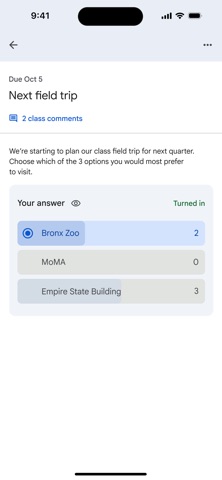
Classroom is designed to help teachers create, collect, and grade assignments paperlessly, including time-saving features like the ability to automatically make a copy of a Google Document for each student. It also creates Drive folders for each assignment and for each student to help keep everyone organized.
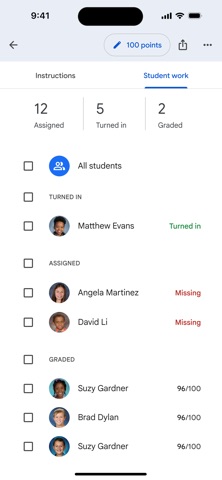
Students can keep track of what’s due on the Assignments page and begin working with just a click. Teachers can quickly see who has or hasn't completed the work, and provide direct, real-time feedback and grades right in Classroom.
With the mobile app for iOS, students and teachers can view their classes and communicate with their classmates in real time. Students can open their assignments and work on them right from their iPhone or iPad. Teachers can keep track of who has turned in work and grade the assignment - at school or on the go. Students and teachers receive notifications when they have new content in Classroom, so they are always up to date.
There are many benefits of using Classroom:
Easy to set up
Teachers can add students directly or share a code with their class to join. It takes just minutes to set up.
Saves time
The simple, paperless assignment workflow allows teachers to create, review, and grade assignments quickly, all in one place.
Improves organization
Students can see all of their assignments on an assignments page, and all class materials (e.g., documents, photos, and videos) are automatically filed into folders in Google Drive.
Enhances communication
Classroom allows teachers to send announcements and start class discussions instantly. Students can share resources with each other or provide answers to questions on the stream.
Secure
Like the rest of Google Workspace for Education services, Classroom contains no ads, never uses your content or student data for advertising purposes.
Permissions Notice:
Camera: Needed to allow the user to take photos or videos and post them to Classroom.
Microphone: Needed to enable audio capture for recording videos to be posted to Classroom.
Photos: Needed to allow the user to attach photos or videos to Classroom. Photos or videos posted to Classroom will be stored on Google servers in order to show them in Classroom.