

Gospel A Day is made and published by Rodney Bradley. AppBrain is an independent app data site and isn't affiliated with Rodney Bradley. The app name, icon, screenshots and description belong to Rodney Bradley and are shown as published on the App Store.
AppBrain's verdict
- Last updated
- July 28, 2026
Rankings
App Store top chartsApp Store Rankings for Gospel A Day
Competitors
Similar apps and more from Rodney BradleyMore from Rodney Bradley

Releases
Updates seen on the App Store- Version
- 1.0
- Launched
- July 2026
No changelog data
User feedback
Ratings and reviews on the App StoreComments on Gospel A Day for iOS
We don't have enough comments to show example comments. Please check back later.
Technology
Found in the app by AppBrain- Price
- $0.99
- App size
- 638.3 MB
- Content rating
- Everyone
Technologies used by Gospel A Day
About the app and developer
About Gospel A Day
Gospel A Day is an education app developed by Rodney Bradley.
What is the rating of Gospel A Day?
Gospel A Day has no ratings yet.
Is Gospel A Day free?
Gospel A Day costs $0.99. The app size is 638.33 MB. The latest version available is 1.0. The last update was on July 28, 2026.
What are the requirements for Gospel A Day?
The app has a content rating of Everyone. The app has been available on the App Store since July 2026.
Developer information for Rodney Bradley
Address:
Frequently asked questions about Gospel A Day
Is Gospel A Day free?
No. Gospel A Day costs $0.99 on the App Store.
Is Gospel A Day still available?
Yes. Gospel A Day is on the App Store, and the last update we saw was on July 28, 2026.
How large is Gospel A Day?
Gospel A Day is 638.33 MB.
Is Gospel A Day suitable for children?
App Store rates the content of Gospel A Day as suitable for everyone.
Who made Gospel A Day?
Gospel A Day was developed by Rodney Bradley. It is listed in the education category on the App Store.
Store listing
By Rodney Bradley, from the App Store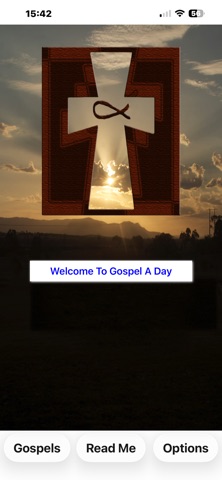

Description by Rodney Bradley Written by the developer, not by AppBrain. Click to read.
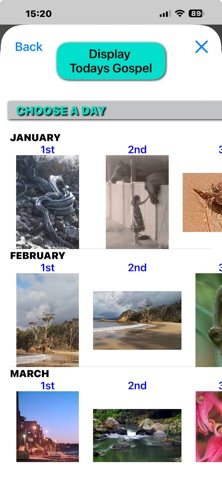
There are 366 gospels.
You are welcomed to each day of the calendar year with a gospel that is specific to that day.
Along with each Gospel is a meaning that is relevant to today’s busy world.
Also in the background is a picture.
Take the time to reflect on this days gospel and meaning.
There is also an option to listen to your choice of a song from your devices Music Library.
GOSPEL SELECTION
You can choose to reflect on today’s gospel “Display Today’s Gospel” or choose a specific day of the year from the collection of photos (perfect for surprising a friend with the gospel for their birthday or special day).
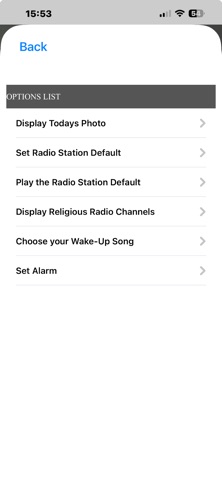
OPTIONS
Listen to a religious radio station.
“Choose your wake-up song”.
“Set the alarm”.
OPTION DETAILS
Display Religious Radio Stations.
Currently there are a choice of 4 station websites that will allow you to listen to their content.
Choose your wake-up song.
To allow this app to access your devices Music Library you will need to have ‘Allowed’ access to “Media & Apple Music” when opening the app for the first time.
This option is available for you to choose a specific song from your devices Music Library. This song will be used for listening too while reflecting on today’s gospel, and, as the song that will wake you up after you have set your alarm time.
If your device has no songs in its Music Library.
You will be offered a free song that has been downloaded from the internet.
Set the Alarm.
To use this option you would need to have agreed to “Allow Notifications” when opening the app for the first time.