

GoWithCapture is made and published by 도나레. AppBrain is an independent app data site and isn't affiliated with 도나레. The app name, icon, screenshots and description belong to 도나레 and are shown as published on the App Store.
AppBrain's verdict
- Last updated
- October 16, 2026
Rankings
App Store top chartsApp Store Rankings for GoWithCapture
This app is not ranked
Releases
Updates seen on the App Store- Version
- 1.0
- Launched
- October 2026
No changelog data
User feedback
Ratings and reviews on the App StoreComments on GoWithCapture for iOS
We don't have enough comments to show example comments. Please check back later.
Technology
Found in the app by AppBrain- Price
- Free
- App size
- 35.9 MB
- Content rating
- Everyone
Technologies used by GoWithCapture
About the app and developer
About GoWithCapture
GoWithCapture is a games app developed by 도나레.
What is the rating of GoWithCapture?
GoWithCapture has no ratings yet.
Is GoWithCapture free?
GoWithCapture is free. The app size is 35.93 MB. The latest version available is 1.0. The last update was on October 16, 2026.
What are the requirements for GoWithCapture?
The app has a content rating of Everyone. The app has been available on the App Store since October 2026.
Developer information for 도나레
Address:
Store listing
By 도나레, from the App Store


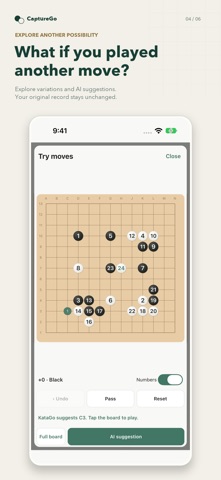


Screenshots by 도나레, from the the App Store listing
Description by 도나레 Written by the developer, not by AppBrain. Click to read.
Photograph a Go board and keep playing from that position.
CaptureGo recognizes stone placements in photos of Go boards, so you can continue playing against AI, analyze positions, and review completed games.
Bring a game from your physical Go board to your phone and explore different moves.
■ Turn a board photo into a playable position
• Take a photo of a Go board or import a saved photo.
• Use 9×9, 13×13, or 19×19 boards.
• Align the four corners of the board and check the recognized stones.
• Overlay the photo while manually adding or removing black and white stones.
• Zoom and pan the original photo to inspect the placement in detail.
■ Continue with AI and explore the position
• Start from a position imported from a photo or from a new board.
• Choose an even game, a fixed-color game without komi, or a handicap game, then play against AI or study on your own.
• View AI move suggestions and position analysis, and use scoring to determine the result.
■ You can also enjoy Go against AI without taking a photo.
■ Review completed games one move at a time
• Step backward and forward through the game and display move numbers on the board.
• Follow the game with autoplay at intervals from 1 to 60 seconds.
• Try different moves in variation mode and view AI suggestions.
• Exploring variations leaves the original game record unchanged. Choose suggested moves yourself to play them.
• Ads may appear before game review when using the app for free.
■ CaptureGo Premium
Get the following features with a monthly subscription.
• Remove ads: Enjoy the app without ads, including those before game review
• Save games: Keep your games and load them again
• Save positions: Store stone placements you want to study
• Export SGF: Save and share game records as files
■ Usage notes
• Supports portrait orientation on iPhone.
• Available in Korean, English, Japanese, and Traditional Chinese.
• Photo recognition imports the current stone placement; it does not reconstruct moves played before the photo was taken.
• Check photo recognition and scoring results, and make corrections as needed.
• Ads, purchases, and purchase restoration may require an internet connection.
Terms of Use (EULA): https://www.apple.com/legal/internet-services/itunes/dev/stdeula/
CaptureGo recognizes stone placements in photos of Go boards, so you can continue playing against AI, analyze positions, and review completed games.
Bring a game from your physical Go board to your phone and explore different moves.
■ Turn a board photo into a playable position
• Take a photo of a Go board or import a saved photo.
• Use 9×9, 13×13, or 19×19 boards.
• Align the four corners of the board and check the recognized stones.
• Overlay the photo while manually adding or removing black and white stones.
• Zoom and pan the original photo to inspect the placement in detail.
■ Continue with AI and explore the position
• Start from a position imported from a photo or from a new board.
• Choose an even game, a fixed-color game without komi, or a handicap game, then play against AI or study on your own.
• View AI move suggestions and position analysis, and use scoring to determine the result.
■ You can also enjoy Go against AI without taking a photo.
■ Review completed games one move at a time
• Step backward and forward through the game and display move numbers on the board.
• Follow the game with autoplay at intervals from 1 to 60 seconds.
• Try different moves in variation mode and view AI suggestions.
• Exploring variations leaves the original game record unchanged. Choose suggested moves yourself to play them.
• Ads may appear before game review when using the app for free.
■ CaptureGo Premium
Get the following features with a monthly subscription.
• Remove ads: Enjoy the app without ads, including those before game review
• Save games: Keep your games and load them again
• Save positions: Store stone placements you want to study
• Export SGF: Save and share game records as files
■ Usage notes
• Supports portrait orientation on iPhone.
• Available in Korean, English, Japanese, and Traditional Chinese.
• Photo recognition imports the current stone placement; it does not reconstruct moves played before the photo was taken.
• Check photo recognition and scoring results, and make corrections as needed.
• Ads, purchases, and purchase restoration may require an internet connection.
Terms of Use (EULA): https://www.apple.com/legal/internet-services/itunes/dev/stdeula/