

GPS Alarm: Location Alert
GPS Alarm: Location Alert is made and published by Matthew Wong. AppBrain is an independent app data site and isn't affiliated with Matthew Wong. The app name, icon, screenshots and description belong to Matthew Wong and are shown as published on the App Store.
AppBrain's verdict
- Last updated
- September 9, 2026
- Size
- 16.4 MB
User feedback
Ratings and reviews on the App StoreComments on GPS Alarm: Location Alert for iOS
We don't have enough comments to show example comments. Please check back later.
Store listing
By Matthew Wong, from the App Store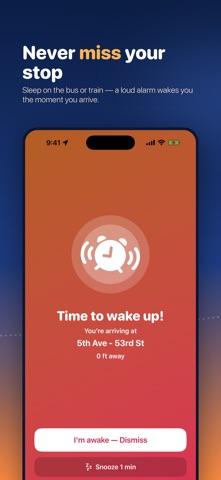




Description by Matthew Wong Written by the developer, not by AppBrain. Click to read.
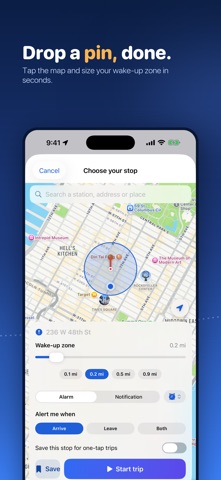
Set the place you want to get off on a map, choose a wake-up zone around it, and start your trip. The app keeps watch in the background and sounds a loud alarm — or a gentle notification, your choice — the moment you come within range. Then relax: nap, read, or just close your eyes.
WHY YOU'LL LOVE IT
• A wake-up alarm based on where you actually are, not a guessed arrival time
• Works in the background, even with the screen locked
• Loud looping alarm with vibration, or a gentle notification — your choice
• Six built-in tones, and snooze if you need a few more minutes
• In Alarm mode the sound plays even when your phone is set to silent
FREE TO USE
• The full single-destination arrival alarm is free — set a stop, start a trip, and we'll wake you when you arrive. No subscription required.
• Save up to 2 stops for one-tap trips
• Start a trip straight from the Home Screen widget, or start and end one with Siri
• The free version is supported by ads. Ads never appear while a trip is running, and never on the alarm screen — nothing gets in the way of waking you up.
GPS ALARM PRO
Upgrade to Pro for:
• No ads anywhere in the app
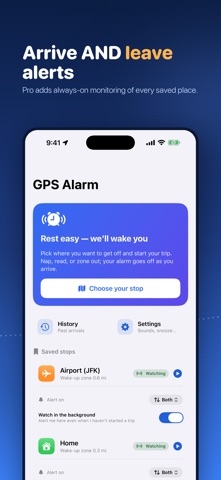
• Leave & arrival alerts — be alerted when you arrive at a place, when you leave it, or both (per place). The free alarm is arrive-only.
• Always-on monitoring of all your saved places — GPS Alarm can watch every saved place in the background and alert you whenever you arrive at or leave any of them, even when no trip is running. You turn this on per device in Settings; it needs the "Always" location permission and is off until you enable it.
• A live countdown on your Lock Screen and Dynamic Island, so you can see how far you have to go at a glance
• Unlimited saved stops
• A full history of every arrival and departure, synced across your devices — with trip stats and CSV or GPX export
Pro is an auto-renewable monthly or yearly subscription with a 7-day free trial. The price is shown in the app before you subscribe, and on this App Store page. Payment is charged to your Apple Account at confirmation of purchase. The subscription renews automatically unless cancelled at least 24 hours before the end of the current period; manage or cancel anytime in your App Store account settings. Any unused portion of the free trial is forfeited when you subscribe.
Terms of Use (EULA): https://www.apple.com/legal/internet-services/itunes/dev/stdeula/
Privacy Policy: https://mwsupplylimited.github.io/timetowakeup/privacy.html
SIMPLE TO USE
• Search for a station or address, or just drop a pin on the map
• Pick a wake-up zone — a larger zone wakes you earlier so you have time to get ready
• Save the stops you travel to often for one-tap trips
• A live screen shows how far you are from your destination
PRIVACY
• Your precise GPS location is processed only on your device — to detect when you arrive at or leave your stop, and, if you turn on always-on monitoring, to watch your saved places in the background. It is never uploaded to us, never sold, and never used to identify you.
• Your saved stops and history back up to your own private iCloud
• Our advertising partners receive an advertising identifier, app usage, purchase and performance data, and a country-level region derived from the ad request's IP address — never your GPS location, your saved stops, or your wake-up zones.
Note: Continued use of GPS running in the background can dramatically decrease battery life. GPS Alarm uses continuous background location only while a trip is active. Always-on monitoring (an optional Pro feature) uses lower-power region and significant-location-change monitoring, and only when you have turned it on.
Safety and technology
Found in the app by AppBrain- Price
- Free
- App size
- 16.4 MB
- Content rating
- Everyone
Technologies used by GPS Alarm: Location Alert
Releases
Updates seen on the App Store- Version
- 1.0.11
- Launched
- June 2026
No changelog data
Alternatives
Similar apps and more from Matthew WongAlternatives to GPS Alarm: Location Alert


More from Matthew Wong


Rankings
App Store top chartsApp Store Rankings for GPS Alarm: Location Alert
About the app and developer
About GPS Alarm: Location Alert
GPS Alarm: Location Alert is a travel app developed by Matthew Wong.
User Ratings
The app has no ratings yet.
App Information
GPS Alarm: Location Alert is freely available from the App Store. The app size is 16.45 MB. The latest version available is 1.0.11. The last update was on September 9, 2026.
Technical Requirements
The app has a content rating of Everyone. The app has been available on the App Store since June 2026.
Developer information for Matthew Wong
Address: