




AppBrain's verdict
- Rating on App Store
- 4.33
- 3 ratings
- Last updated
- September 10, 2026
- Size
- 15.7 MB
It doesn't have enough ratings yet to judge what users think.
User feedback
Ratings and reviews on the App StoreComments on GPS Mapper for iOS
We don't have enough comments to show example comments. Please check back later.
Store listing
By NIKOLAH LOUIS DANCHUK-LAUZON, from the App StoreDescription by NIKOLAH LOUIS DANCHUK-LAUZON Written by the developer, not by AppBrain. Click to read.
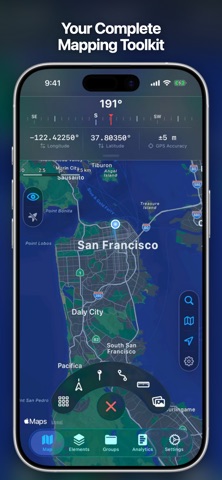
Whether you're a hiker logging every step, a cyclist tracking new roads, or someone who wants every outdoor activity tracked in one place — GPS Mapper is built for it.
GRID EXPLORATION
- Place rectangular grids anywhere, or map any-shaped area with freeform grids
- 10 grid detail sizes, from 16 cells up to 2,500 cells
- Cells auto-fill as you move through them via GPS
- Optionally mark cells from geotagged photos and recorded trails
- Track completion percentage for every grid
TRAIL RECORDING
- Record GPS trails with live distance, duration, elevation, pace, speed, and more
- Tag trails with your own custom labels
- Replay recorded trails on the map with animated Playback
PINS
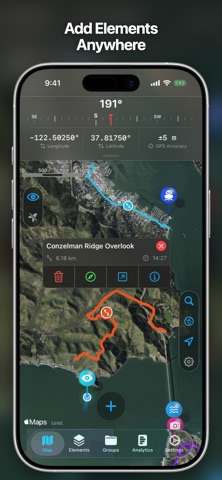
- Drop custom pins anywhere
- Organize with icons, colors, and names
ROUTES
- Draw custom multi-waypoint routes, or auto-generate a road-following route to a destination
- Save and view your routes on the map
RANGE FINDER
- Measure point-to-point distances directly on the map
- Save measurements with custom names and colors
- Great for golf, hunting, surveying, and more
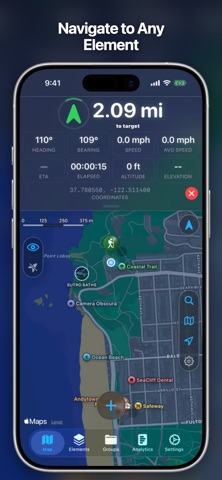
NAVIGATION
- Navigate to your elements with the in-app compass direct feature
- Use Apple Maps to navigate to any element
IMAGE OVERLAYS
- Place photos on the map as georeferenced overlays
- Adjust position, scale, rotation, and transparency
- Perfect for historical maps, trail maps, or site plans
GROUPS
- Bundle any mix of grids, pins, trails, routes, ranges, and overlays
- Organize trips and projects
- Sort and manage from one place
TAGS
- Create custom tags and apply them to any element
- Filter your map elements by tag to find exactly what you need
- Use tags across element types for flexible organization
LOCATION SHARING
- See friends' real-time locations on your map
PHOTOS ON MAP
- View geotagged photos from your photos library on the map
- Find and share your photos straight from the map
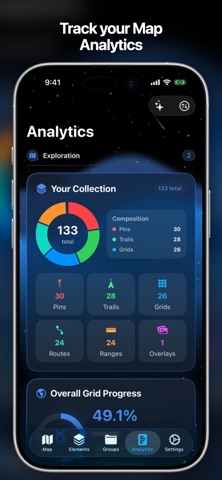
ANALYTICS DASHBOARD
- Apple Health integration — steps, distance, calories, exercise minutes, and heart rate shown alongside your activity
- Daily and weekly activity — what you've added each week, your most active days, daily averages, and per-type breakdowns
- Exploration progress — total grids, cells mapped, cells visited, completion rate, and your most-explored area
- Your collection at a glance — a visual breakdown of grids, trails, pins, routes, ranges, and overlays
- Detailed stats for every element type — distances, lengths, counts, and more
- Build your own layout — reorder, show, or hide cards to focus on the metrics that matter to you
IMPORT & EXPORT
- Import and export GPX files
- Full backup and restore of your data — always free
- Share your elements with friends
CUSTOMIZATION
- Coordinate display in Decimal Degrees, DDM, DMS, UTM, and MGRS
- Standard, Satellite, and Hybrid map styles
- Toggle POIs, traffic, compass, and scale
- Interactive tutorials
- Customizable analytics dashboard layout
- Custom sort orders for every element type
- Customize backgrounds across your screens
PREMIUM
Upgrade to unlock:
- Unlimited grids, trails, pins, routes, ranges, and image overlays
- Freeform grids — map any-shaped area
- Advanced analytics dashboard with Apple Health
- Navigation — in-app compass + Apple Maps directions to any element
- Trail Playback — replay recorded trails
- Location history with time-range filtering on the map
- Configurable GPS update intervals
- See up to 20 friends' locations (free: 2)
- Customize backgrounds across your screens
Terms of Use (EULA): https://www.apple.com/legal/internet-services/itunes/dev/stdeula/
Safety and technology
Found in the app by AppBrain- Price
- Free
- App size
- 15.7 MB
- Content rating
- Everyone
Technologies used by GPS Mapper
Releases
Updates seen on the App Store- Version
- 1.2.1
- Launched
- June 2026
No changelog data
Alternatives
Similar apps and more from NIKOLAH LOUIS DANCHUK-LAUZONAlternatives to GPS Mapper


More from NIKOLAH LOUIS DANCHUK-LAUZON

Rankings
App Store top chartsApp Store Rankings for GPS Mapper
About the app and developer
About GPS Mapper
GPS Mapper is a navigation app developed by NIKOLAH LOUIS DANCHUK-LAUZON.
What is the rating of GPS Mapper?
GPS Mapper is rated 4.33 out of 5 stars, based on 3 ratings.
Is GPS Mapper free?
GPS Mapper is free. The app size is 15.68 MB. The latest version available is 1.2.1. The last update was on September 10, 2026.
What are the requirements for GPS Mapper?
The app has a content rating of Everyone. The app has been available on the App Store since June 2026.
GPS Mapper is made and published by NIKOLAH LOUIS DANCHUK-LAUZON. AppBrain is an independent app data site and isn't affiliated with NIKOLAH LOUIS DANCHUK-LAUZON. The app name, icon, screenshots and description belong to NIKOLAH LOUIS DANCHUK-LAUZON and are shown as published on the App Store.
Developer information for NIKOLAH LOUIS DANCHUK-LAUZON
Address: