

GPS Speedometer HUD: Speedra
GPS Speedometer HUD: Speedra is made and published by Arthur Pimentel. AppBrain is an independent app data site and isn't affiliated with Arthur Pimentel. The app name, icon, screenshots and description belong to Arthur Pimentel and are shown as published on the App Store.
AppBrain's verdict
- Rating on App Store
- 5.00
- 3 ratings
- Last updated
- September 30, 2026
It doesn't have enough ratings yet to judge what users think.
Rankings
App Store top chartsApp Store Rankings for GPS Speedometer HUD: Speedra
Competitors
Similar apps and more from Arthur PimentelMore from Arthur Pimentel


Releases
Updates seen on the App Store- Version
- 1.6
- Launched
- January 2026
No changelog data
User feedback
Ratings and reviews on the App StoreComments on GPS Speedometer HUD: Speedra for iOS
We don't have enough comments to show example comments. Please check back later.
Technology
Found in the app by AppBrain- Price
- Free
- App size
- 24.8 MB
- Content rating
- Everyone
Technologies used by GPS Speedometer HUD: Speedra
About the app and developer
About GPS Speedometer HUD: Speedra
GPS Speedometer HUD: Speedra is a navigation app developed by Arthur Pimentel.
User Ratings
GPS Speedometer HUD: Speedra is rated 5.00 out of 5 stars. The rating is based on 3 ratings.
App Information
GPS Speedometer HUD: Speedra is freely available from the App Store. The app size is 24.80 MB. The latest version available is 1.6. The last update was on September 30, 2026.
Technical Requirements
The app has a content rating of Everyone. The app has been available on the App Store since January 2026.
Developer information for Arthur Pimentel
Address:
Store listing
By Arthur Pimentel, from the App Store


Description by Arthur Pimentel Written by the developer, not by AppBrain. Click to read.
Set the top of the dial to match what you drive. Choose the colors that mark fast and slow. Choose what sits under the number: a live map, a g-force meter, a compass or a clock. Read it in km/h, mph or knots, in a car, on a motorcycle, on a bike or on a boat.
No ads anywhere in it. No account to make.
THE SPEEDOMETER
Your speed fills the screen, on a dial you set up once. Choose the top of the scale to match what you actually drive, choose the colors that mark fast and slow, and switch between km/h, mph and knots whenever you like.
THREE VIEWS
Standard puts your speed on the dial with one panel underneath. Sport sets two panels side by side, so you can watch g-force and the 0-100 timer at once. Zen is the number and nothing else. All three work in portrait and in landscape.
STYLE
Four gauge styles: an arc, a full ring, segments, or a swinging needle. Three typefaces for the digits, from rounded to a seven-segment LCD, each in three weights. A single fixed color if you would rather the dial did not change. Light or dark.
BUILT FOR ANY VEHICLE
Car, motorcycle, bike or boat. Knots and nautical miles on the water, feet or meters for altitude, and a gauge that reads sensibly whether you top out at 30 or 300.
PICK YOUR SECOND DISPLAY
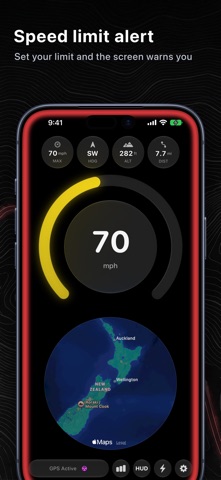
Choose what sits below the main gauge:
- Live map
- G-force meter for cornering and braking
- Compass heading
- Clock
SPEED LIMIT ALERTS
Set your own threshold. The screen edges pulse red and an optional chime sounds the moment you cross it.
HEAD-UP DISPLAY
Mirror mode projects your speed onto the windshield after dark, in digits you can read without taking your eyes off the road.
THE NUMBERS
Max speed, average speed, distance, duration, altitude, a 0-100 km/h (0-60 mph) acceleration timer, and a lifetime odometer that never resets.
RECORD YOUR DRIVES
Speedra can start a trip on its own once you are moving, or you can turn that off in Settings and tap Start Trip yourself. Every route is saved on your phone and stays there. Nothing is uploaded, because there is no server to upload it to, and no account to attach it to. Afterwards you can play a drive back over the map at whatever pace you like, scrubbing the speed profile, reading the elevation underneath, or jumping to the fastest point of the run.
SHARE THE DRIVE
Turn a replay into a short video, or a clean stats card, ready for Messages and Instagram. Export the track as GPX for another app, or import a route someone sent you and replay it here.
ON THE LOCK SCREEN
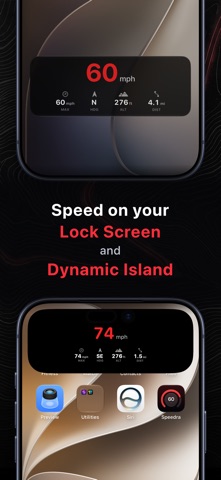
Your speed carries on updating on the Lock Screen and in the Dynamic Island, so you can check it without unlocking anything.
PRIVACY
Speedra never asks for the Always location permission, only While Using. Your location is used to draw your speed and nothing else. There is no account, no analytics on where you go, and no server behind the app at all.
FREE TO USE
The speedometer, all three views, all three units, head-up display mode and GPX are free forever, along with your recent drives and your first replays. Speedra Pro opens every drive you have recorded, plus the second display, speed limit alerts, the gauge styles and digit faces, your own scale and color zones, and your speed on the Lock Screen.
Terms of Use: https://speedra.arthurmachado.dev/terms
Privacy Policy: https://speedra.arthurmachado.dev/privacy