

GPS Speedometer: Track Speed
GPS Speedometer: Track Speed is made and published by AppAspect Technologies Pvt. Ltd. AppBrain is an independent app data site and isn't affiliated with AppAspect Technologies Pvt. Ltd. The app name, icon, screenshots and description belong to AppAspect Technologies Pvt. Ltd. and are shown as published on the App Store.
AppBrain's verdict
EstablishedLoved by users- Best rank
- #14
- Top Free, India
- Rating on App Store
- 4.61
- 1,482 ratings
- Last updated
- September 10, 2026
Users love it: 4.6 stars from 1,482 ratings. Its best ranking is #14 in Top Free, Navigation in India.
Rankings
App Store top charts- Highest rank
- #14
- Chart
- Top Free
- Navigation
- Country
- India
Competitors
Similar apps and more from AppAspect Technologies Pvt. Ltd.Alternatives to GPS Speedometer: Track Speed




More from AppAspect Technologies Pvt. Ltd.



Releases
Updates seen on the App Store- Version
- 19.3
- Launched
- October 2013
No changelog data
User feedback
Ratings and reviews on the App StoreComments on GPS Speedometer: Track Speed for iOS
We don't have enough comments to show example comments. Please check back later.
Technology
Found in the app by AppBrain- Price
- Free
- App size
- 214.6 MB
- Content rating
- Everyone
Technologies used by GPS Speedometer: Track Speed
About the app and developer
About GPS Speedometer: Track Speed
GPS Speedometer: Track Speed is a navigation app developed by AppAspect Technologies Pvt. Ltd.
User Ratings
GPS Speedometer: Track Speed is rated 4.61 out of 5 stars. The rating is based on 1.5 thousand ratings.
App Information
GPS Speedometer: Track Speed is freely available from the App Store. The app size is 214.58 MB. The latest version available is 19.3. The last update was on September 10, 2026.
Technical Requirements
The app has a content rating of Everyone. The app has been available on the App Store since October 2013.
Developer information for AppAspect Technologies Pvt. Ltd.
AppAspect Technologies Pvt. Ltd.
Address:
Frequently asked questions about GPS Speedometer: Track Speed
Is GPS Speedometer: Track Speed free?
Yes. GPS Speedometer: Track Speed is free on the App Store.
Is GPS Speedometer: Track Speed still available?
Yes. GPS Speedometer: Track Speed is on the App Store, and the last update we saw was on September 10, 2026.
How large is GPS Speedometer: Track Speed?
GPS Speedometer: Track Speed is 214.58 MB.
Is GPS Speedometer: Track Speed suitable for children?
App Store rates the content of GPS Speedometer: Track Speed as suitable for everyone.
How do people rate GPS Speedometer: Track Speed?
GPS Speedometer: Track Speed scores 4.61 out of 5 stars, from 1,482 ratings on the App Store.
Who made GPS Speedometer: Track Speed?
GPS Speedometer: Track Speed was developed by AppAspect Technologies Pvt. Ltd. It is listed in the navigation category on the App Store.
What are the best alternatives to GPS Speedometer: Track Speed?
People looking at GPS Speedometer: Track Speed also look at these navigation apps: Speedometer ⊲, Speed Tracker: GPS Speedometer, GPS Speedometer MPH Tracker, Digital Speed GPS Speedometer, GPS Speedometer Odometer HUD.
Store listing
By AppAspect Technologies Pvt. Ltd., from the App Store



Description by AppAspect Technologies Pvt. Ltd. Written by the developer, not by AppBrain. Click to read.
● DISPLAY MODE
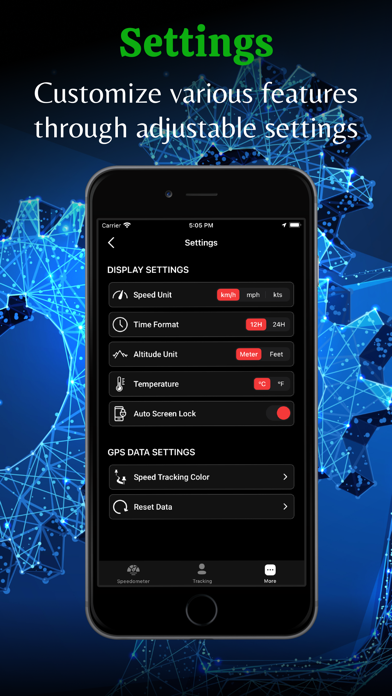
- Unit Switching: Easily switch between KM/H, MPH, and KTS for speed measurement.
- Analog & Digital Speedometer: Analog speedometer available in portrait mode, and a full-screen digital speedometer in landscape mode.
- Speed Metrics: Display the average and maximum speed of your trip.
- Mode Switching: Switch between bike and car modes, with speed ranges from 120 km/h to 360 km/h.
● SPEED LIMIT ALARM
- Customizable Alerts: Set speed limits and receive notifications when you exceed them.
- Safety Feature: Advanced alerts provide added safety while driving.
● TRACKING
- Journey Tracking: Track traveled distance, average speed, and top speed.
- History Storage: Store tracking data history along with real-time data.
- Tracking Control: Easily turn tracking on or off.
- Time Tracking: Keep track of total travel time.
- Quick Reset: Reset history tracking data quickly and easily.
● CAR CAMERA
- Dash Cam Mode: Use your device as a dash camera to record video during your drive.
- Camera Settings: Customize resolution, orientation, and storage preferences.
- Never lose a moment - securely upload and store your dashcam recordings in the cloud, managing and accessing your trips anytime, anywhere.
● PARKING
- Park/Unpark: Mark your parked vehicle and unpark when ready to leave.
- Map Support: Works seamlessly across all map views – Standard, Satellite, and Hybrid.
- Navigation to Vehicle: Navigate back to your parked location using Google Maps, Apple Maps, or built-in in-app navigation. Displays real-time distance between you and your parked car.
● MAP
- Live Tracking: Display current speed and distance on the map.
- Real-Time Positioning: Show your current position on the map with Standard, Satellite, or Hybrid view options.
● WEATHER
- Current Conditions: Display weather conditions for your current location.
- Sunrise & Sunset: Show sunrise and sunset times.
● GPS INDICATOR
- Accuracy Indicator: Shows the accuracy of your GPS signal.
● WATCH SUPPORT
- Full Tracking Control: Start, pause, and stop trip tracking directly from your Apple Watch.
- Live Map View: See your live trip tracking map right on your watch screen.
- Easy Monitoring: Check speed, distance, and time without touching your phone.
- Saved Trips Sync: All saved trips on your watch can be viewed anytime on the connected iPhone.
- Seamless Experience: Use the app from your wrist while riding, walking, or driving.
● DRIVING PERFORMANCE ANALYSIS & SCORE
- Track how well you drive with detailed analysis of your speed, braking, and acceleration. Get a driving score after each trip to improve safety and efficiency.
● ACCIDENT DETECTION
- Stay safe on every drive with automatic accident alerts. The app detects sudden impacts and instantly notifies your emergency contacts with your live location—ensuring quick assistance when it matters most.
● NOTE:
- Battery Usage: Continued use of GPS in the background can dramatically decrease battery life.
- GPS Accuracy: GPS accuracy may vary due to device hardware sensor limitations.
- Data Connection: A data connection is required to view the map.
- Location Services: Ensure location services are enabled for the application. Go to Settings > Privacy > Location Services > ON.
- Enhance your travel experience with our all-in-one Speedometer app, designed for convenience and safety.
Terms of Use: https://www.appaspect.com/apps/apple/smartgpsspeedometer/terms.html