AppBrain
AppBrain
  • Apps
  • Apps being viewed right now Trending apps today Most popular apps All-time most installed apps Top rated apps iPhone and iPad apps
  • Intelligence ▾
    Intelligence overview → Track any Android app or your whole market
    Track & analyze
    Keyword Tracker & OptimizerTrack & improve Play rankings App Performance ReportOne-off PDF for any app StatisticsFree Android & Play market stats
    Promote your app
    Featured Apps App Links
  • Intelligence
  • Pricing
  • Dashboard
  • Sign up
  • Log in
App Store Apps > Photo & Video > GR Control: Ricoh GR Remote
GR Control: Ricoh GR Remote icon

GR Control: Ricoh GR Remote

1.0.9
Nathan Nguyen
1.00
1 reviews
Free

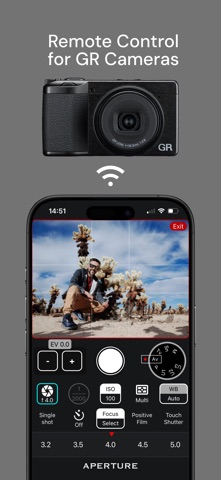
GR Control: Ricoh GR Remote Screenshot 1 of 5
GR Control: Ricoh GR Remote Screenshot 2 of 5
GR Control: Ricoh GR Remote Screenshot 3 of 5
GR Control: Ricoh GR Remote Screenshot 4 of 5
GR Control: Ricoh GR Remote Screenshot 5 of 5
Screenshots by Nathan Nguyen, from the the App Store listing
View on the App Store Also on Google Play

AppBrain's verdict

Rating on App Store
1.00
1 ratings
Last updated
August 18, 2026
Size
71.4 MB

It doesn't have enough ratings yet to judge what users think.

Official page on the App Store

User feedback

Ratings and reviews on the App Store

Comments on GR Control: Ricoh GR Remote for iOS

We don't have enough comments to show example comments. Please check back later.

Store listing

By Nathan Nguyen, from the App Store
Description by Nathan Nguyen Written by the developer, not by AppBrain. Click to read.
GR Control turns your phone into a wireless remote for your Ricoh GR so you can step into the frame while staying in full control. Perfect for travel selfies, group shots, or studio tethering. No extra hardware. No cables. Just open the app, connect and shoot.

[For travel photographers]
You're always behind the lens, so you're almost never in the shot. GR Control changes that. Set up your frame, step into it, and trigger the shutter from your phone. No asking strangers, no missing yourself from your own trip.

[For street photographers]
Street photography lives in unguarded moments. But the second your camera goes up, faces change, and whatever was real a moment ago isn't anymore. GR Control helps you avoid that by keeping the camera down. Mount low, frame from your phone, and shoot without anyone noticing. Live View lets you compose from any angle, such as ground level, overhead, or around corners. The shot looks natural because it was.

[For studio and tethered shooting]
With high-speed image sync, GR Control transfers each shot to your phone or tablet automatically, the moment you press the shutter. Review full images on a larger screen without pulling cards or running cables. Your subject stays ready, your session stays moving, and nothing breaks the rhythm.

[Key Features]
- Live View — real-time preview on your phone screen for precise framing.
- Full camera control — Aperture, Shutter Speed, ISO, EV, White Balance, Metering Mode, Drive Mode, Focus Mode, Self-timer, Image Control effects, and more.
- Image sync & Wireless tethering — automatic photo transfer for quick review after every shot.
- Offline gallery — browse and review synced images even when the camera is off.

[Supported Devices]
- Ricoh GR IV
- Ricoh GR IV HDF
- Ricoh GR IV Monochrome
- Ricoh GR III
- Ricoh GR III HDF
- Ricoh GR IIIx
- Ricoh GR IIIx HDF
- Ricoh GR II

Safety and technology

Found in the app by AppBrain
Price
Free
App size
71.4 MB
Content rating
Medium

Technologies used by GR Control: Ricoh GR Remote

Releases

Updates seen on the App Store
Version
1.0.9
Launched
April 2026

No changelog data

Alternatives

Similar apps and more from Nathan Nguyen

Alternatives to GR Control: Ricoh GR Remote

GR Link icon GR Link
晓明 刘
5.0
Free
6 ratings
Focus In Motion icon Focus In Motion
Sebastien BUET
0.0
$1.99
SOOC - Ricoh & Fuji Recipes icon SOOC - Ricoh & Fuji Recipes
树森 赵
0.0
Free
Ghost Detector: Spooky Camera icon Ghost Detector: Spooky Camera
Shailesh Padiya
4.1
Free
18 ratings
StreetSync icon StreetSync
CHI LIANG CHENG
0.0
Free
GR Mint icon GR Mint
海芸 曾
4.7
Free
7 ratings
StoryKite - Insta Story Editor icon StoryKite - Insta Story Editor
TFaces Studio
0.0
Free
Lomo: Analog Vintage Camera icon Lomo: Analog Vintage Camera
GCO Apps
4.7
Free
6 ratings

Also available on Google Play

GR Control: Ricoh GR Remote icon GR Control: Ricoh GR Remote
Nathan Nguyen
0.0
Free
500+

Rankings

App Store top charts

App Store Rankings for GR Control: Ricoh GR Remote

This app is not ranked

About the app and developer

About GR Control: Ricoh GR Remote

GR Control: Ricoh GR Remote is a photo & video app developed by Nathan Nguyen.

What is the rating of GR Control: Ricoh GR Remote?

GR Control: Ricoh GR Remote is rated 1.00 out of 5 stars, based on one rating ratings.

Is GR Control: Ricoh GR Remote free?

GR Control: Ricoh GR Remote is free. The app size is 71.40 MB. The latest version available is 1.0.9. The last update was on August 18, 2026.

What are the requirements for GR Control: Ricoh GR Remote?

The app has a content rating of Medium Maturity. The app has been available on the App Store since April 2026.

GR Control: Ricoh GR Remote is made and published by Nathan Nguyen. AppBrain is an independent app data site and isn't affiliated with Nathan Nguyen. The app name, icon, screenshots and description belong to Nathan Nguyen and are shown as published on the App Store.

Developer information for Nathan Nguyen

Nathan Nguyen

Address:

Share GR Control: Ricoh GR Remote

Price drops on Google Play Apps other people are watching Today's trending apps Popular Photo & Video Apps Top new apps
GR Link icon GR Link
Focus In Motion icon Focus In Motion
SOOC - Ricoh & Fuji Recipes icon SOOC - Ricoh & Fuji Recipes
Ghost Detector: Spooky Camera icon Ghost Detector: Spooky Camera
StreetSync icon StreetSync
GR Mint icon GR Mint
StoryKite - Insta Story Editor icon StoryKite - Insta Story Editor
Lomo: Analog Vintage Camera icon Lomo: Analog Vintage Camera
Overview Alternatives Reviews Rankings Technology
AppBrain Intelligence premium content

Subscribe now to get full and unlimited access to AppBrain Intelligence. You'll have access to:

  • App Intelligence dashboard (performance timeline, competitor comparison, country rankings, insight cards)
  • Detailed ranking data per app
  • Full timeline per developer
  • Device market shares data per country
  • Unlimited keyword tracking
  • AI assistant access via MCP (Claude, Cursor or any MCP client)
1 Month

$75/mo
(billed every month)

SAVE 0%
Subscribe
3 Months

$65/mo
($195 billed every 3 months)

SAVE 13%
Subscribe
1 Year

$57.50/mo
($690 billed every year)

SAVE 23%
Subscribe
Each subscription will automatically renew 3 days before the expiration date for the same time period. Subscriptions can be cancelled at any time before the renewal.

AppBrain is an app data site, we track rankings, ratings, installs for all apps and games on Google Play and the App Store. AppBrain doesn't host app files or APKs, all install links go directly to the official store. All trademarks are owned by their respective owners.

More apps

  • Top Android apps being viewed
  • XinStars-Win Big Now!
  • View BassCraft: Subwoofer Lab
  • Lion Bonanza Slots stats

App statistics

  • Android statistics
  • Google Play Developer stats
  • Trending Android Apps
  • Trending iOS apps
  • Top popular Apps
  • Buy the best Android phone
  • Buy & sell app businesses

About AppBrain

  • Contact
  • Privacy
  • Documentation
  • DMCA takedowns
  • Blog
  • The best curated Android app categories
© 2010-2026 - AppBrain