

Gradiator - AI Mesh Gradient
Gradiator - AI Mesh Gradient is made and published by Emin Emini. AppBrain is an independent app data site and isn't affiliated with Emin Emini. The app name, icon, screenshots and description belong to Emin Emini and are shown as published on the App Store.
AppBrain's verdict
- Rating on App Store
- 3.00
- 2 ratings
- Last updated
- December 6, 2025
It doesn't have enough ratings yet to judge what users think.
Rankings
App Store top chartsApp Store Rankings for Gradiator - AI Mesh Gradient
Competitors
Similar apps and more from Emin EminiMore from Emin Emini







Releases
Updates seen on the App Store- Version
- 1.0
- Launched
- December 2025
No changelog data
User feedback
Ratings and reviews on the App StoreComments on Gradiator - AI Mesh Gradient for iOS
We don't have enough comments to show example comments. Please check back later.
Technology
Found in the app by AppBrain- Price
- Free
- App size
- 10.9 MB
- Content rating
- Everyone
Technologies used by Gradiator - AI Mesh Gradient
About the app and developer
About Gradiator - AI Mesh Gradient
Gradiator - AI Mesh Gradient is a graphics & design app developed by Emin Emini.
User Ratings
Gradiator - AI Mesh Gradient is rated 3.00 out of 5 stars. The rating is based on 2 ratings.
App Information
Gradiator - AI Mesh Gradient is freely available from the App Store. The app size is 10.92 MB. The latest version available is 1.0. The last update was on December 6, 2025.
Technical Requirements
The app has a content rating of Everyone. The app has been available on the App Store since December 2025.
Developer information for Emin Emini
Address:
Store listing
By Emin Emini, from the App Store


Description by Emin Emini Written by the developer, not by AppBrain. Click to read.
Why creators choose Gradiator?
• Instant AI Generator or one tap presets
• Full manual control when you want to craft the perfect look
• Clean, focused canvas for fast creation
• Universal app that feels at home on iPhone, iPad, and Mac
Gradient types
• Mesh
• Linear
• Radial
• Conic
Key features
• AI Generator, create on theme gradients that match your style
• Surprise Me, fresh options with a single tap
• Color Mood, vibrant, muted, pastel, deep
• Temperature slider, shift from cool to warm
• Smart color picker and harmony suggestions
• Point placement, organic, scattered, or custom
• Per point opacity and radius controls
• Angle, stops, and curve controls for linear designs
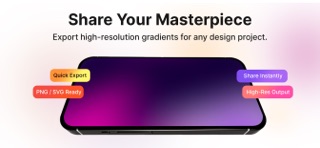
• Quick export to PNG or SVG, high resolution ready
• Share instantly to your favorite tools
Built for creators
Whether you design UI, prepare slides, explore brand palettes, or make wallpapers, Gradiator helps you go from idea to export quickly and confidently.
Cross platform
Design on iPhone, iPad, and Mac with a consistent interface and workflow.
Export
• PNG for pixel perfect assets
• SVG for resolution independent graphics