

Grape Notes Pro: Scan to Text
Grape Notes Pro: Scan to Text is made and published by Robert Corbin. AppBrain is an independent app data site and isn't affiliated with Robert Corbin. The app name, icon, screenshots and description belong to Robert Corbin and are shown as published on the App Store.
AppBrain's verdict
- Last updated
- October 6, 2026
- Size
- 5.04 MB
User feedback
Ratings and reviews on the App StoreComments on Grape Notes Pro: Scan to Text for iOS
We don't have enough comments to show example comments. Please check back later.
Store listing
By Robert Corbin, from the App Store


Description by Robert Corbin Written by the developer, not by AppBrain. Click to read.
Grape Notes Pro is a private notes and scanning workspace. Scan paper, read photos of notes and whiteboards, import files, or just type. Then search, organize, and export everything.
TURN SCANS INTO NOTES
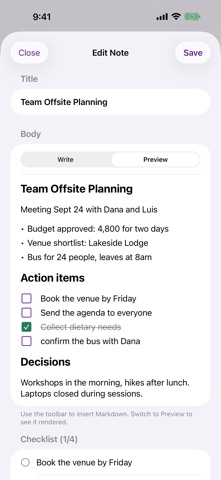
- Turn into Note reads a scan or photo and rebuilds it as editable Markdown
- Larger handwriting and short lines like "Decisions:" become headings
- Checkbox marks, bullets, arrows and numbered lines become real lists
- Lines starting with TODO, Action or Follow up become tasks
- Lines that wrapped on paper are joined back into paragraphs
- The original scan is kept, and the new note shows where it came from
SEARCHABLE PDFS
- The text read from each page is embedded as an invisible layer, so search, select and copy work in the Files app and other PDF readers
- Read Text Again makes scans from earlier versions searchable too
- Find in Scan highlights every match on the page, with next and previous buttons
- Scanned pages are sized to print at Letter width
HANDWRITING AND PRINTED TEXT
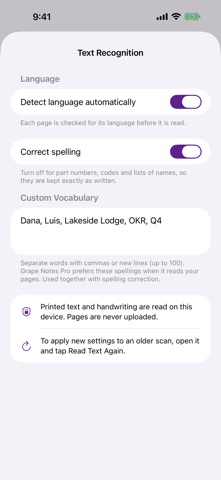
- Printed text and handwriting are read on your device
- The language can be detected automatically, or you can pick the languages you write in
- Custom vocabulary for names, jargon and abbreviations
- Turn off spelling correction for part numbers and codes
- Works best with clear handwriting
FROM PHOTOS
- Pick up to 30 photos of pages, whiteboards or receipts
- Rotate, reorder, filter and delete pages in the Scan Studio before saving
- Apply one filter to every page; Black & White now gives crisp black-and-white pages
FIND ANYTHING
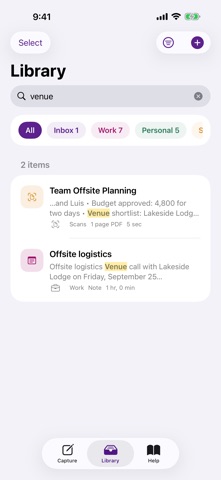
- Library search matches every word you type, in any order, ignoring accents
- Best matches come first, with a highlighted snippet showing where the word is, even deep inside a scan
- Spotlight on your Home Screen finds notes and scans (you can turn this off)
- Siri and Shortcuts: Scan Notes, Notes from Photos, New Note, Search Notes
SMART DETAILS
- Found in This Note lists dates, links, email addresses, phone numbers and street addresses
- Tap a date to set a reminder, or a number, link or address to open it
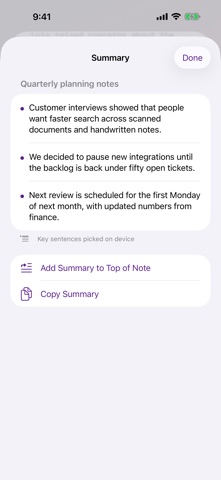
- Summarize long notes: on iPhone and iPad models with Apple Intelligence (iOS 26 or later), the on-device model writes the summary; on other devices the app picks the key sentences
EXPORT
- PDF export now runs over as many pages as the note needs, with headings, lists and checkboxes formatted
- New: Rich Text (.rtf) for word processors and a web page (.html)
- Export many items at once as separate PDFs or as one combined PDF
- Plain text, Markdown, JSON and password-protected PDF are still here
EVERYTHING FROM 1.x
- Markdown editor with toolbar, live preview and tappable checklists
- Custom notebooks, tags, pins, sorting and filters
- Reminders with local notifications
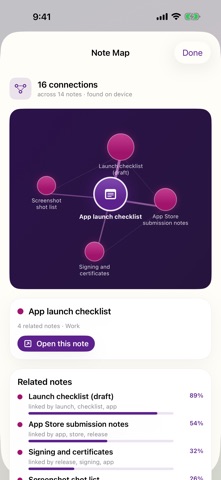
- Note Map links related notes and flags possible duplicates
- Library Insights and a daily writing goal
- Note templates and an offline Markdown reference
PRIVATE BY DESIGN
- No account, no sign-in, no ads, no subscriptions
- No analytics or tracking
- Your notes, scans and imported files stay on your device
Safety and technology
Found in the app by AppBrain- Price
- $3.99
- App size
- 5.04 MB
- Content rating
- Everyone
Technologies used by Grape Notes Pro: Scan to Text
Releases
Updates seen on the App Store- Version
- 2.0.3
- Launched
- April 2026
No changelog data
Alternatives
Similar apps and more from Robert CorbinAlternatives to Grape Notes Pro: Scan to Text


More from Robert Corbin


Rankings
App Store top chartsApp Store Rankings for Grape Notes Pro: Scan to Text
About the app and developer
About Grape Notes Pro: Scan to Text
Grape Notes Pro: Scan to Text is a productivity app developed by Robert Corbin.
User Ratings
The app has no ratings yet.
App Information
Grape Notes Pro: Scan to Text costs $3.99. The app size is 5.04 MB. The latest version available is 2.0.3. The last update was on October 6, 2026.
Technical Requirements
The app has a content rating of Everyone. The app has been available on the App Store since April 2026.
Developer information for Robert Corbin
Address:
Frequently asked questions about Grape Notes Pro: Scan to Text
Is Grape Notes Pro: Scan to Text free?
No. Grape Notes Pro: Scan to Text costs $3.99 on the App Store.
Is Grape Notes Pro: Scan to Text still available?
Yes. Grape Notes Pro: Scan to Text is on the App Store, and the last update we saw was on October 6, 2026.
How large is Grape Notes Pro: Scan to Text?
Grape Notes Pro: Scan to Text is 5.04 MB.
Is Grape Notes Pro: Scan to Text suitable for children?
App Store rates the content of Grape Notes Pro: Scan to Text as suitable for everyone.
Who made Grape Notes Pro: Scan to Text?
Grape Notes Pro: Scan to Text was developed by Robert Corbin. It is listed in the productivity category on the App Store.
What are the best alternatives to Grape Notes Pro: Scan to Text?
People looking at Grape Notes Pro: Scan to Text also look at these productivity apps: Countdown: Days Until Widget, TimeSee: Visual Timer for ADHD, MindNote - AI Notetaking App, Steno Notes, DokPro.