AppBrain
AppBrain
  • Apps
  • Apps being viewed right now Trending apps today Most popular apps All-time most installed apps Top rated apps iPhone and iPad apps
  • Intelligence ▾
    Intelligence overview → Track any Android app or your whole market
    Track & analyze
    Keyword Tracker & OptimizerTrack & improve Play rankings App Performance ReportOne-off PDF for any app StatisticsFree Android & Play market stats
    Promote your app
    Featured Apps App Links
  • Intelligence
  • Pricing
  • Dashboard
  • Sign up
  • Log in
App Store Apps > Education > GraphNCalc83
GraphNCalc83 icon

GraphNCalc83

by Ernest Brock · Education · $12.99
On the App Store since May 2014 · Data updated 2026-11-01

GraphNCalc83 is made and published by Ernest Brock. AppBrain is an independent app data site and isn't affiliated with Ernest Brock. The app name, icon, screenshots and description belong to Ernest Brock and are shown as published on the App Store.

AppBrain's verdict

EstablishedLoved by users
Rating on App Store
4.88
4,041 ratings
Last updated
November 22, 2025
Size
9.65 MB

Users love it: 4.9 stars from 4,041 ratings.

Official page on the App Store

User feedback

Ratings and reviews on the App Store

Comments on GraphNCalc83 for iOS

We don't have enough comments to show example comments. Please check back later.

Store listing

By Ernest Brock, from the App Store
GraphNCalc83 Screenshot 1 of 9
GraphNCalc83 Screenshot 2 of 9
GraphNCalc83 Screenshot 3 of 9
GraphNCalc83 Screenshot 4 of 9
GraphNCalc83 Screenshot 5 of 9
GraphNCalc83 Screenshot 6 of 9
GraphNCalc83 Screenshot 7 of 9
GraphNCalc83 Screenshot 8 of 9
GraphNCalc83 Screenshot 9 of 9
Screenshots by Ernest Brock, from the the App Store listing
Description by Ernest Brock Written by the developer, not by AppBrain. Click to read.
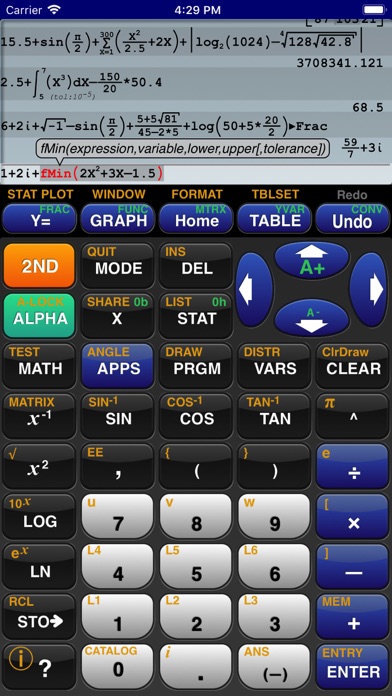
GraphNCalc83 uses touch, color and blazing speed to handle your math problems. The familiar calculator keyboard, arrow keys and functions are enhanced with full touch input for all graphs, editors and menus. Enter calculations in natural textbook format. Enter fractions and view result as fractions. Trace graphs with your finger. Zoom in and out with a pinch. Explore regressions with a tap on the screen. Scroll through the list, matrix and calculation history with a swipe. Tap the ? key for help. Written using the latest 64 bit math libraries, GraphNCalc83 harnesses the amazing computing resources of the iPhone and iPad to provide a colorful, fast and fluid experience. Graphs scroll, glide and zoom smoothly. Matrix, statistics and BASIC programs run 500x times faster than traditional calculators.

GraphNCalc83 includes:

Algebraic entry: Enter problems using full algebraic textbook notation. The command line editor includes interactive parenthesis matching and high lighting, undo and redo, bubble function help and a 200 level calculation history and recall stack. Generate a PDF report of calculations for mailing or printing using the SEND function.

Math functions: Trigonometry, logarithms, function minimum, maximum, numeric integration and derivatives, general solver, real and imaginary numbers, combination, permutation, random number generation, normal, T, chi squared, Fisher, poisson and geometric distributions, binary shift and rotate, test and logic operations, list operations including sort, std. deviation, sum, sequence, matrix determinant, transpose, sum, ref, rref, addition, multiplication.

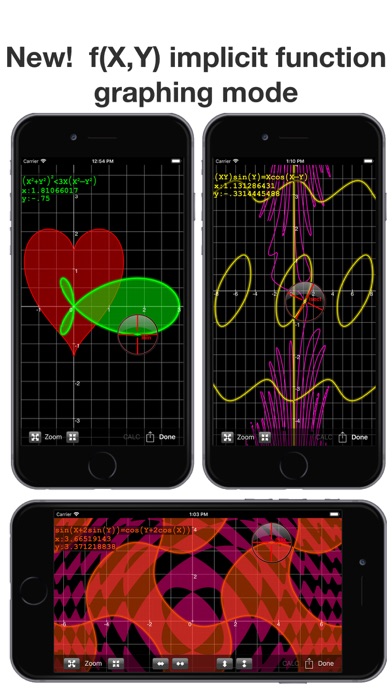
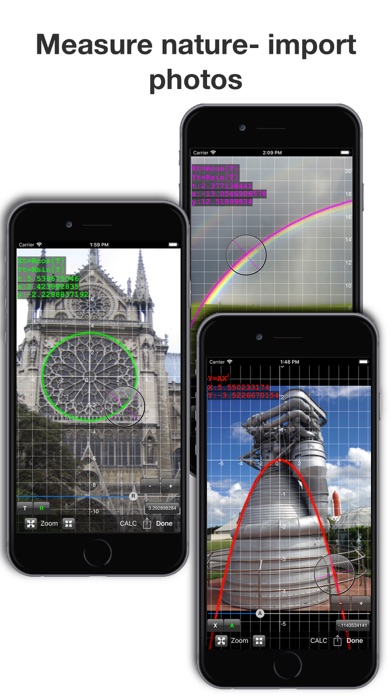
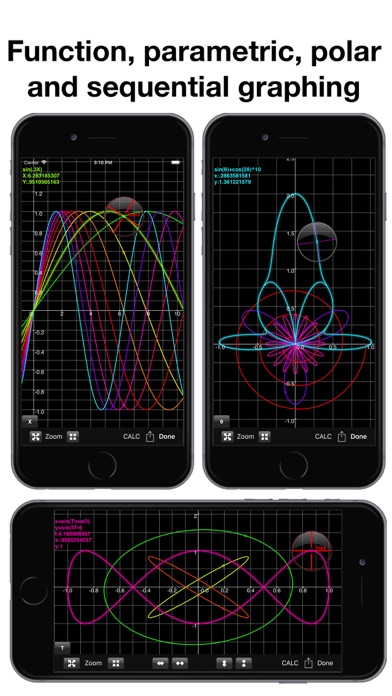
Graph functions, parametric, f(x,y) and polar equations and statistics plots: Full color graphs with touch to trace, pinch zoom, function minimum, maximum, intersections, asymptotes and numeric integration. Output graphs in high resolution PDF format for mailing or printing. Interactively explore function behavior using variables tied to slider bars.

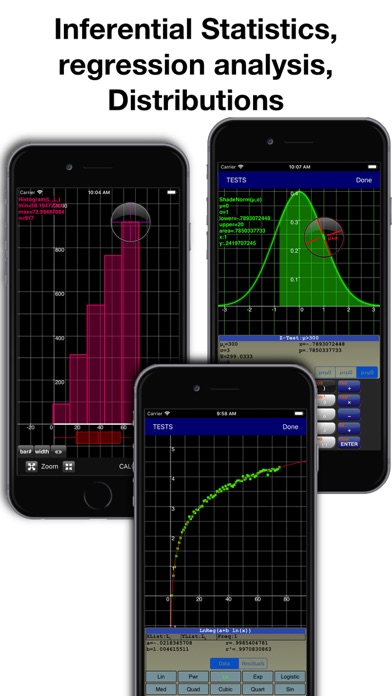
Statistics, Inferential Statistics and Distributions: A set of inferential statistics worksheets and graphs of distributions are included. The regression analysis screen allows you to quickly compute, view and analyze a data set using a variety of curve fitting methods.

Table: Analyze functions using the table viewer. Use the split screen mode to simultaneously view a graph and table.

Matrix and Lists: Matrix and list editors and a full set of matrix and list operations are built in.

Unit Converter and Constants: Convert between a wide variety of scientific, engineering and common units. A large set of physical constants are also included.

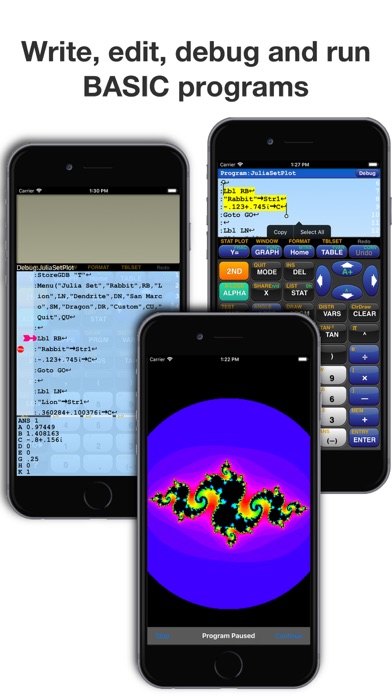
BASIC programming: Create, edit, debug and run BASIC programs. Programs run more than 500 times faster than traditional calculators. Import and execute .83p and .8xp files.

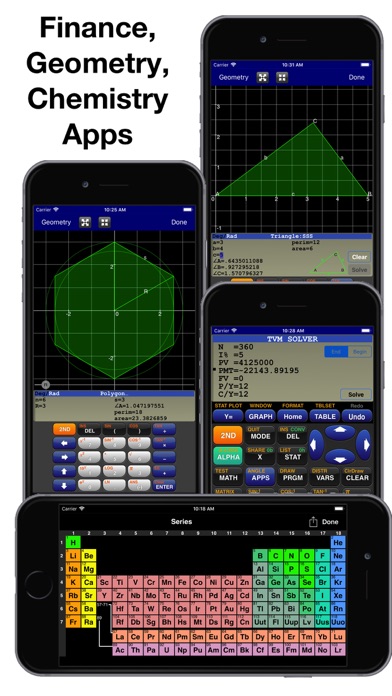
Chemistry: The calculator includes a full featured periodic table, a mass calculator and a data base of element properties. The touch interface allows you to view and interact with the periodic table to view by series, state, melting point, boiling point, electronegativity, electron affinity, valence, ionization, radius, hardness, modulus, density, conductivity, heat and year discovered.

Geometry: The geometry application computes perimeter and area for a variety of 2d geometric figures including squares, rectangles, parallelograms, triangles, polygons, circles, arcs and ellipses. A full triangle solver and interactive unit circle grapher are built in. Solve line intersections, project a point to a line and find a circle given 3 points.

Finance: Compute time value of money problems including annuities, lump sums and uneven cash flow analysis with IRR and NPV

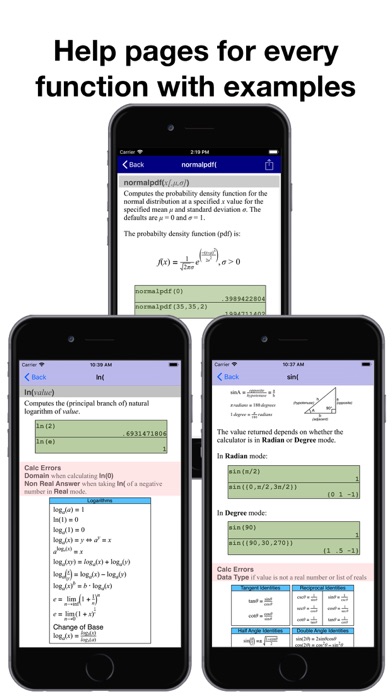
Built-in user guide: A user guide is included and is a touch away using the ? key or ⓘ on any menu. All functions have a full manual page with description of arguments and examples of use. Pop up bubble help displays function arguments during problem entry and program editing.
Official page on the App Store

Safety and technology

Found in the app by AppBrain
Price
$12.99
App size
9.65 MB
Content rating
Everyone

Technologies used by GraphNCalc83

Releases

Updates seen on the App Store
Version
3.4
Launched
May 2014

No changelog data

Alternatives

Similar apps and more from Ernest Brock

Alternatives to GraphNCalc83

Graphing Calculator 84: Calc84 icon Graphing Calculator 84: Calc84
Tran Duy
4.6
Free
5.1K ratings
Graphing Calculator X84 icon Graphing Calculator X84
Incpt.Mobis
4.5
Free
50.1K ratings
Taculator 84 Graphing Calc icon Taculator 84 Graphing Calc
Di Venisco UG (haftungsbeschrankt)
4.5
Free
7.7K ratings
Graphing Calculator Plus AI icon Graphing Calculator Plus AI
Incpt.Mobis
4.6
$5.99
12.1K ratings
Calculate84 Plus icon Calculate84 Plus
Di Venisco UG (haftungsbeschrankt)
4.5
Free
306 ratings
Desmos Test Mode icon Desmos Test Mode
Desmos
1.6
Free
370 ratings
Calculate84 icon Calculate84
Century Light LLC
4.8
Free
54.4K ratings
Desmos Graphing Calculator icon Desmos Graphing Calculator
Desmos
4.3
Free
1.3K ratings

More from Ernest Brock

10BII Calc HD icon 10BII Calc HD
Ernest Brock
4.9
$8.99
3.8K ratings
12Calc icon 12Calc
Ernest Brock
4.9
$8.99
926 ratings
BAFinancePrime icon BAFinancePrime
Ernest Brock
4.5
$8.99
36 ratings

Rankings

App Store top charts

App Store Rankings for GraphNCalc83

This app is not ranked

About the app and developer

About GraphNCalc83

GraphNCalc83 is an education app developed by Ernest Brock.

What is the rating of GraphNCalc83?

GraphNCalc83 is rated 4.88 out of 5 stars, based on 4 thousand ratings.

Is GraphNCalc83 free?

GraphNCalc83 costs $12.99. The app size is 9.65 MB. The latest version available is 3.4. The last update was on November 22, 2025.

What are the requirements for GraphNCalc83?

The app has a content rating of Everyone. The app has been available on the App Store since May 2014.

Developer information for Ernest Brock

Ernest Brock

Address:

Share GraphNCalc83

Price drops on Google Play Popular Education Apps Apps other people are watching Top new apps Today's trending apps
Graphing Calculator 84: Calc84 icon Graphing Calculator 84: Calc84
Graphing Calculator X84 icon Graphing Calculator X84
Taculator 84 Graphing Calc icon Taculator 84 Graphing Calc
Graphing Calculator Plus AI icon Graphing Calculator Plus AI
Calculate84 Plus icon Calculate84 Plus
Desmos Test Mode icon Desmos Test Mode
Calculate84 icon Calculate84
Desmos Graphing Calculator icon Desmos Graphing Calculator
Overview Alternatives Reviews Rankings Technology
AppBrain Intelligence premium content

Subscribe now to get full and unlimited access to AppBrain Intelligence. You'll have access to:

  • App Intelligence dashboard (performance timeline, competitor comparison, country rankings, insight cards)
  • Detailed ranking data per app
  • Full timeline per developer
  • Device market shares data per country
  • Unlimited keyword tracking
1 Month

$75/mo
(billed every month)

SAVE 0%
Subscribe
3 Months

$65/mo
($195 billed every 3 months)

SAVE 13%
Subscribe
1 Year

$57.50/mo
($690 billed every year)

SAVE 23%
Subscribe
Each subscription will automatically renew 3 days before the expiration date for the same time period. Subscriptions can be cancelled at any time before the renewal.

AppBrain is an app data site, we track rankings, ratings, installs for all apps and games on Google Play and the App Store. AppBrain doesn't host app files or APKs, all install links go directly to the official store. All trademarks are owned by their respective owners.

More apps

  • Top Android apps being viewed
  • OneLiquid - Icon Pack stats
  • PriceMath: Discount & Tip Calc
  • Printa: 3D Printing Tycoon

App statistics

  • Android statistics
  • Google Play Developer stats
  • Trending Android Apps
  • Trending iOS apps
  • Top popular Apps
  • Buy the best Android phone
  • Buy & sell app businesses

About AppBrain

  • Contact
  • Privacy
  • Documentation
  • DMCA takedowns
  • Blog
  • Monetization tips: Understanding your eCPM
© 2010-2026 - AppBrain