

Great-T2S is made and published by John Colani. AppBrain is an independent app data site and isn't affiliated with John Colani. The app name, icon, screenshots and description belong to John Colani and are shown as published on the App Store.
AppBrain's verdict
- Last updated
- August 31, 2026
Rankings
App Store top chartsApp Store Rankings for Great-T2S
Competitors
Similar apps and more from John ColaniMore from John Colani


Releases
Updates seen on the App Store- Version
- 1.0.3+11
- Launched
- August 2025
No changelog data
User feedback
Ratings and reviews on the App StoreComments on Great-T2S for iOS
We don't have enough comments to show example comments. Please check back later.
Technology
Found in the app by AppBrain- Price
- Free
- App size
- 64.6 MB
- Content rating
- Everyone
Technologies used by Great-T2S
About the app and developer
About Great-T2S
Great-T2S is an education app developed by John Colani.
User Ratings
The app has no ratings yet.
App Information
Great-T2S is freely available from the App Store. The app size is 64.55 MB. The latest version available is 1.0.3+11. The last update was on August 31, 2026.
Technical Requirements
The app has a content rating of Everyone. The app has been available on the App Store since August 2025.
Developer information for John Colani
Address:
Store listing
By John Colani, from the App Store


Description by John Colani Written by the developer, not by AppBrain. Click to read.
Key Features:
Natural Voice Quality - Advanced AI-powered speech synthesis
Multi-Format Support - Upload PDF, TXT, DOC files or type directly
Smart OCR - Extract text from images and photos
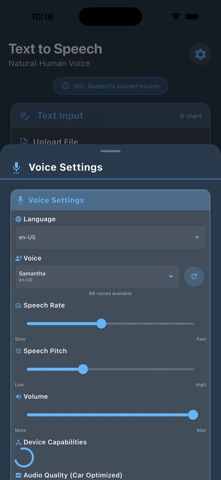
Voice Customization - Adjust speed, pitch, volume, and language
Anti-Stuttering Playback - Smooth MP3 generation and offline playback
Multi-Language Support - English, Spanish, French, and more
Reading Progress - Real-time word highlighting and progress tracking
History Management - Save and replay your favorite TTS sessions
Perfect For:
Students - Listen to study materials and textbooks
Professionals - Convert documents to audio for multitasking
Accessibility - Screen reader support for visually impaired users
Language Learning - Practice pronunciation with native-like voices
Content Creators - Generate audio versions of written content
Busy Professionals - Listen to documents while commuting
Smart Features:
File Processing - Support for PDF, TXT, DOC, DOCX files
Image Text Extraction - OCR technology for photos and screenshots
Voice Selection - Choose from multiple natural-sounding voices
Progress Tracking - Visual feedback during speech synthesis
Export Options - Save audio as high-quality MP3 files
Offline Support - Works without an internet connection
Beautiful Design:
Material 3 Design - Modern, intuitive interface
Dark/Light Themes - Comfortable viewing in any lighting
Responsive Layout - Optimized for all screen sizes
Smooth Animations - Professional user experience
Accessibility - Screen reader and text scaling support